



Kurven-Ankerpunkte verschwunden/nicht Anfassbar
Hallo zusammen,
ich kann seit heute bei Illustrator CC plötzlich die Kurven-Ankerpunkte nicht mehr anfassen.
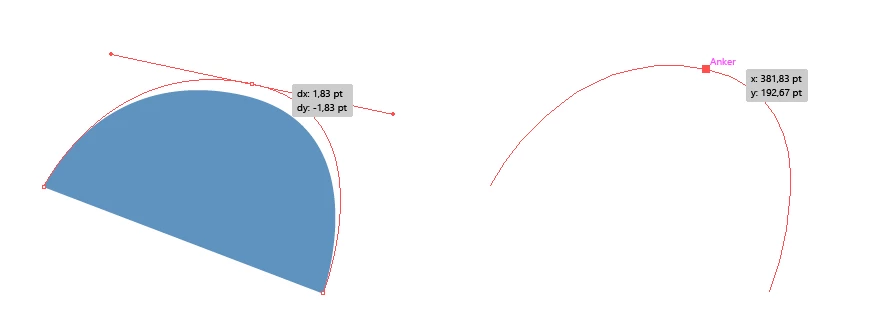
Sprich, ich ziehe den Pfad mit dem Pfadwerkzeug auf, halte gedrückt um eine Kurve zu erstellen. Dann möchte ich mit Hilfe des weißen Pfeils, oder der Taste "strg" den Pfad erneut anfassen und verändern. Solange ich die Maus gedrückt halte und den Ankerpunkt versetze, kann ich die Kurven-Anfasser auch sehen. Lasse ich den Ankerpunkt allerdings los, sind sie verschwunden.
Hatte schon mal jemand ähnliche Schwierigkeiten mit Illustrator? Vielleicht irgendetwas in den Einstellungen verdreht? (Neustart und Re-Installation leider Erfolglos)
___________________________________________________________________________________
Hello everybody,
since today I have a problem with my Illustrator CC.. Suddenly it doesn't display my curve-anchors anymore.
Every time I use the path tool to create a nice curve and want to chance it a little bit afterwards, Illustrator doesn't show me the needed anchor points.
But when I hold the left mouse button I can see the anchors to modify the curve just then I stop holding the button they disappear...
Does anybody of you had any trouble like that? Maybe I accidently adjusted something wrong at the settings. (Restarting my Computer and Re-Installation didn't work)
I'm sorry if my english isn't that good
 AdChoices