


New Participant
August 13, 2019
Answered

Line stroke with even dash spacing

  • August 13, 2019
  • 7 replies
  • 5328 views

Hi, I'm looking for a way to create even spacing between dashes on lines. As you can see with the black line below, the line is stroked and dashed, but the spacing is uneven, and the dashes don't show up on the bottom half of the line. How do I create even spacing of the dashes along the entire line?
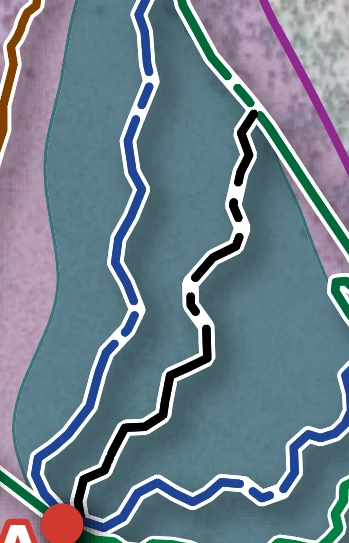
Thank you

    This topic has been closed for replies.
    Correct answer michelew83603738

    You are not getting an even spacing because the setting in the dash and gap isn't even. You have 15, 5, 4, 5 which will automatically lead to an uneven pattern. Try just entering values in the first dash and gap values. You may need to play with the values til you come up with what you want.

    7 replies

    macpawel
    Participating Frequently
    August 15, 2019

    Maybe another option is creating a Pattern Brush

    Try to prepare Pattern brush and start with any dash size you need - it's nice option I hope

    New Participant
    August 15, 2019

    Thank you for everyone's help.

    The line came from a KML file. Here is a snapshot of the line selected with the direct selection tool with the dashed/stroke window open. I'd like to see the dashes show up on the bottom half of the line.

    michelew83603738
    michelew83603738Correct answer
    Adobe Expert
    August 15, 2019

    You are not getting an even spacing because the setting in the dash and gap isn't even. You have 15, 5, 4, 5 which will automatically lead to an uneven pattern. Try just entering values in the first dash and gap values. You may need to play with the values til you come up with what you want.

    jane-e
    Adobe Expert
    August 13, 2019

    Hi Sara,

    Just from looking at your image, we can’t tell if it is one line, multiple lines, or possibly a fill with a white stroke.

    How was it created?

    ~ Jane

    Larry G. Schneider
    Adobe Expert
    August 13, 2019

    What you show would happen if the path is not joined correctly. If you use the Direct Select tool (White arrow) and click toward one end or the other, does the whole path highlight?

    John Mensinger
    Adobe Expert
    August 13, 2019

    sarak28584490  wrote

    How do I create even spacing of the dashes along the entire line?

    In the Stroke panel:

    • Enter a value in the first dash field = all dashes and all gaps will be that size
    • Enter a value in the first gap field = all gaps will be that size
    meganchi
    Brainiac
    August 13, 2019

    When drawing a stroked line, do you have "dashed line" selected in your stroke panel? You can make adjustments to the width of the dashes and gaps in the strokes panel.

    John T Smith
    Adobe Expert
    August 13, 2019

    Please post the name of the program you use so a Moderator may move this message to that forum

    -A program would be Photoshop or Dreamweaver or Muse or Illustrator or ???

    New Participant
    August 13, 2019

    Thank you, I'm using Illustrator.