


- Home
- Illustrator
- Discussions
- Re: Looking Script to rotate objects
- Re: Looking Script to rotate objects

Copy link to clipboard
Copied
Hello Friends,
I am looking an illustrator script, which will rotate the selected objects. by its current rotate angle * 0
is this possible ?


 2 Correct answers

I have a script in the archive, unfortunately I do not know its author 🙂
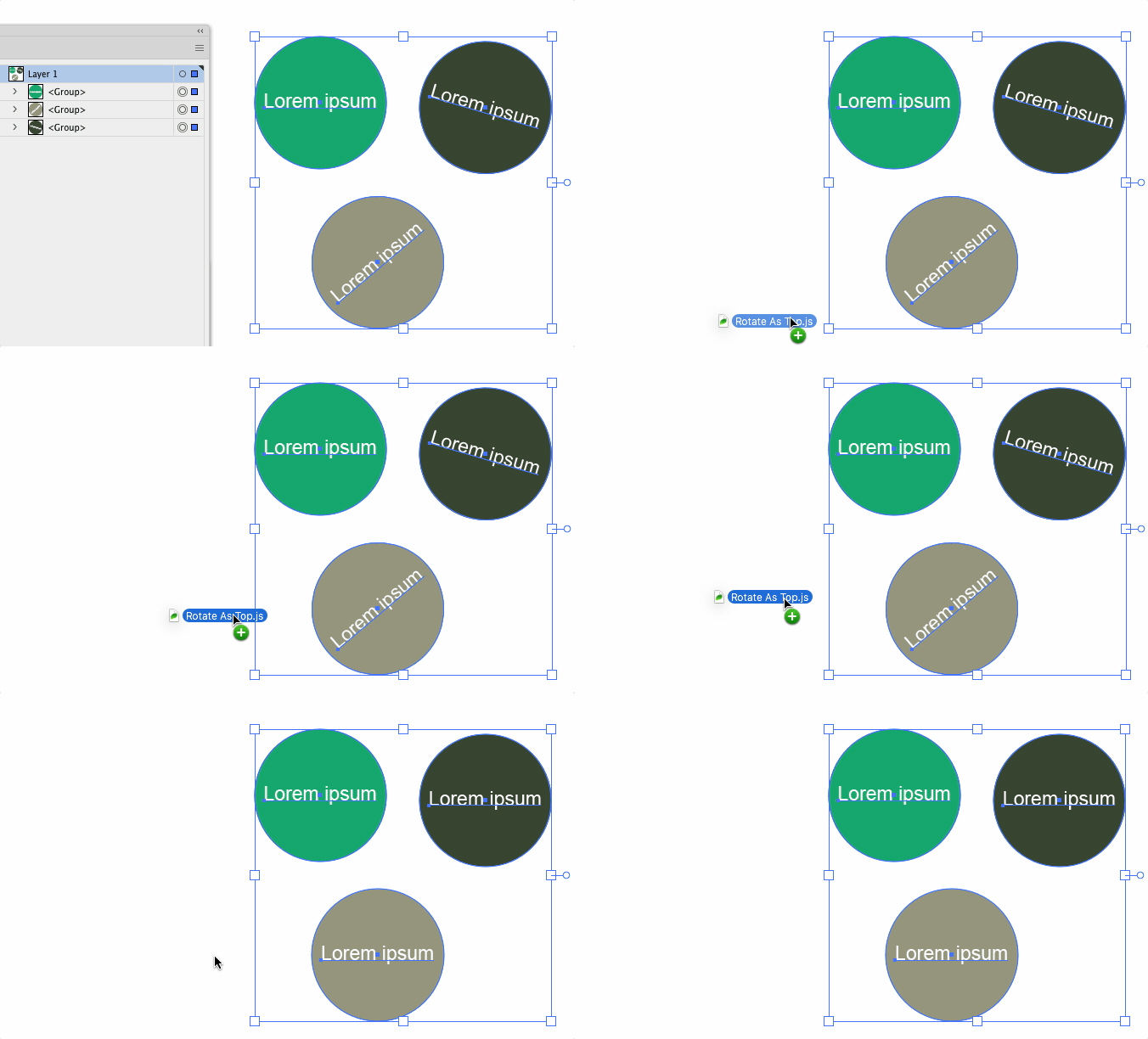
doc = app.activeDocument;
sel = doc.selection;

first = 1;
ang = 0;
for (i = 0; i < sel.length; i++) {
  if (sel[i].typename == "GroupItem" || sel[i].typename == "PathItem" || sel[i].typename == "CompoundPathItem") {
    currGroup = sel[i];

    getFP = FindFirstPath(currGroup);
    currpath = getFP[1];

    if (getFP[0] == 1) {
      p1 = currpath.pathPoints[0].anchor;
      p2 = currpath.pathPoints[1].anchor;

      delt


Also see:
https://community.adobe.com/t5/illustrator-discussions/rotation/m-p/12443669
Apart from that, there is a very good script called Circular, provided by Alexander Ladygin. It has an option to reset rotations.
https://github.com/alexander-ladygin/illustrator-scripts

Explore related tutorials & articles
 16
Replies
16
16
Replies
16


Copy link to clipboard
Copied
var selection = app.activeDocument.selection;
for(var s=0;s<selection.length;s++)
{
selection[0].rotate(0);
}
Copy link to clipboard
Copied
Thank you for your reply. I test the code but it doesn't work in my case. I am attaching the screenshot the problem I am facing and the solution is expecting.
Please Refer the attached screenshot.

Copy link to clipboard
Copied
I have a script in the archive, unfortunately I do not know its author 🙂
doc = app.activeDocument;
sel = doc.selection;

first = 1;
ang = 0;
for (i = 0; i < sel.length; i++) {
  if (sel[i].typename == "GroupItem" || sel[i].typename == "PathItem" || sel[i].typename == "CompoundPathItem") {
    currGroup = sel[i];

    getFP = FindFirstPath(currGroup);
    currpath = getFP[1];

    if (getFP[0] == 1) {
      p1 = currpath.pathPoints[0].anchor;
      p2 = currpath.pathPoints[1].anchor;

      deltax = p1[0] - p2[0];
      deltay = p1[1] - p2[1];

      currang = Math.atan(deltay / deltax);
      if (deltax < 0)
        currang += Math.PI;

      if (first) {
        first = 0;

        ang = currang;
      } else {
        currGroup.rotate((ang - currang) * 180 / Math.PI);
      }
    }
  }
}

function FindFirstPath(workGroup) {
  if (workGroup.typename == "PathItem")
    return [1, workGroup];

  if (workGroup.typename == "CompoundPathItem")
    return [1, workGroup.pathItems[0]];

  nSubPathes = workGroup.pathItems.length;
  if (nSubPathes > 0)
    return [1, workGroup.pathItems[0]];

  nSubPathes = workGroup.compoundPathItems.length;
  if (nSubPathes > 0)
    return [1, workGroup.compoundPathItems[0].pathItems[0]];

  nSubGroups = workGroup.groupItems.length;
  if (nSubGroups == 0)
    return [0, 0];
  var currRet = [0, 0];
  for (iGroup = 0; iGroup < nSubGroups; iGroup++) {
    currRet = FindFirstPath(workGroup.groupItems[iGroup]);
    if (currRet[0] == 1)
      break;
  }
  return currRet;
}
Copy link to clipboard
Copied
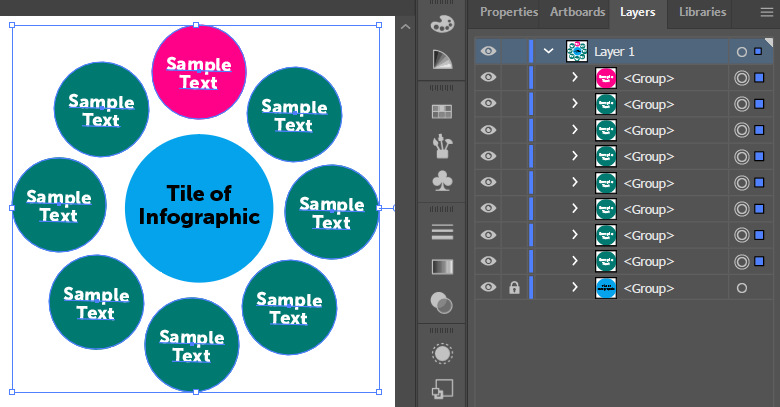
Thank you so much Sergey Osokin, this works perfectly as I want. only one issue in this is we have to maintain the stacking order of layers. The reference group (here is the pink object) always should be at top before run the script. I never forget this is 2nd time you given me correct solution. Thanks lot 🙂
Copy link to clipboard
Copied
•And Reference object must be selected, while selecting others object to rotate

Copy link to clipboard
Copied
I have a script in the archive, unfortunately I do not know its author 🙂
By @Sergey Osokin

could it be from xpmycpc?
Copy link to clipboard
Copied
Maybe. No other sources can be found. I will add this link to my local JS file.

Copy link to clipboard
Copied
Now that's cool, thanks.
Copy link to clipboard
Copied
but rotating by 0 or rotating by angle*0 would not apply any rotation, right?
Copy link to clipboard
Copied
that is my understanding. doesn't matter what the current rotation is.. if you multiply it by zero, no rotation will occur.

Copy link to clipboard
Copied
I think they might have meant ° (degree symbol), as opposed to 0 (zero).
Copy link to clipboard
Copied
it makes sense, you might be 100% right
Copy link to clipboard
Copied
I still don't think that would be enough information to provide any help. Unless they're asking for something to "rotate again" by just doubling the existing rotation angle?
Copy link to clipboard
Copied
Thank you for reply. Please refer the shared screenshot
Copy link to clipboard
Copied
Also see:
https://community.adobe.com/t5/illustrator-discussions/rotation/m-p/12443669
Apart from that, there is a very good script called Circular, provided by Alexander Ladygin. It has an option to reset rotations.
https://github.com/alexander-ladygin/illustrator-scripts
Copy link to clipboard
Copied
I am really very thankful to all, who replies on my query. and my problem is solved now 🙂


Get ready! An upgraded Adobe Community experience is coming in January.
Learn more
 AdChoices