


Piter1288
Inspiring
December 12, 2020
Question

Messed up values on size and corners. Numbers don't match what I have entered.

  • December 12, 2020
  • 4 replies
  • 1154 views

I have updated to version 25.0.1 and there are more glitches than ever regarding values.


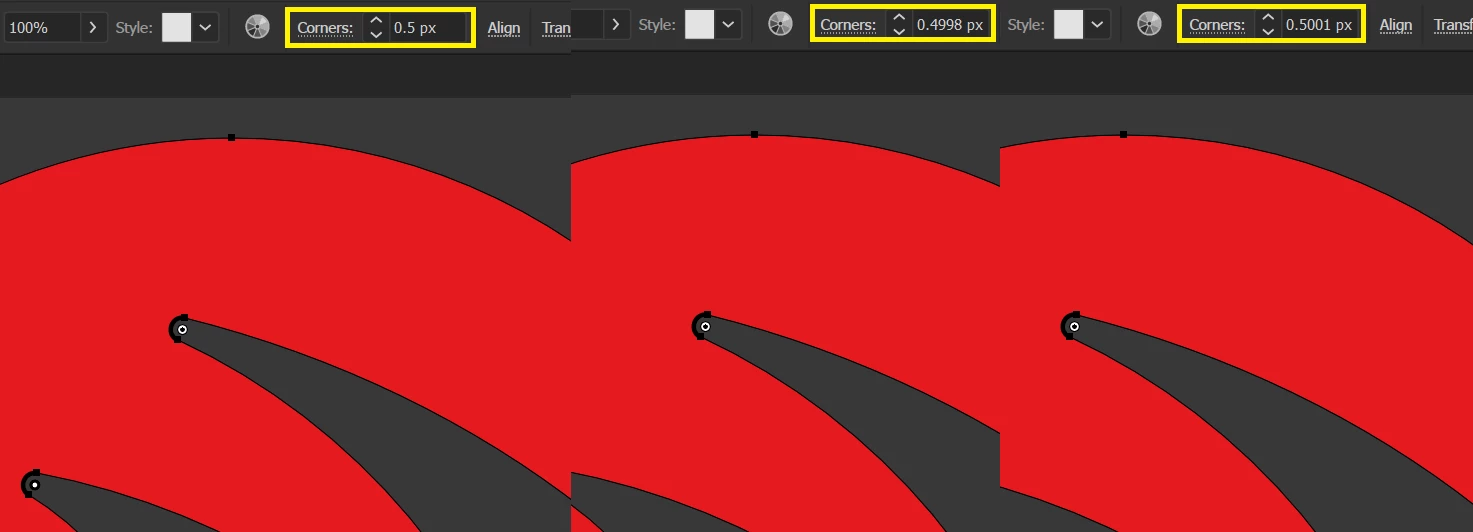
For example I have selected some corners to be 0.5 px but then if I select any of them that number will be different on each of them:


Another thing (already happening before latest update) is that I have 2 shapes that get reduced a little when I use the "Add" function in the pathfinder window and I cannot think of a reason to why:
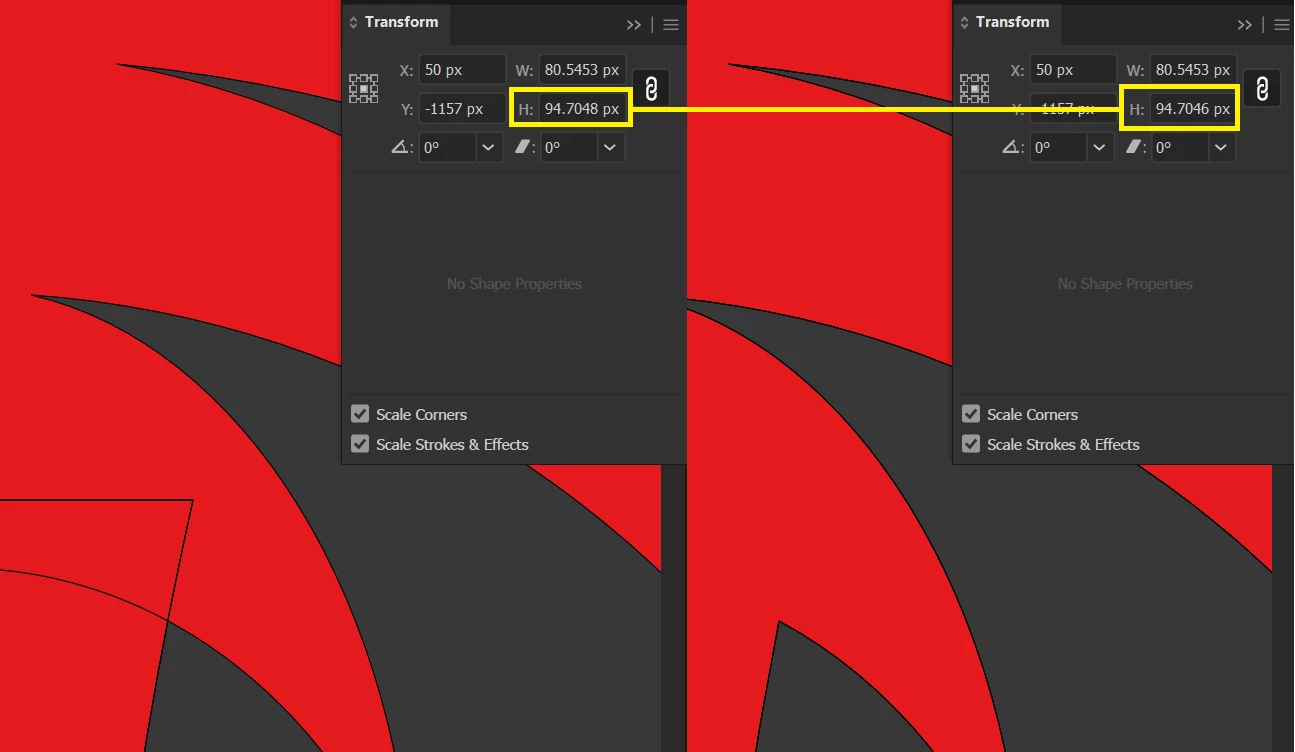
Am I missing changing any option here?

This topic has been closed for replies.

4 replies

Lukas Engqvist
Community Expert
Community Expert
January 2, 2022

I'm a little curious about what PPI you are using. I don't know what the base units are in the software (@Srishti Bali please help) , but most software uses one internal unit of measurement and converts to all other units. which could give you a rounding error. I doubt if the base unit is pixels since images can be various PPI, and therefore there may be a mathematical rounding of numbers. 

Ton Frederiks
Community Expert
Community Expert
January 2, 2022

Pixels and points are the same in Illustrator. 

There are 72 pts in an inch and 72 pixels per inch.

Srishti Bali
Community Manager
Community Manager
January 25, 2021

Hi there,


Sorry about the delay. I am hopeful that the issue was fixed. If not, please try updating the application to 25.1 and let us know how it goes.

If that doesn't help either, please share a small video of the issue.  We'd be happy to help.


Regards,

Srishti

Piter1288
Piter1288Author
Inspiring
January 2, 2022

Srisht,


I had provided a video on my original post: https://recordit.co/re9Vup9HmG


Haven't used Illustrator in a year, today went to version 26.0 and guess what? This issue is still there, I select a 10 px corner radius and I get 9.9992 px, 10.0002 px, 9.9941 px and all kinds of variants but not a simple 10.


I can't belive this is still an issue. Is this some setting I have maybe?

Ton Frederiks
Community Expert
Community Expert
January 2, 2022

If you look at the transform panel it will give you more pleasing rounded values.

Here 125px instead of 124,999.

Ton Frederiks
Community Expert
Community Expert
December 13, 2020

Did  you already try to restart your machine, restart Illustrator, reset your preferences (make sure to backup things like your custom swatches, symbols, brushes...)?

Piter1288
Piter1288Author
Inspiring
December 13, 2020

Of course that was my first approach and it still an issue. How do I roll back to my previous version? It still had values issues, though which I've reported here also.

Piter1288
Piter1288Author
Inspiring
December 13, 2020

Disregard the question, I rolled back to 24.1.3 and issue is still there!!!

Ton Frederiks
Community Expert
Community Expert
December 12, 2020

I cannot reproduce your first problem, but for your second one; does it improve when you set the Pathfiner Options > Precision to its smallest value?

Piter1288
Piter1288Author
Inspiring
December 13, 2020

Hi Ton,


When seaching for similar issues here on the forum, I've found what you mention and changed the value but that did not solve the issue.


For the other one I tried everything, changing the position to rounded numbers, pasting on a new document but that is still happening, check here how the corner number changes depending on which I select: https://recordit.co/re9Vup9HmG 

Piter1288
Piter1288Author
Inspiring
December 13, 2020

Forgot to mention that also tried using rounded numbers like 1, or 2 but the result is the same, some go down to 0.9992 px and other go up to 1.0006 px.