

New Participant
March 10, 2023
Answered

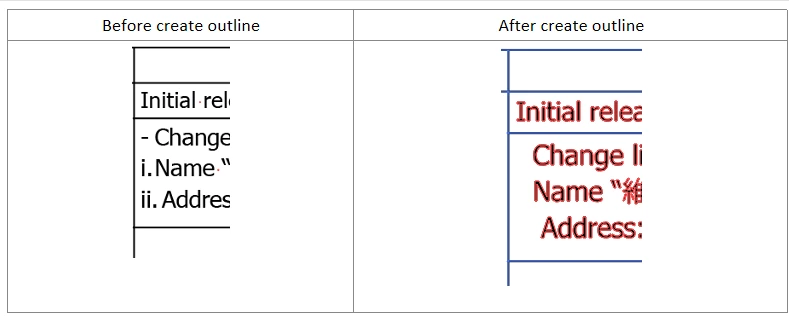
Missing content in artwork after create outline

  • March 10, 2023
  • 3 replies
  • 973 views

Recently I facing an issue that when I select all for my artwork, then create outline.

Some of the content of my artwork was disappear. Not sure who can help on this?

 
This topic has been closed for replies.
Correct answer Met1

from https://helpx.adobe.com/illustrator/using/bullets-numbering.html

  1. Select the paragraph containing the bulleted or numbered list.
  2. Select Type > Bullets and Numbering > Convert to text.
 

3 replies

Met1
Met1Correct answer
Brainiac
March 10, 2023

from https://helpx.adobe.com/illustrator/using/bullets-numbering.html

  1. Select the paragraph containing the bulleted or numbered list.
  2. Select Type > Bullets and Numbering > Convert to text.
 
New Participant
March 13, 2023

Thanks for the advice, it is works.

Monika Gause
Community Expert
March 10, 2023

Those are lists, right?


Try to outline them by using Object > Flatten transparency and then check "Outline text".


If that does not work, turn them into editable text first. There is a function for that.

New Participant
March 13, 2023

Thanks for the advice, it is works.

barbara_a7746676
Community Expert
March 10, 2023

I can't replicate this issue. You could try resetting preferences. If that doesn't work you may need to uninstall/reinstall the application.

New Participant
March 10, 2023

In my company, we have 3 person using the AI. However, in the same file we did the same create outline, the information will be disappear. So I think should not be setting preferences or required to reinstal the application right.

And this issue mostly happen on the part we are using bullet function or numbering list function.