Exit
  • Global community
    • Language:
      • Deutsch
      • English
      • Español
      • Français
      • Português
  • 日本語コミュニティ
  • 한국 커뮤니티
0

Missing Fill and Stroke options in Illustrator 2020

Community Beginner ,
Nov 14, 2019 Nov 14, 2019

I am missing these options in the upper-left corner. I can't change the fill/stroke color or any of the stroke properties from the top control bar as I have always done. 

Screen Shot 2019-11-14 at 1.00.21 PM.png


This is what mine looks like:

Screen Shot 2019-11-14 at 1.00.36 PM.png

The fill and stroke options should be all the way on the left after "Path."


I have only noticed this after updating to 2020. Is this intentional, or is there a way I can fix it somehow? This really affects my workflow and productivity!

TOPICS
Bug , Feature request
17.6K
Translate
Report
Community guidelines
Be kind and respectful, give credit to the original source of content, and search for duplicates before posting. Learn more
community guidelines

correct answers 1 Correct answer

Community Expert , Nov 14, 2019 Nov 14, 2019

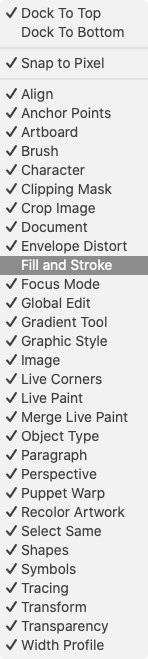
Hi, Is it turned off in the control bar menu?

Screen Shot 2019-11-15 at 03.40.51.png


Translate
Adobe
Community Expert ,
Nov 14, 2019 Nov 14, 2019

To the very right of the control panel there is a menu where you can configure which options to show. You might need to either check the fill/stroke option or uncheck a few others to make room.

Translate
Report
Community guidelines
Be kind and respectful, give credit to the original source of content, and search for duplicates before posting. Learn more
community guidelines
Community Beginner ,
Nov 14, 2019 Nov 14, 2019

Don't remember un-checking it, but I just restarted Illustrator for the THIRD time and now it's fixed! Thanks!

Translate
Report
Community guidelines
Be kind and respectful, give credit to the original source of content, and search for duplicates before posting. Learn more
community guidelines
Community Expert ,
Nov 14, 2019 Nov 14, 2019

Hi, Is it turned off in the control bar menu?

Screen Shot 2019-11-15 at 03.40.51.png


--
Susumu Iwasaki
Translate
Report
Community guidelines
Be kind and respectful, give credit to the original source of content, and search for duplicates before posting. Learn more
community guidelines
New Here ,
Feb 20, 2022 Feb 20, 2022

where is the control bar menu?

Translate
Report
Community guidelines
Be kind and respectful, give credit to the original source of content, and search for duplicates before posting. Learn more
community guidelines
Community Expert ,
Feb 21, 2022 Feb 21, 2022
LATEST

To display the control bar menu, click the control bar menu icon on the far right of the control bar.

Screen Shot 2022-02-21 at 18.11.38.png

--
Susumu Iwasaki
Translate
Report
Community guidelines
Be kind and respectful, give credit to the original source of content, and search for duplicates before posting. Learn more
community guidelines