


Missing fonts not being highlighted and do not show in Find/Replace Font dialog box
- April 18, 2025
- 5 replies
- 4954 views
We are using Illustrator 2025 (29.4), and a customer sent in an Illustrator file to replace a PDF that they sent us.
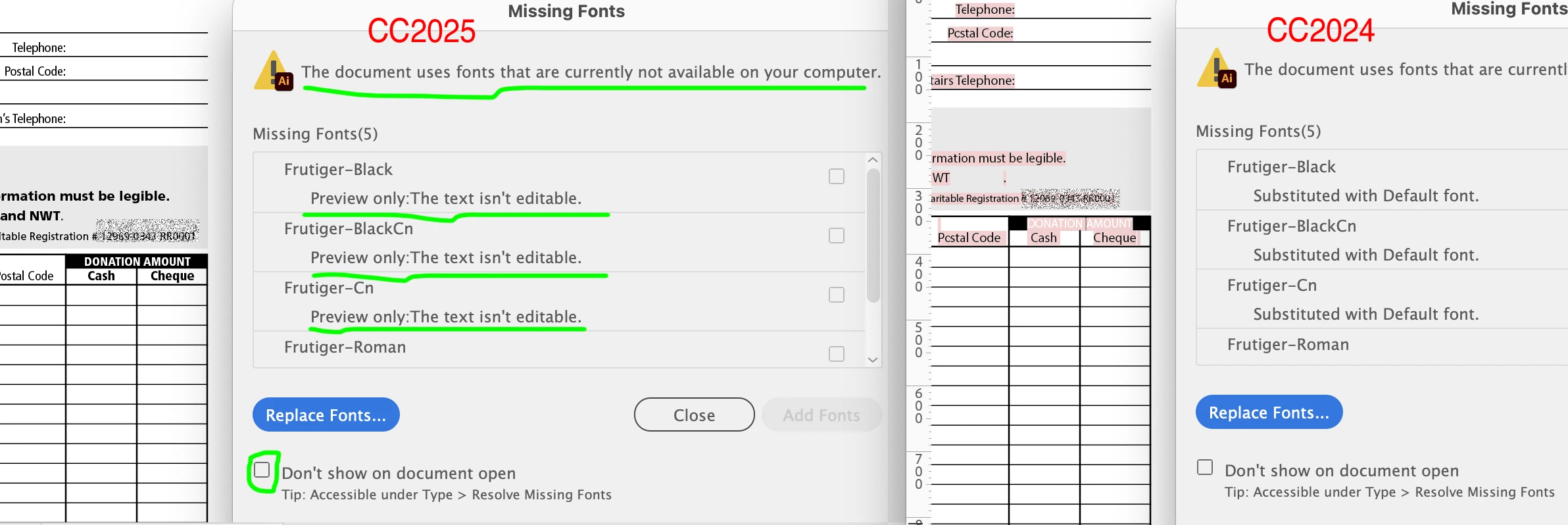
When we open the file, it warns us that the font is missing. We cancelled to see where it is being used, but no text was highlighted. Then we open the Find/Replace Font dialog box, and it does not flag the fonts as missing. So our user assumed that the fonts got loaded from the Creative Cloud, and made a PDF. The PDF has the wrong font showing, as it substituted a default font. And now we have to reprint the piece because of this issue with Illustrator.
So doing some testing to figure out where the problem lands. I checked all the same dialog boxes that the user did. But I also checked the Missing Fonts dialog box, and it shows the ones that are missing, but still no text is highlighted.
Next, I 'Reset All Warning Dialogs', and got the same issue.
Then, I 'Reset Preferences', and got the same issue.
I'm pretty sure it's an Illustrator 2025 issue at this point.
But to double check, I open the file in Illustrator 2024 (28.7.5) and it flagged the fonts like in 2025, but it also highlighted the text that was using the missing fonts. And in the Find/Replace Font dialog now shows a warning sign next to the fonts.
To fix the issue in our shop, we have stopped using Illustrator 2025 and have gone back to Illustrator 2024, until this issue is fixed.
Who else has had this issue?
 AdChoices