


Participating Frequently
November 23, 2022
Answered

Missing main menu on Mac (file, view, windows, etc)

  • November 23, 2022
  • 3 replies
  • 4824 views

Hello, I just started using AI on a Mac computer for the first time and it is missing the main menu options bar with file, view, windows, etc.  Does anyone know why it is missing and how I can get it to show up on the Mac computer?  


I have used it on a Windows computer for a few years and did not have this problem on the Windows computer.  Thank you!   
This topic has been closed for replies.
Correct answer Anshul_Saini

Hi @Kimberly G 44,


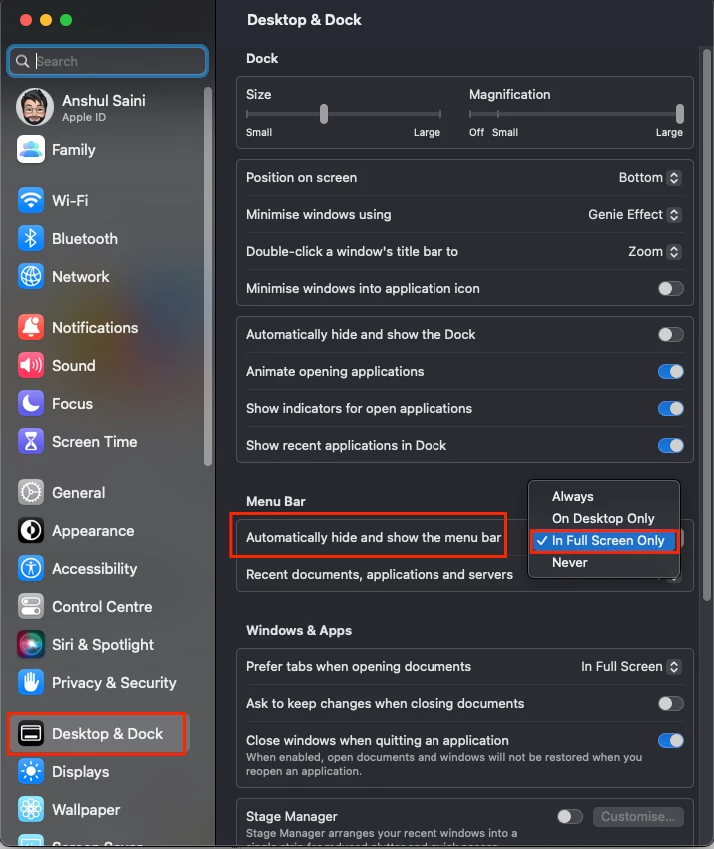
Thanks for reaching out. I agree with Doug. The menu bar is a part of macOS. Would you mind restarting your Mac and checking if it reappears or not? Also, it is possible that the menu hides or unhides automatically. Please check that in the macOS System Settings > Desktop & Dock > Menu Bar > Automatically hide and show the menu bar > "In Full Screen Only" is selected.


I hope this helps!


Thanks,

Anshul Saini

3 replies

Anshul_Saini
Community Manager
Anshul_SainiCommunity ManagerCorrect answer
Community Manager
November 25, 2022

Hi @Kimberly G 44,


Thanks for reaching out. I agree with Doug. The menu bar is a part of macOS. Would you mind restarting your Mac and checking if it reappears or not? Also, it is possible that the menu hides or unhides automatically. Please check that in the macOS System Settings > Desktop & Dock > Menu Bar > Automatically hide and show the menu bar > "In Full Screen Only" is selected.


I hope this helps!


Thanks,

Anshul Saini

Participating Frequently
December 12, 2022

Thank you!  I appreciate your response!  Now I won't be going crazy, at least for this one thing about the Mac.  😄  

Anshul_Saini
Community Manager
Community Manager
December 12, 2022

Happy to help, @Kimberly G 44. Please feel free to reach out if you run into any other questions or issues in the future. We will try our best to help you out.


Thanks,

Anshul Saini

Doug A Roberts
Community Expert
November 23, 2022

On a Mac, that menu is not part of the application window but an intrinsic part of the OS. It may be on your main monitor or every monitor depending on your system settings.

Participating Frequently
December 12, 2022

Thank you!  I have never used a Mac before, so big learning curve.  I appreciate you taking the time to respond!  

Monika Gause
Community Expert
November 23, 2022

So you launched Illustrator and it wasn't there?


Do you have additional monitors attached? If so, please check monitor settings. Do you spaces or any of those things activated in your system?

Participating Frequently
December 12, 2022

Yes, I tried unplugging my second monitor, but looks like I have an answer.  I have never used a Mac before and did not realize that the main menu is part of the OS and is at the top of the computer itself instead of inside of the program.  Thank you for trying to help!