


Participating Frequently
March 13, 2018
Answered

Most EmojiOne font glyphs showing up as 2 black x-ed boxes

  • March 13, 2018
  • 1 reply
  • 3165 views

Hello,

I'm trying to use the EmojiOne Font in Illustrator but, (although they appear fully in the glyphs panel) when used, most of them show up as two black x-ed boxes rather than the emoji. Can anyone help? Am I doing something silly? It does the same thing using the Apple Color Emoji font. I'm using a new, up-to-date iMac with the latest Illustrator version.

Here's an illustration using 5 different glyphs, only one of which works.
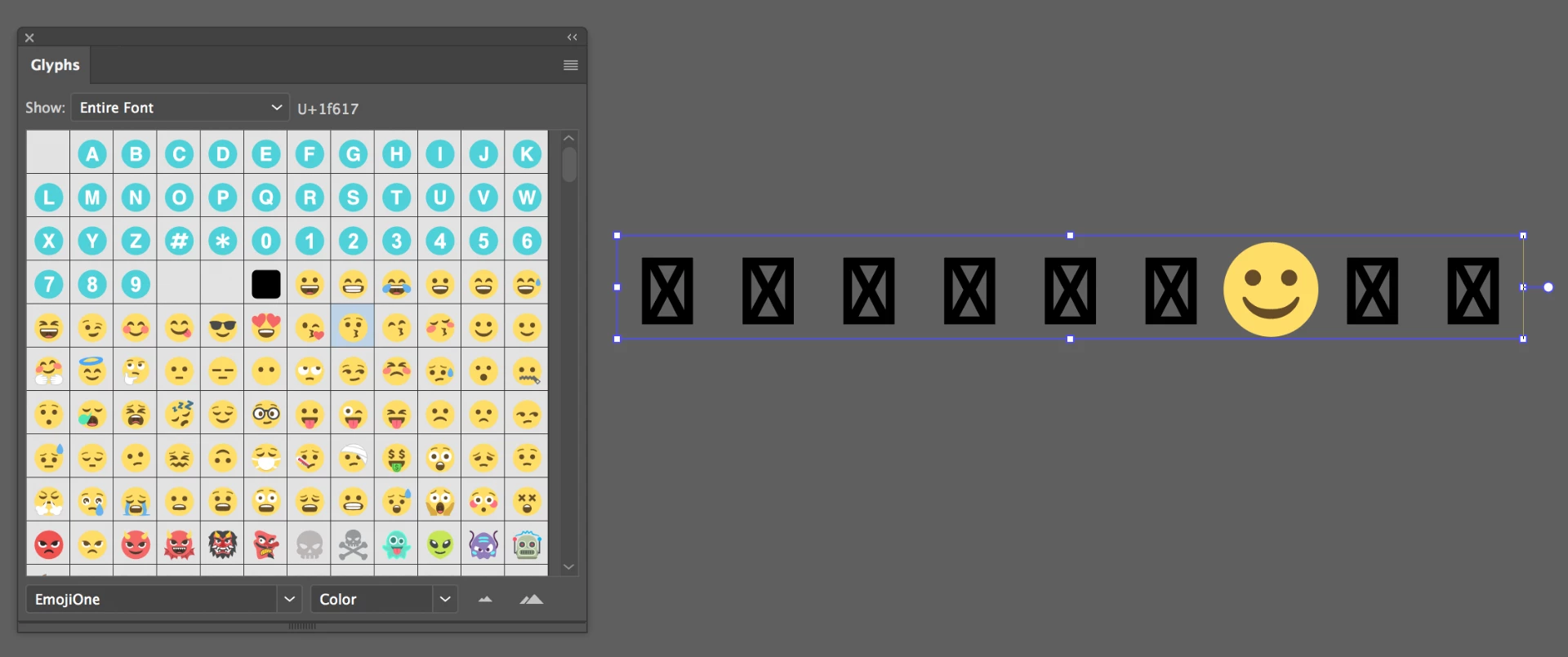
Thank you,

Petra

    This topic has been closed for replies.
    Correct answer barbara_a7746676

    I reloaded CC and there was the update so installed it and tried again, but still no luck. Thanks for showing me the update though.


    Next thing you could try would be resetting preferences.

    How to set preferences in Illustrator

    1 reply

    barbara_a7746676
    Community Expert
    Community Expert
    March 13, 2018

    I'm not able to reproduce this issue. Which characters are you typing that result in "X"?

    pdueckAuthor
    Participating Frequently
    March 13, 2018

    Thanks for the reply Barbara.

    In the following example I used the emojis on the left that are in the red box to produce the result on the right.

    barbara_a7746676
    Community Expert
    Community Expert
    March 13, 2018

    I discovered that if I specify the Emoji font before typing it works. If I specify a different font and try to change it to Emoji, I get X.

    Try this and let me know if the problem persists:

    • Select the Type tool but don't click on the artboard yet.
    • Select the Emoji font, from any of the usual ways: the Type menu, from the Character panel, or from the Glyphs panel.
    • With the Type tool, click or drag on the artboard, and then add the Emoji characters.