Participating Frequently
January 14, 2025
Answered

Need Help Automating Clipping Masks for Multiple Paths in Illustrator

  • January 14, 2025
  • 1 reply
  • 3255 views

Hi everyone,

I’m currently working on a project in Adobe Illustrator and could really use some help. I want to automate a repetitive workflow that involves:

  1. Copying the artwork (design) from a layer called “design.”
  2. Going through each path (or compound path) in a layer called “print media.”
  3. For each path:
    • Pasting my design in place behind it.
    • Creating a clipping mask (where the path is the mask and the design is the content).
    • Making sure the finished mask stays in the exact same position as the original path.
    • (Optionally) moving the final clipped artwork to another layer called “print ready.”

I’ve tried several JavaScript/ExtendScript approaches, and I’ve learned the following:

  • The path must be on top (in z-order) so Illustrator recognizes it as the mask, rather than the design.
  • If the path is inside a group, sometimes Illustrator treats the whole group as part of the mask, which isn’t what I want.
  • When there are multiple paths, I want to make sure each one becomes its own clipping group—no combining multiple paths into a single clip group—and that each path ends up correctly masked with the design.
  • Sometimes the position of the clipped group shifts if Illustrator is handling transformations or bounding boxes differently.

Despite trying various code snippets and suggestions (including collecting all the paths in an array before looping, making sure to bring each path to the front, and so on), I’m still running into issues:

  • Illustrator occasionally reuses the same path for multiple masks, or merges them into one large group.
  • Sometimes it misplaces the final mask so it no longer lines up with the original path position.
  • Compound paths (“stansade banor”) especially like to combine or behave unexpectedly.


Any tips, scripts, or pointers you can share would be greatly appreciated! Thank you so much in advance—I’m really hoping there’s a tried-and-true approach to simplify this workflow.
Cheers,
K

Correct answer m1b

Ah @kalle27850504iimx that's exactly what I needed!


Here's a script that will (I hope!) do what you want. It works on your sample files at least. Actually I made one of your masks into a compound path item because they are more difficult to work with. Let me know how it goes.

- Mark
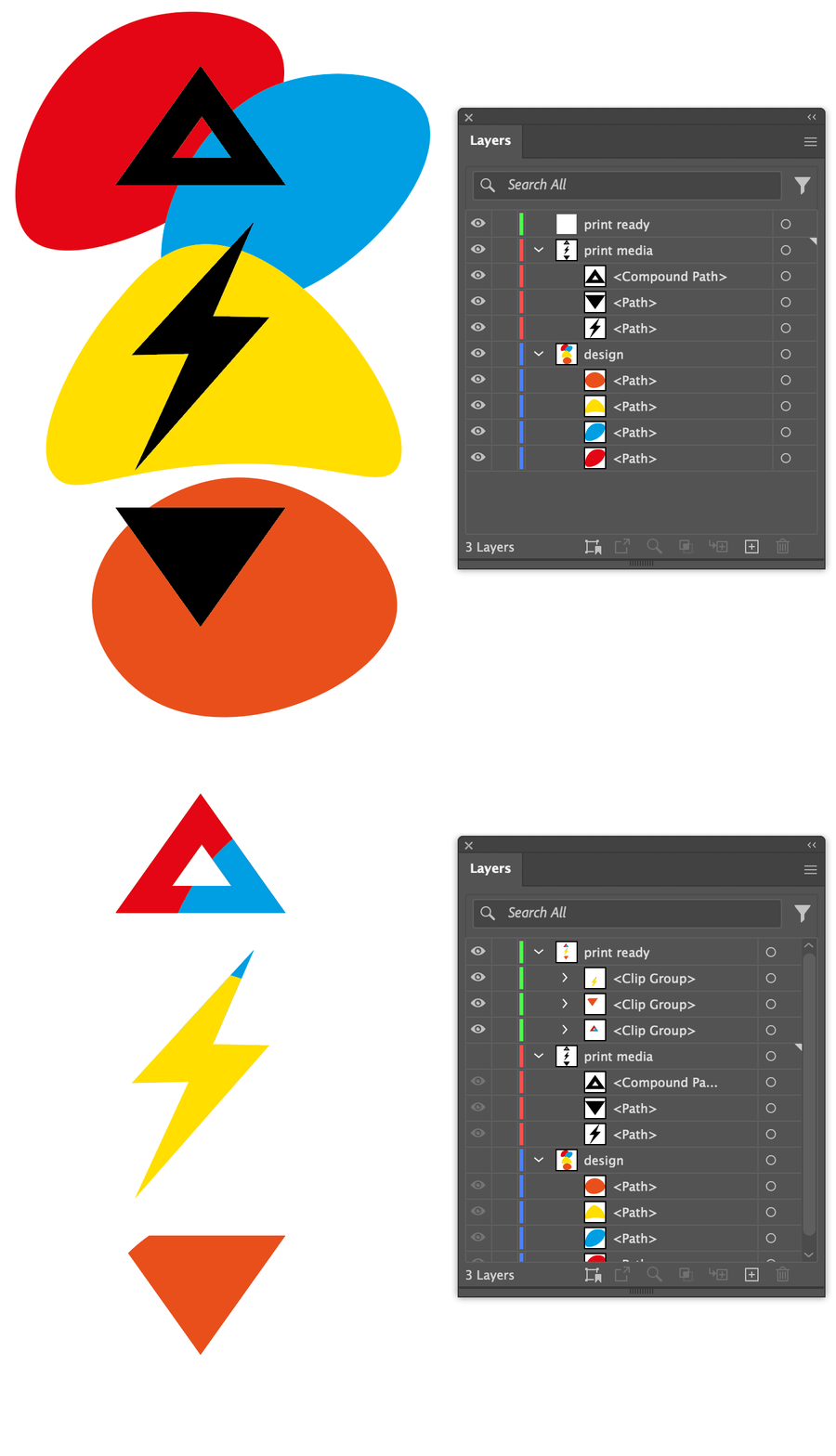
 

/**
 * @file Create Clipping Groups From Layers.js
 * 
 * Using masks from one layer, and artwork from another,
 * create clipping groups on another layer.
 * See `settings` object for configuration.
 * 
 * @author m1b
 * @discussion https://community.adobe.com/t5/illustrator-discussions/need-help-automating-clipping-masks-for-multiple-paths-in-illustrator/m-p/15089842
 */
(function () {

    var settings = {

        // the layer names used in document
        CLIPPED_LAYER_NAME: 'print ready',
        MASK_LAYER_NAME: 'print media',
        DESIGN_LAYER_NAME: 'design',

        // whether to hide layers after making groups
        hideDesignLayer: true,
        hideMaskLayer: true,

    };

    var doc = app.activeDocument;

    var clippedLayer = getThing(doc.layers, 'name', settings.CLIPPED_LAYER_NAME),
        maskLayer = getThing(doc.layers, 'name', settings.MASK_LAYER_NAME),
        designLayer = getThing(doc.layers, 'name', settings.DESIGN_LAYER_NAME);

    if (!clippedLayer || !maskLayer || !designLayer)
        return alert('Document does not have the required layers:\n' + [settings.CLIPPED_LAYER_NAME, settings.MASK_LAYER_NAME, settings.DESIGN_LAYER_NAME].join('\n'));

    var readyItems = [],
        maskItems = maskLayer.pageItems,
        designItems = designLayer.pageItems;

    // for each mask item, collect the designItems that intersect
    // with it and create the clipping group using those items
    for (var i = 0; i < maskItems.length; i++) {

        var maskItem = maskItems[i],
            maskBounds = maskItem.visibleBounds,
            intersectingItems = getIntersectingItems(designItems, maskBounds);

        if (0 === intersectingItems.length)
            continue;

        var group = clippedLayer.groupItems.add(),
            groupMask = maskItem.duplicate(group, ElementPlacement.PLACEATBEGINNING),
            compoundPathWorkaroundPathItem = undefined;

        if ('CompoundPathItem' === groupMask.constructor.name) {
            // workaround for bug with scripting API that won't allow
            // making a clipping group with compound path item
            compoundPathWorkaroundPathItem = group.pathItems.add();
            compoundPathWorkaroundPathItem.move(group, ElementPlacement.PLACEATBEGINNING)
        }

        for (var j = 0; j < intersectingItems.length; j++)
            intersectingItems[j].duplicate(group, ElementPlacement.PLACEATEND);

        // convert group to a clipping group
        group.clipped = true;

        if (compoundPathWorkaroundPathItem) {
            // workaround for bug with scripting API that won't allow
            // making a clipping group with compound path item
            // (I use a surrogate path item, which I then remove
            // and switch with the compound path item we want)
            compoundPathWorkaroundPathItem.remove();
            groupMask.pathItems[0].clipping = true;
        }

        readyItems.push(group);

    }

    if (settings.hideDesignLayer)
        designLayer.visible = false;

    if (settings.hideMaskLayer)
        maskLayer.visible = false;

})();

/**
 * Returns a thing with matching property.
 * If `key` is undefined, evaluate the object itself.
 * @author m1b
 * @version 2024-04-21
 * @param {Array|Collection} things - the things to look through.
 * @param {String} [key] - the property name (default: undefined).
 * @param {*} value - the value to match.
 */
function getThing(things, key, value) {

    for (var i = 0, obj; i < things.length; i++)
        if ((undefined == key ? things[i] : things[i][key]) == value)
            return things[i];

};

/**
 * Returns array of an `items` that have
 * bounds intersecting with `bounds`, if any.
 * @author m1b
 * @version 2025-01-15
 * @param {Array<PageItem>} items - the items to check.
 * @param {Array<Number>} bounds - the target bounds (LTRB for Illustrator, TLBR for Indesign).
 * @param {Boolean} [useGeometricBounds] - whether to use geometricBounds (default: false, visibleBounds).
 * @returns {Array<PageItem>}
 */
function getIntersectingItems(items, bounds, useGeometricBounds) {

    var found = [],
        boundsType = true === useGeometricBounds ? 'geometricBounds' : 'visibleBounds';

    for (var i = 0; i < items.length; i++)
        if (boundsDoIntersect(items[i][boundsType], bounds))
            found.push(items[i]);

    return found;

};
/**
 * Returns true if the two bounds intersect.
 * @author m1b
 * @version 2024-03-10
 * @param {Array} bounds1 - bounds array.
 * @param {Array} bounds2 - bounds array.
 * @param {Boolean} [TLBR] - whether bounds arrays are interpreted as [t, l, b, r] or [l, t, r, b] (default: based on app).
 * @returns {Boolean}
 */
function boundsDoIntersect(bounds1, bounds2, TLBR) {

    if (undefined == TLBR)
        TLBR = (/indesign/i.test(app.name));

    return !(

        TLBR

            // TLBR
            ? (
                bounds2[0] > bounds1[2]
                || bounds2[1] > bounds1[3]
                || bounds2[2] < bounds1[0]
                || bounds2[3] < bounds1[1]
            )

            // LTRB
            : (
                bounds2[0] > bounds1[2]
                || bounds2[1] < bounds1[3]
                || bounds2[2] < bounds1[0]
                || bounds2[3] > bounds1[1]
            )
    );

};


 

1 reply

m1b
Community Expert
January 14, 2025

Hi @kalle27850504iimx, could you please post a demo file (save as pdf with illustrator editable) that shows before and another demo file showing after running the hypothetical script? This is the best way to show exactly what you want the script to do.

- Mark

Participating Frequently
January 14, 2025

Hi Mark! Thanks for answering.

Here’s a detailed rundown of what I’d like the script to do in Illustrator:

Copy all the artwork from a layer called “design.”
In the layer “print media,” loop through every path (including compound paths). For each path:
Paste the copied design behind the path (i.e., “Paste in Place” but behind in z-order) so it occupies the exact same coordinates as the path.
Create a clipping mask where the path is the mask, and the pasted design is the content.
(Optional) Move (or cut/paste) the newly created clipping mask into a layer named “print ready” while keeping the same position, if possible.
Repeat the above until all paths/compound paths in “print media” have become clipping masks.

m1b
Community Expert
January 16, 2025

I’ve recently started to realize the potential of scripts, and honestly, it feels like I’m fumbling in the dark trying to figure things out. After seeing how well your solution worked, it got me thinking about whether something like this might be possible:

  1. Gather or update positions from “print ready.”
  2. Create the clipping masks (similar to how your original script works).
  3. Before placing each new mask in “print ready,” check its ID (name) and move it to a predefined position—essentially “nesting” or auto-arranging each piece.

I’ve put together some example files to show what I have in mind.

Of course, I completely understand if this isn’t something you have time for or want to take on. But if you do, I’d really value any guidance or advice you can offer.

Thanks so much for everything so far—it’s been a huge help.


Hi @kalle27850504iimx, you're very welcome. There is a complexity when it comes to aligning items which is that the geometric bounds given for a clipping group is actually the entire contents of the group, not just the visible part. However, I have written a function that handles the heavy lifting (getItemBoundsIllustrator) so it isn't a huge job to do what you want. Let me know if it works as you expect.

- Mark


/**
 * @file Create Clipping Groups From Layers.js
 *
 * Using masks from one layer, and artwork from another,
 * create clipping groups on another layer.
 * See `settings` object for configuration.
 *
 * If a mask layer item's name matches a target layer
 * item's name, then the new masked group can be
 * positioned to align with that target item.
 *
 * @author m1b
 * @version 2025-01-16
 * @discussion https://community.adobe.com/t5/illustrator-discussions/need-help-automating-clipping-masks-for-multiple-paths-in-illustrator/m-p/15089842
 */
(function () {

    var settings = {

        // the layer names used in document
        TARGET_LAYER_NAME: 'print ready',
        MASK_LAYER_NAME: 'print media',
        DESIGN_LAYER_NAME: 'design',

        // whether to position artwork on target layer
        positionArtwork: true,
        deleteTargetItems: true,

        // whether to hide layers after making groups
        hideDesignLayer: true,
        hideMaskLayer: true,

    };

    var doc = app.activeDocument;

    var targetLayer = getThing(doc.layers, 'name', settings.TARGET_LAYER_NAME),
        maskLayer = getThing(doc.layers, 'name', settings.MASK_LAYER_NAME),
        designLayer = getThing(doc.layers, 'name', settings.DESIGN_LAYER_NAME);

    if (!targetLayer || !maskLayer || !designLayer)
        return alert('Document does not have the required layers:\n' + [settings.TARGET_LAYER_NAME, settings.MASK_LAYER_NAME, settings.DESIGN_LAYER_NAME].join('\n'));

    var readyItems = [],
        targetItems = targetLayer.pageItems,
        maskItems = maskLayer.pageItems,
        designItems = designLayer.pageItems;

    // collect target item info for later
    var targetBounds = [],
        deleteMeUUIDs = [];

    for (var i = 0, targetItem; i < maskItems.length; i++) {

        if (!maskItems[i].name)
            continue;

        targetItem = getThing(targetItems, 'name', maskItems[i].name);

        if (!targetItem)
            continue;

        deleteMeUUIDs.push(targetItem.uuid);

        targetBounds[i] = getItemBoundsIllustrator(targetItem, true);

    }

    // for each mask item, collect the designItems that intersect
    // with it and create the clipping group using those items
    // for (var i = 0; i < maskItems.length; i++) {
    for (var i = maskItems.length - 1; i >= 0; i--) {

        var targetItem = undefined,
            maskItem = maskItems[i],
            maskBounds = maskItem.visibleBounds,
            intersectingItems = getIntersectingItems(designItems, maskBounds);

        if (0 === intersectingItems.length)
            continue;

        var group = targetLayer.groupItems.add(),
            groupMask = maskItem.duplicate(group, ElementPlacement.PLACEATBEGINNING),
            compoundPathWorkaroundPathItem = undefined;

        if ('CompoundPathItem' === groupMask.constructor.name) {
            // workaround for bug with scripting API that won't allow
            // making a clipping group with compound path item
            compoundPathWorkaroundPathItem = group.pathItems.add();
            compoundPathWorkaroundPathItem.move(group, ElementPlacement.PLACEATBEGINNING)
        }

        for (var j = 0; j < intersectingItems.length; j++)
            intersectingItems[j].duplicate(group, ElementPlacement.PLACEATEND);

        // convert group to a clipping group
        group.clipped = true;

        if (compoundPathWorkaroundPathItem) {
            // workaround for bug with scripting API that won't allow
            // making a clipping group with compound path item
            // (I use a surrogate path item, which I then remove
            // and switch with the compound path item we want)
            compoundPathWorkaroundPathItem.remove();
            groupMask.pathItems[0].clipping = true;
        }

        if (
            undefined != targetBounds[i]
            && settings.positionArtwork
        ) {

            // position new group on target layer
            var bounds = getItemBoundsIllustrator(group, true),
                dx = targetBounds[i][0] - bounds[0],
                dy = targetBounds[i][1] - bounds[1];

            group.translate(dx, dy, true, true, true, true);

        }

        readyItems.push(group);

    }

    if (settings.hideDesignLayer)
        designLayer.visible = false;

    if (settings.hideMaskLayer)
        maskLayer.visible = false;

    // delete only the target items we used
    if (settings.deleteTargetItems)
        for (var i = deleteMeUUIDs.length - 1; i >= 0; i--)
            doc.getPageItemFromUuid(deleteMeUUIDs[i]).remove();

})();

/**
 * Returns a thing with matching property.
 * If `key` is undefined, evaluate the object itself.
 * @author m1b
 * @version 2024-04-21
 * @param {Array|Collection} things - the things to look through.
 * @param {String} [key] - the property name (default: undefined).
 * @param {*} value - the value to match.
 */
function getThing(things, key, value) {

    for (var i = 0, obj; i < things.length; i++)
        if ((undefined == key ? things[i] : things[i][key]) == value)
            return things[i];

};

/**
 * Returns array of an `items` that have
 * bounds intersecting with `bounds`, if any.
 * @author m1b
 * @version 2025-01-15
 * @param {Array<PageItem>} items - the items to check.
 * @param {Array<Number>} bounds - the target bounds (LTRB for Illustrator, TLBR for Indesign).
 * @param {Boolean} [useGeometricBounds] - whether to use geometricBounds (default: false, visibleBounds).
 * @returns {Array<PageItem>}
 */
function getIntersectingItems(items, bounds, useGeometricBounds) {

    var found = [],
        boundsType = true === useGeometricBounds ? 'geometricBounds' : 'visibleBounds';

    for (var i = 0; i < items.length; i++)
        if (boundsDoIntersect(items[i][boundsType], bounds))
            found.push(items[i]);

    return found;

};

// from here down is just code to get a page item's bounds

/**
 * Returns bounds of item(s).
 * @author m1b
 * @version 2025-01-20
 * @param {PageItem|Array<PageItem>} item - an Illustrator PageItem or array of PageItems.
 * @param {Boolean} [geometric] - if false, returns visible bounds.
 * @param {Array} [bounds] - private parameter, used when recursing.
 * @returns {Array} - the calculated bounds.
 */
function getItemBoundsIllustrator(item, geometric, bounds) {

    var newBounds = [],
        boundsKey = geometric ? 'geometricBounds' : 'visibleBounds';

    if (undefined == item)
        return;

    if (
        item.typename == 'GroupItem'
        || item.constructor.name == 'Array'
    ) {

        var children = item.typename == 'GroupItem' ? item.pageItems : item,
            contentBounds = [],
            isClippingGroup = (item.hasOwnProperty('clipped') && item.clipped == true),
            clipBounds;

        for (var i = 0, child; i < children.length; i++) {

            child = children[i];

            if (
                (
                    child.hasOwnProperty('clipping')
                    && true === child.clipping
                )
                || (
                    'CompoundPathItem' === child.constructor.name
                    && child.pathItems.length > 0
                    && child.pathItems[0].hasOwnProperty('clipping')
                    && true === child.pathItems[0].clipping
                )
            )
                // child is a clipping path
                clipBounds = child.geometricBounds;

            else
                contentBounds.push(getItemBoundsIllustrator(child, geometric, bounds));

        }

        newBounds = combineBounds(contentBounds);

        if (isClippingGroup)
            newBounds = intersectionOfBounds([clipBounds, newBounds]);

    }

    else if (
        'TextFrame' === item.constructor.name
        && TextType.AREATEXT !== item.kind
    ) {

        // get bounds of outlined text
        var dup = item.duplicate().createOutline();
        newBounds = dup[boundsKey];
        dup.remove();

    }

    else if (item.hasOwnProperty(boundsKey)) {

        newBounds = item[boundsKey];

    }

    // `bounds` will exist if this is a recursive execution
    bounds = (undefined == bounds)
        ? bounds = newBounds
        : bounds = combineBounds([newBounds, bounds]);

    return bounds;

};

/**
 * Returns the combined bounds of all bounds supplied.
 * Works with Illustrator or Indesign bounds.
 * @author m1b
 * @version 2024-03-09
 * @param {Array<bounds>} boundsArray - an array of bounds [L, T, R, B] or [T, L , B, R].
 * @returns {bounds?} - the combined bounds.
 */
function combineBounds(boundsArray) {

    var combinedBounds = boundsArray[0],
        comparator;

    if (/indesign/i.test(app.name))
        comparator = [Math.min, Math.min, Math.max, Math.max];

    else if (/illustrator/i.test(app.name))
        comparator = [Math.min, Math.max, Math.max, Math.min];

    // iterate through the rest of the bounds
    for (var i = 1; i < boundsArray.length; i++) {

        var bounds = boundsArray[i];

        combinedBounds = [
            comparator[0](combinedBounds[0], bounds[0]),
            comparator[1](combinedBounds[1], bounds[1]),
            comparator[2](combinedBounds[2], bounds[2]),
            comparator[3](combinedBounds[3], bounds[3]),
        ];

    }

    return combinedBounds;

};

/**
 * Returns the overlapping rectangle
 * of two or more rectangles.
 * NOTE: Returns undefined if ANY
 * rectangles do not intersect.
 * @author m1b
 * @version 2024-09-05
 * @param {Array<bounds>} arrayOfBounds - an array of bounds [L, T, R, B] or [T, L , B, R].
 * @returns {bounds?} - intersecting bounds.
 */
function intersectionOfBounds(arrayOfBounds) {

    var comparator;

    if (/indesign/i.test(app.name))
        comparator = [Math.max, Math.max, Math.min, Math.min];

    else if (/illustrator/i.test(app.name))
        comparator = [Math.max, Math.min, Math.min, Math.max];

    // sort a copy of array
    var bounds = arrayOfBounds
        .slice(0)
        .sort(function (a, b) { return b[0] - a[0] || a[1] - b[1] });

    // start with first bounds
    var intersection = bounds.shift(),
        b;

    // compare each bounds, getting smaller
    while (b = bounds.shift()) {

        // if doesn't intersect, bail out
        if (!boundsDoIntersect(intersection, b))
            return;

        intersection = [
            comparator[0](intersection[0], b[0]),
            comparator[1](intersection[1], b[1]),
            comparator[2](intersection[2], b[2]),
            comparator[3](intersection[3], b[3]),
        ];

    }

    return intersection;

};

/**
 * Returns true if the two bounds intersect.
 * @author m1b
 * @version 2024-03-10
 * @param {Array} bounds1 - bounds array.
 * @param {Array} bounds2 - bounds array.
 * @param {Boolean} [TLBR] - whether bounds arrays are interpreted as [t, l, b, r] or [l, t, r, b] (default: based on app).
 * @returns {Boolean}
 */
function boundsDoIntersect(bounds1, bounds2, TLBR) {

    if (undefined == TLBR)
        TLBR = (/indesign/i.test(app.name));

    return !(

        TLBR

            // TLBR
            ? (
                bounds2[0] > bounds1[2]
                || bounds2[1] > bounds1[3]
                || bounds2[2] < bounds1[0]
                || bounds2[3] < bounds1[1]
            )

            // LTRB
            : (
                bounds2[0] > bounds1[2]
                || bounds2[1] < bounds1[3]
                || bounds2[2] < bounds1[0]
                || bounds2[3] > bounds1[1]
            )
    );

};



Edit 2025-01-18: Fixed bug in `getItemBoundsIllustrator` where it didn't handle compound path item correctly!

Edit 2025-01-20: added check for mal-formed compoundPathItems with no paths.