


Participant
July 4, 2025
Answered

Need help finding a more efficient way of doing an image trace with live paint

  • July 4, 2025
  • 1 reply
  • 285 views

For this assignment I'm doing, I had to hand draw and scan each diagram. I did an image trace, but most of the objects generated were partially filled to where it was in the scan. To work around this, I expanded all the shapes, and dragged each one to form a complete object. This enabled me to add color via live paint. Is there a faster way to achieve the same results?

Correct answer creative explorer

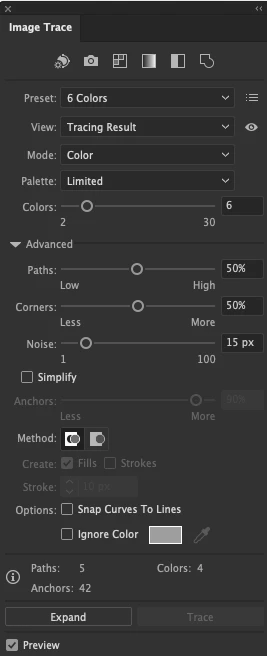
@r.hodge1  yes, go to Window-Image Trace


1 reply

creative explorer
Community Expert
Community Expert
July 5, 2025

@r.hodge1 i would make sure the drawings are closed (no open gaps). And I would remove the dash line. You can fill that in later with the pen tool. I would do an image trace, maybe using the black and white preset. You can pick and choose which ones. Maybe even th 3 colour could work. 

m
r.hodge1Author
Participant
July 5, 2025

I'll play around with it some more, but is there any way to adjust the tolerance when I do a black and white image trace? The full objects aren't generating from my original image. 

creative explorer
Community Expert
creative explorerCommunity ExpertCorrect answer
Community Expert
July 6, 2025

@r.hodge1  yes, go to Window-Image Trace


m