New Participant
December 8, 2018
Answered

Need non printing but visible objects in a PDF from a template.

  • December 8, 2018
  • 2 replies
  • 7591 views

I tried to make a template with some non-printing elements in it.

I put them on a separate layer and switched off the 'print' tick box.

This works fine when printing in Illustrator but the saved PDF is also missing the objects.

I tried to switch off printing of the layer in Acrobat (that works as well) but the re-opened and edited PDF file has it switched on again.
Any ideas anyone?

    This topic has been closed for replies.
    Correct answer jane-e

    https://forums.adobe.com/people/ivo+dielen  wrote

    I tried to switch off printing of the layer in Acrobat (that works as well) but the re-opened and edited PDF file has it switched on again.

    Hi Ivo,

    To make sure I understand your workflow:

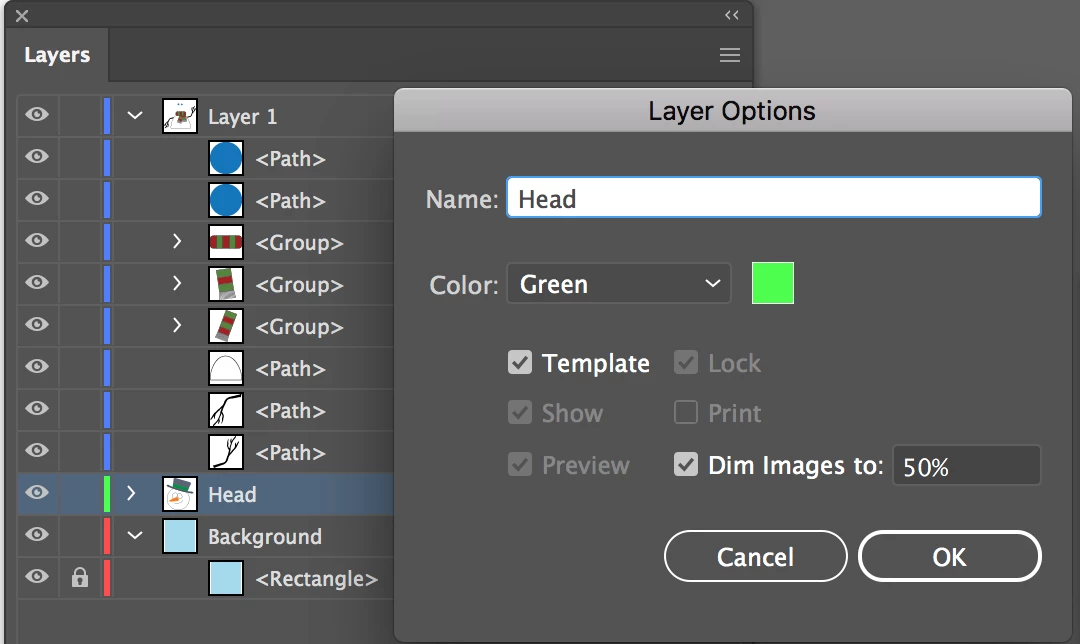
    • When you make the template, do you make a template layer by changing the Layer Options to make it a non-printing template layer?
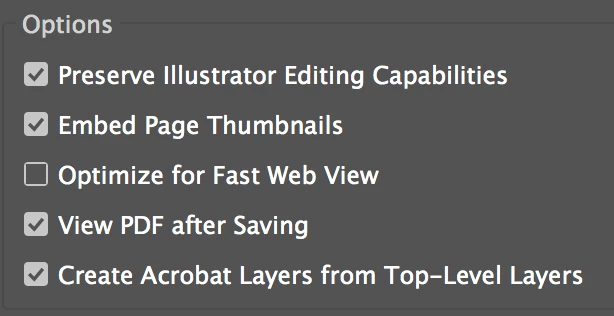
    • Then you make the PDF with the top level layers creating Acrobat layers

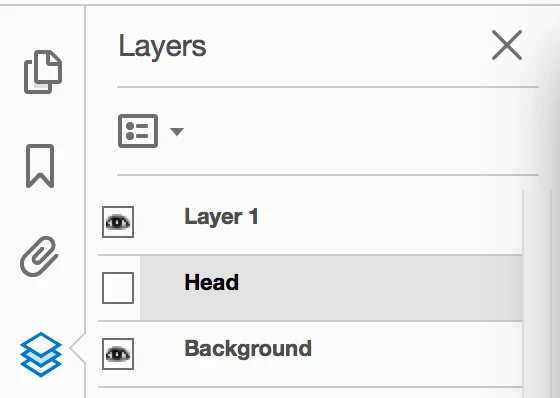
    • When you open the file in Acrobat, the hidden layer is hidden by default. The layers panel is showing in the left hand panels. Click to expand and turn on the hidden layer.
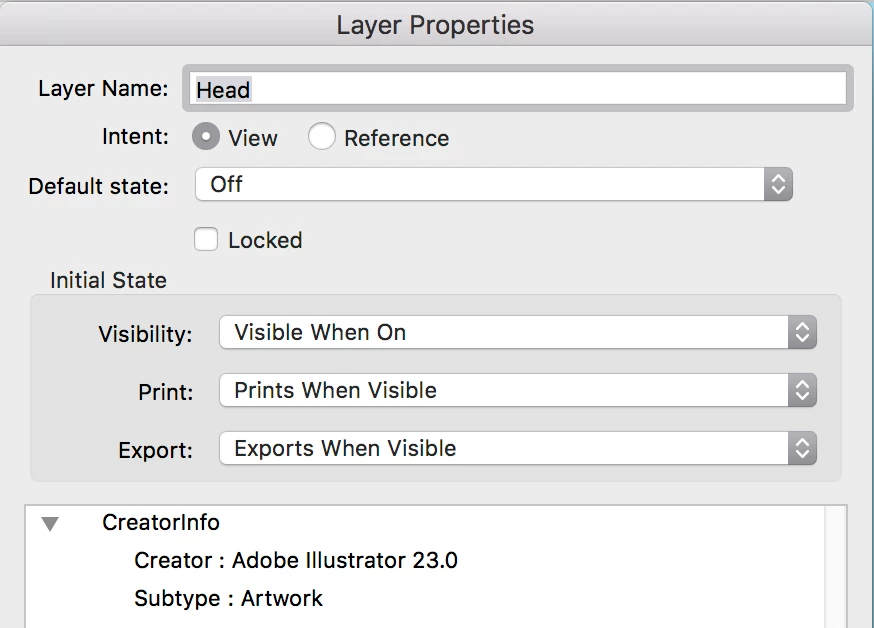
    • In Acrobat, you have more choices for the layer. Right click the layer to get Layer Properties. Right now my default state is Off, meaning that if I make the layer visible, then save, close, and reopen, it will be off again. That's what happened to you.

      If I set this control to On, the Visibility control says that because I chose On, it will be Visible by default when I reopen, but I have other choices. I also have choices for how this layer prints and exports. Play with these settings and see if that answers your question.

    ~ Jane

    2 replies

    jane-e
    jane-eCorrect answer
    Adobe Expert
    December 8, 2018

    https://forums.adobe.com/people/ivo+dielen  wrote

    I tried to switch off printing of the layer in Acrobat (that works as well) but the re-opened and edited PDF file has it switched on again.

    Hi Ivo,

    To make sure I understand your workflow:

    • When you make the template, do you make a template layer by changing the Layer Options to make it a non-printing template layer?
    • Then you make the PDF with the top level layers creating Acrobat layers

    • When you open the file in Acrobat, the hidden layer is hidden by default. The layers panel is showing in the left hand panels. Click to expand and turn on the hidden layer.
    • In Acrobat, you have more choices for the layer. Right click the layer to get Layer Properties. Right now my default state is Off, meaning that if I make the layer visible, then save, close, and reopen, it will be off again. That's what happened to you.

      If I set this control to On, the Visibility control says that because I chose On, it will be Visible by default when I reopen, but I have other choices. I also have choices for how this layer prints and exports. Play with these settings and see if that answers your question.

    ~ Jane

    New Participant
    March 30, 2023

    You can double-click - just to the right of the "layer name" of the layer that you do not want to print, and uncheck the "[   ] Print" box. Then all layers that you have the eyeball-icon turned on WILL SHOW, but the layer(s) that you have unchecked the "Print" box will NOT print. It works like magic!! 

    Monika Gause
    Adobe Expert
    December 8, 2018

    You want that some elements in your PDF don't print, but the others do?

    I would guess that you need to ask this in the Acrobat forum.

    New Participant
    December 8, 2018

    Elements or layers, either will do. But they must show in a PDF save out of Illustrator.
    I posted it here because I don't really want to edit each and every PDF in Acrobat.

    You can set a layer to not print in Acrobat but then I need to open them one by one which is what I am trying to avoid.

    If you do that in Illustrator's layer settings, it does not show in the PDF.

    New Participant
    December 8, 2018

    I'm sorry, but I still don't understand your goal? Every time I read your posts, I can interpret it multiple ways.

    Are you using the workflow that I suggested or something else?

    I tried to switch off printing of the layer in Acrobat (that works as well) but the re-opened and edited PDF file has it switched on again.

    Any ideas anyone?
    And what are you trying to do in Acrobat if not what you said above??

    I apologize for not understanding, but can give a much better answer once I know what you want to do, so thanks. Screen shots are extremely helpful.

    ~ Jane


    Sorry Jane, the answer was to Monika's reply,
    They are moderated so with a bit of delay.

    If I understand it well, your solution will work but I need to open each file in Acrobat, which is what I hoped to avoid.

    What I'm trying to do here is have a template file (either .ait or .ai or pdf) that I can edit in Illustrator.

    I need a black background to present designs to the client but don't want to print that layer (it costs a ton in toner).

    Unchecking the 'print' box in Illustrator is what I need but then in a PDF file I can send by email.

    Ivo