craigm95412593
Participant
July 20, 2017
Answered

Negative Space Text over Text

  • July 20, 2017
  • 2 replies
  • 3391 views

All,

I'm new to illustrator. I'm trying to create a negative space note in between two letters. I've gotten the negative space part down, but keep hitting a road block when trying to remove the stroke in the letters where the negative space should also be.

I've succeeded once, but the line across the letters was not correct. Does anyone have suggestions?

This topic has been closed for replies.
Correct answer Ray Yorkshire

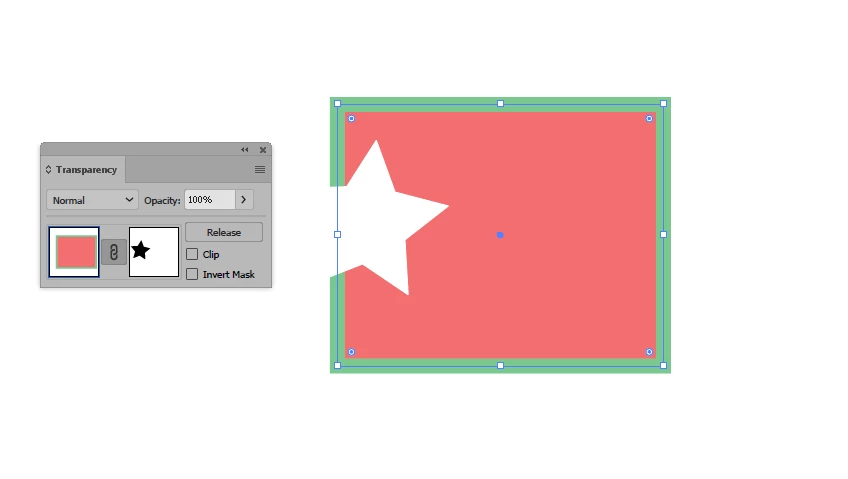
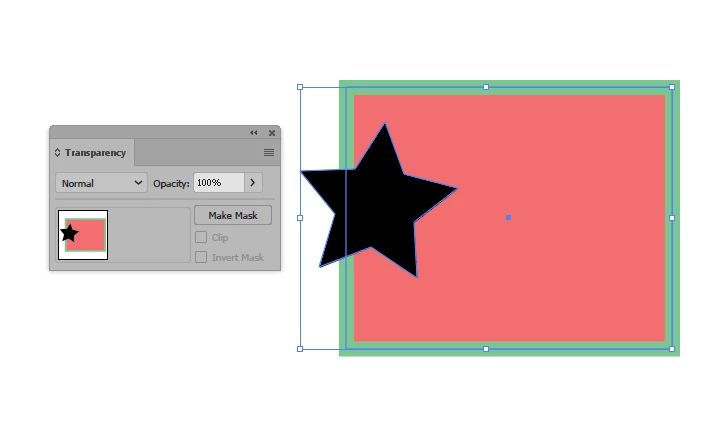
To make an opacity mask

Open  the panel Window > Transparency

Make sure the 'negative space' object at least covers the area you want to hide and give it a black fill -

as in an opacity mask: black reveals, white conceals.

Select  both your letter and the negative space

Click Make Mask

with those settings

2 replies

Ray Yorkshire
Ray YorkshireCorrect answer
Participating Frequently
July 21, 2017

To make an opacity mask

Open  the panel Window > Transparency

Make sure the 'negative space' object at least covers the area you want to hide and give it a black fill -

as in an opacity mask: black reveals, white conceals.

Select  both your letter and the negative space

Click Make Mask

with those settings

Monika Gause
Community Expert
Community Expert
July 20, 2017

You need to expand the stroke: Object > Path > Outline stroke

Expand the text

Then use the pathfinder panel to actually subtract the expanded stroke from the letter shape

In case you want this to be editable: use an opacity mask.

You might want to check the documentation for the functions you don't know how to use.