

Participant
April 22, 2021
Question

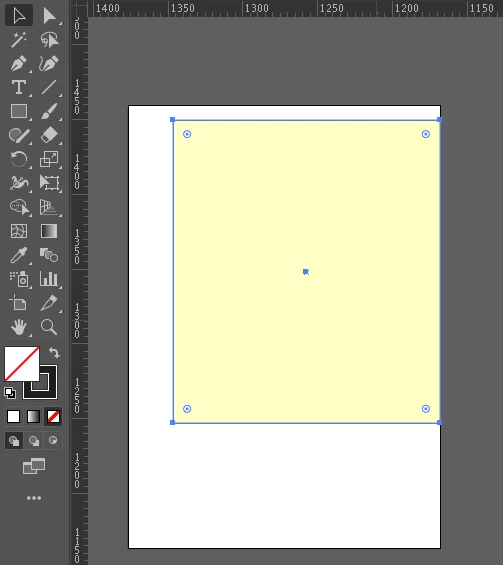
No fill comes out as yellow fill on Adobe Illustrator

  • April 22, 2021
  • 5 replies
  • 389 views

No fill comes out as yellow fill on Adobe Illustrator, I don't know what to do.
This topic has been closed for replies.

5 replies

Mike_Gondek10189183
Community Expert
Community Expert
April 22, 2021

You may have inadvertently assigned a fill at the layer level, can happen very easily. Select the item, then In appearance click on the work layer


Ton Frederiks
Community Expert
Community Expert
April 22, 2021

Can you show your Appearance panel?

It is possible to have multiple fills for an object (one of them may be none and selected).

Larry G. Schneider
Community Expert
Community Expert
April 22, 2021

If you look closely there are two anchors shown. An active one which is related to the selected no fill/black stroke object and an unselected one which is probably associated with the yellow filled object. As suggested can you show the Layer panel (expanded) so we can make sure?

Kurt Gold
Community Expert
Community Expert
April 22, 2021

Which version of Illustrator are you using?


Please elaborate and describe the issue as detailed as possible.


Otherwise it is nearly impossible to provide some reasonable advice.


Inspiring
April 22, 2021

How many Layers in your file?  It could be you are looking at your Layer that is currently slected and shows no fill and your non-selected Layer has the Yellow.  Just a hunch.
