


Participant
January 15, 2017
Answered

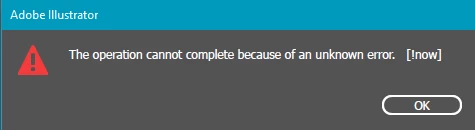
[!now] error message whenever I try to export files
  • January 15, 2017
  • 15 replies
  • 93519 views

this error message has randomly started happening since i updated illustrator. I have done a clean windows install and it still happens. All I am doing is trying to export designs at 300dpi as a png. I cannot export anything now. And as a work around I have to copy the designs to photoshop and export using that. However I don't like this option as the file is not a vector anymore. I have searched the internet everywhere and can't find anyone with this issue. Please HELP

Correct answer defaultfrbv4gjl8o35

Had the same issue just now. I'm pretty sure that it was because the output filename was too long; I unchecked the Suffix option and that fixed it.

15 replies

Participant
October 15, 2017

I was having this problem too; I checked "Use Artboards" when exporting and then it worked fine!

Participant
September 14, 2022

Incredible! Thank you I've been suffering all morning! Perfect fix!!!!


dgaplansc32017418
Participant
October 13, 2017

Same problem here. Encountered it today.

System/Software Specs:

Illustrator CC 21.1.0 (64-bit)

Windows 7 Professional

Trying to save the file to a network drive

Export method : Export > Export As... > Use Artboards

I am trying to save a large (600in x 72in) image at 300dpi.

Participant
September 29, 2017

I am having the same exact problem when try to export file in png in 300 dpi. Any soution?

Monika Gause
Community Expert
Community Expert
September 29, 2017

https://forums.adobe.com/people/r+ra1746432  schrieb

I am having the same exact problem when try to export file in png in 300 dpi. Any soution?

Please answer the questions in #5

Also: how large is the artwork?

Participant
January 2, 2022

Help #1 for IRS what is available soulution for the Problem

Participant
August 9, 2017

Got the same probblem, did anyone find a solution?

Monika Gause
Community Expert
Community Expert
August 9, 2017

https://forums.adobe.com/people/Katja+Trolle+Taksholt  schrieb

Got the same probblem, did anyone find a solution?

Which version of Illustrator?

Which system?

Where are you traing to save the file?

Which export method?

What kind of file are you saving? If it's not a PNG, please create your own thread.

Participant
July 7, 2023

hello can you help i have the same issue 

im using win11 

i cannot export to any file from AI file 

Monika Gause
Community Expert
Community Expert
January 15, 2017

Which system is it?

Do you have any third party plugins in Illustrator?

A Wacom?

A printer?

Participant
January 15, 2017

Hi, I am running Illustrator CC 2017 on windows 10 64 bit and have no third party plugins at all

jimf24
Participant
April 18, 2017

I get the same error and I am on a Mac with Illustrator CC 2017