Piter1288
Inspiring
March 16, 2021
Answered

Offset feature distorts a part of the shape

  • March 16, 2021
  • 3 replies
  • 1651 views

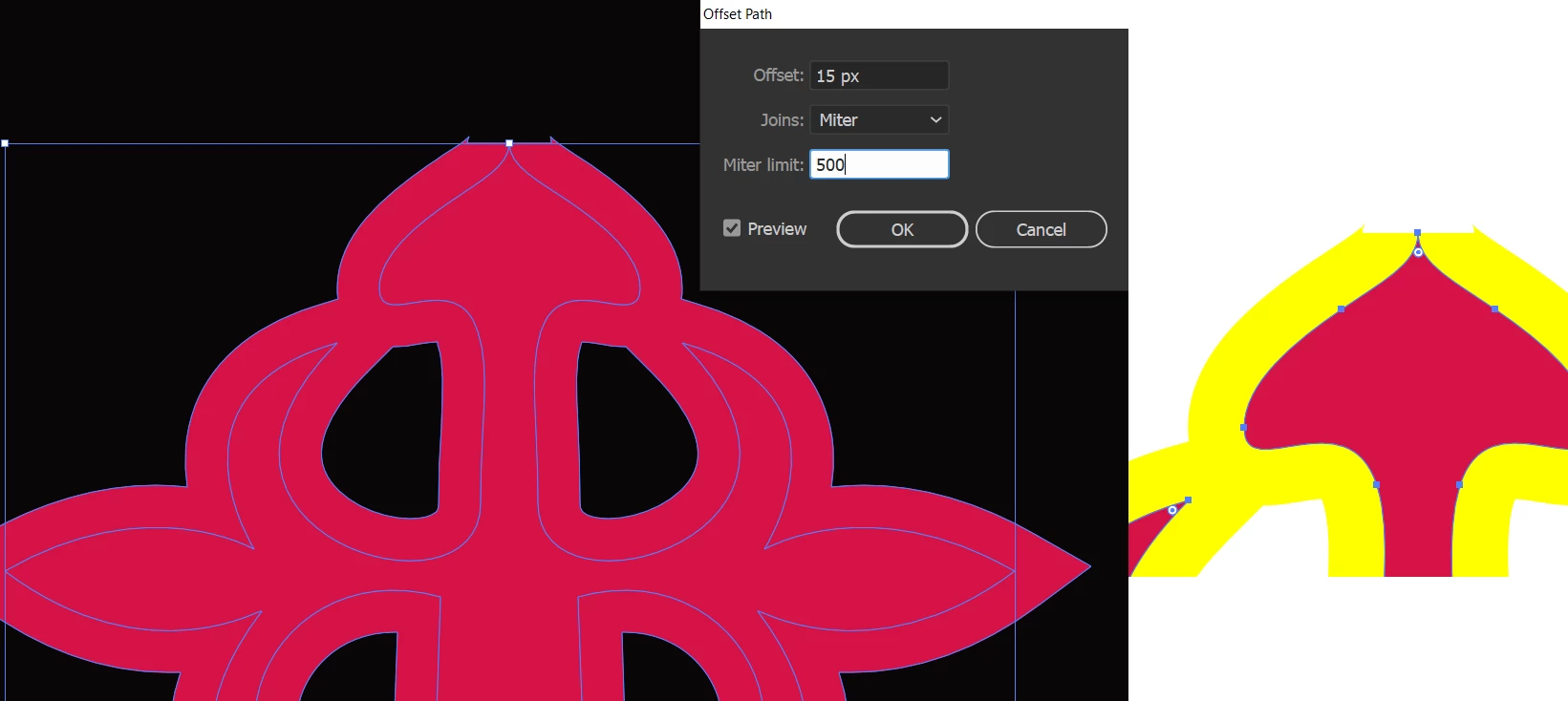
The offset option creates this weird shape at the top of my path. Please bear in mind that:
1) I've increased the miter limit up to random numbers like 500 to make it work.
2) No, there's no extra anchor at the top, only 3 per side:


This topic has been closed for replies.
Correct answer Lukas Engqvist

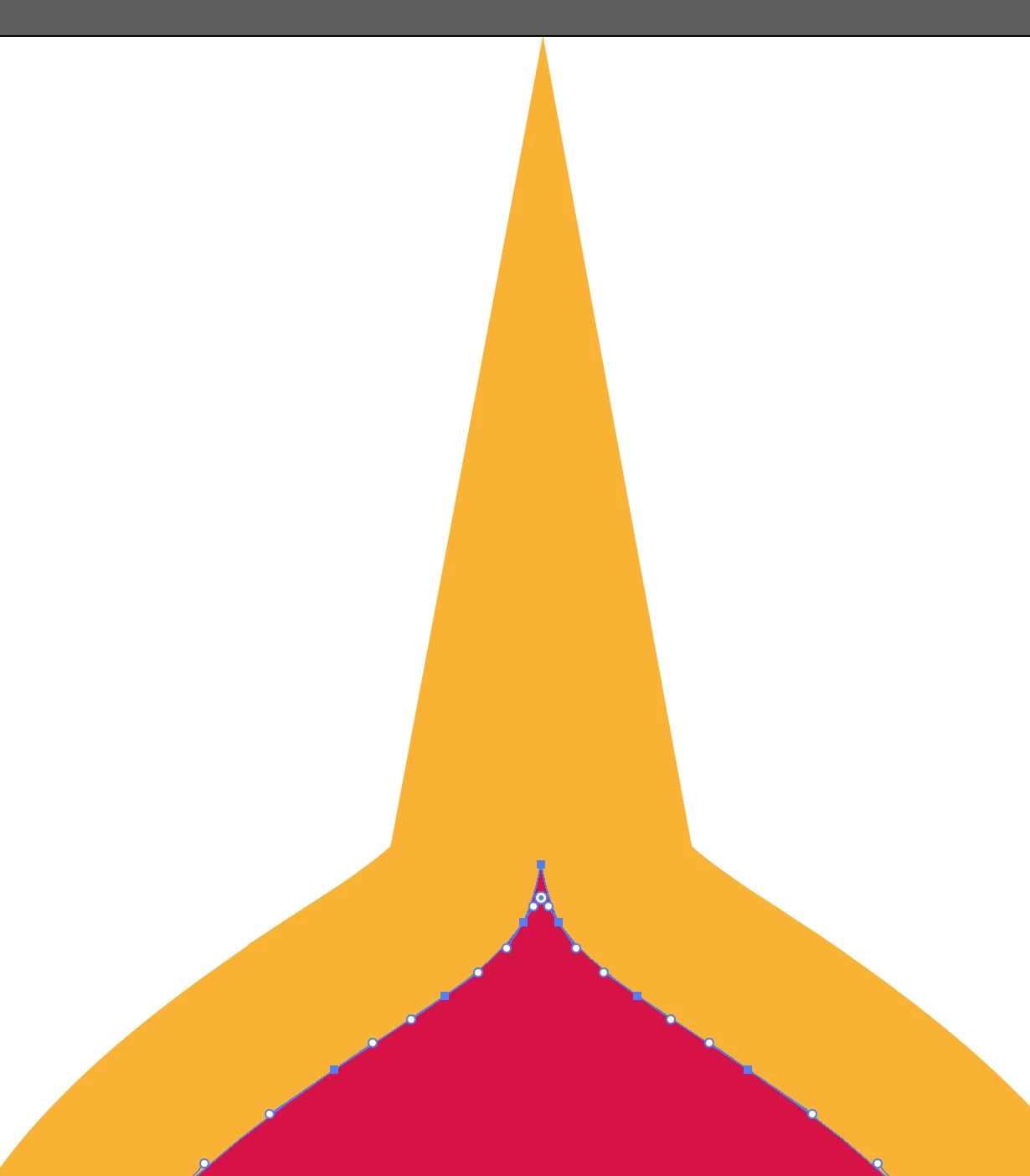
Sorry did not see the svg first only the screen shot. As Monica implies it is teh rules of mathematics that cause your problems. Offset path is calculated perpendicular to the stroke and as you are coming to a tangent the miter would need to be infinity (because parallel lines never meet) if you round the point or make it so that it is not infinite you will get a correct path. Offset with round will work but never with miter at this angle, you must round the angle or make the handles meet as a v-


Are you sure a miter is what you want? I don't think you want an unmodified offset path because it would at best look something like this:
 

I tried to upload an ai file but seems it does not work, why I wanted to give you an ai is that Illustrator allows to use your original as a guide.


I couldn't stop without showing how I would solve such a situation.

First mae a copy of your shape and made it to a guide, so I could make sure I was true to your original.

I deledet the side points on the top part of the cross and modified the curves to simplify it even further.

Next I offset the path getting a similar result to the image you first got.

I removed the top segment.

Aligned the top points of the ofset path to centre of selection and joined them.

I moved the top point of the offset path uppward and then adjusted the path so that it had the same flow as the inner shape.

It is not quite parallel and not a true offset path but I imagine this is what you were aiming for.
Hope your project works out 🙂
Here is an svg of my result (did not manage to get ai file to work correct)


3 replies

Lukas Engqvist
Community Expert
March 16, 2021

Could you also please show the handles? I am trying to recreate your issue.

Piter1288
Piter1288Author
Inspiring
March 17, 2021

Hi Lukas,


Below is the image and I've attached the original cross in svg format for you to try on your end. The offset size is 15 px.


Monika Gause
Community Expert
March 17, 2021

That is a very sharp point. With those vertical handles Illustrator it's close to impossible to offset the path. Illustrator can just do math, there is no optimization functionality built into the offset function. So you will have to either change those handles or build the joint on the offset path manually.

Jacob Bugge
Community Expert
March 16, 2021

Piter,


Maybe far too far out, but what happens if you Ctrl/Cmd+E?


Piter1288
Piter1288Author
Inspiring
March 17, 2021

Hi there!


In my case Ctrl+E changes the view from Preview to GPU Preview. Unfortunately, nothing changes doing that. Is there something else I should look at?

Mylenium
Brainiac
March 16, 2021

It's all just math and based on the tangent directions it pretty much appears correct within reason. The algorithm employed by AI simply has no provision to consolidate backward loops.. You have to fix it manually.


Mylenium