


samgw
Participant
May 13, 2020
Answered

Outline Stroke not working on text in Illustrator 24.1.2

  • May 13, 2020
  • 4 replies
  • 8514 views

Installing Illustrator CC 2020 on a work Mac, that did not have illustrator previously. I'm creating editable type and i've typically went to Effect > Path > Outline Stroke - to better align text without a large bounding box.


What i'm seeing is that its not actually applying the effect to text anymore where the box would be the same size of the text. I tested on a personal computer running Illustrator 24.0 and it works no problem.


{Renamed by MOD}
 

This topic has been closed for replies.
Correct answer Disposition_Dev

Try this:


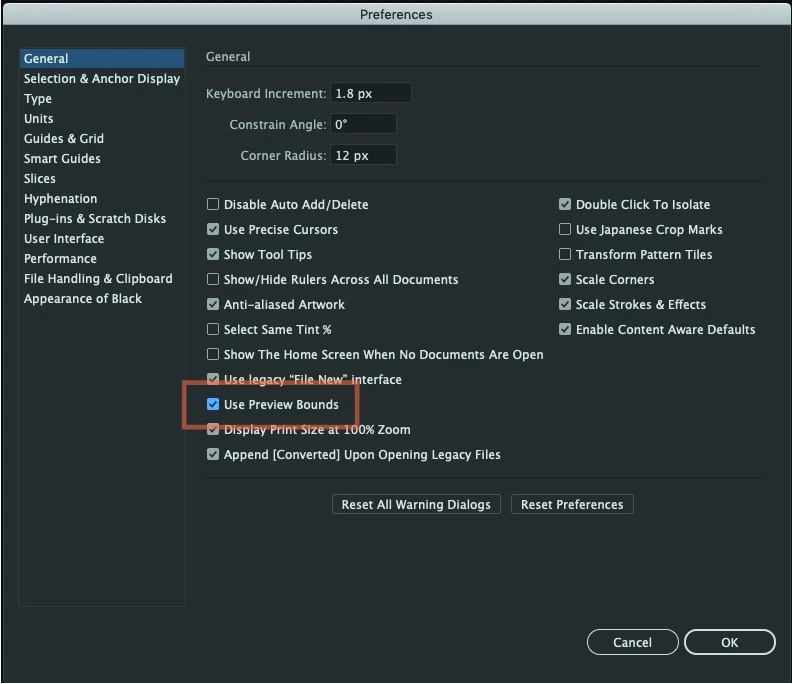
Instead of applying the Outline Stroke effect to the individual object, you can change the behavior of these oversized bounding boxes in the preferences dialog. Hit Control/Command + k, then look for the checkbox labeled "Use Preview Bounds". If you check this box, then the bounding box around text objects will fit tight to the edge of the text.


4 replies

gretavgudm
Participant
March 14, 2022

I used Expand appearance for the same result as Outline Stroke did before.


samgw
samgwAuthor
Participant
May 13, 2020

🙊 thank you both....once applying the preview bound box, then applying the affect it works.


just having preview bound enabled does not apply to all fonts.

Disposition_Dev
Community Expert
Community Expert
May 13, 2020

Disposition_Dev
Community Expert
Disposition_DevCommunity ExpertCorrect answer
Community Expert
May 13, 2020

Try this:


Instead of applying the Outline Stroke effect to the individual object, you can change the behavior of these oversized bounding boxes in the preferences dialog. Hit Control/Command + k, then look for the checkbox labeled "Use Preview Bounds". If you check this box, then the bounding box around text objects will fit tight to the edge of the text.


Ton Frederiks
Community Expert
Community Expert
May 13, 2020

Preferences > Use Preview Bounds ?