



Zaximus
Known Participant
August 12, 2024
Answered

Path from Overlapping Shapes

  • August 12, 2024
  • 6 replies
  • 1625 views

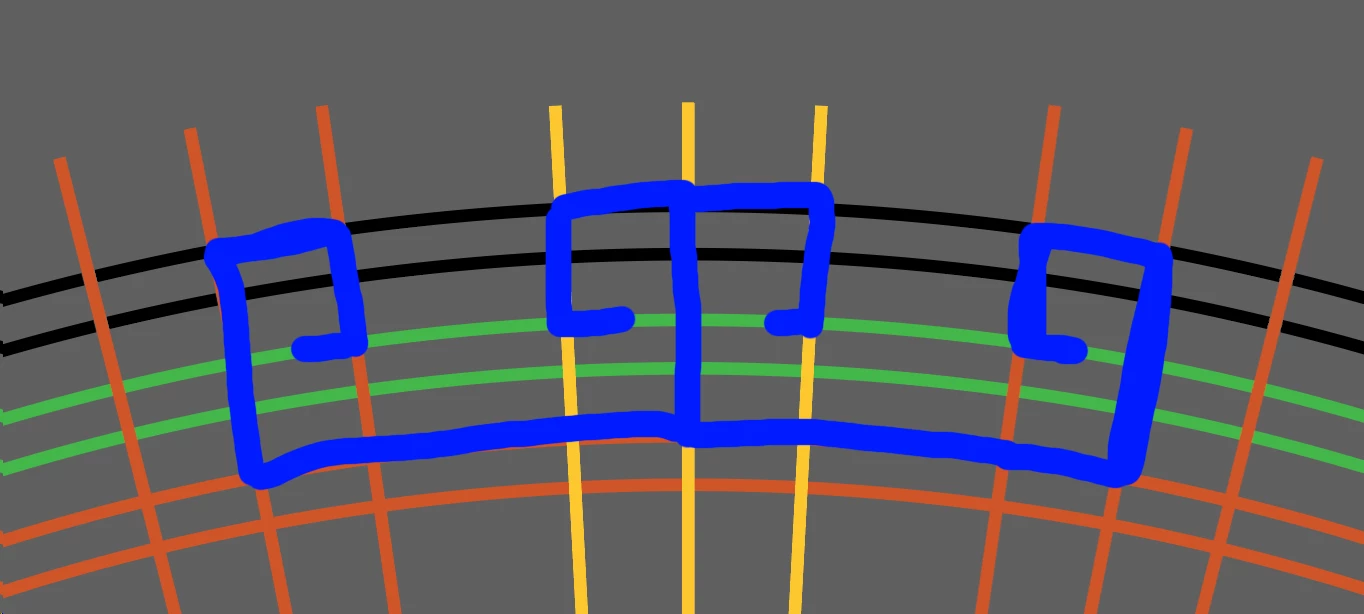
I mainly use Illustrator for layouts, so it is so incredibily frustrating to not be able to figure out how to make this path (forgive me if the term is wrong), from overlapping circles and lines (how I would do it with pencil and paper). I want the exact curvature I need for this repeating radial pattern. In the image I'm posting, I am showing 2 of the shapes that I would be using in a radial repeat.
 

This topic has been closed for replies.
Correct answer Monika Gause

Select all these lines.

Use the shapebuilder tool

Hold down Alt and then click (or click and drag on the parts you want gone.

When only those are left that you want to keep, Join them with Object > Path > Join


If you want to keep the center of the construction, mark it with Guides first.

6 replies

Zaximus
ZaximusAuthor
Known Participant
August 13, 2024

Finished my design! Thank you everyone for your assistance.


Monika Gause
Monika GauseCorrect answer
Community Expert
August 12, 2024

Select all these lines.

Use the shapebuilder tool

Hold down Alt and then click (or click and drag on the parts you want gone.

When only those are left that you want to keep, Join them with Object > Path > Join


If you want to keep the center of the construction, mark it with Guides first.

Zaximus
ZaximusAuthor
Known Participant
August 12, 2024

Thank you! I was able to get my pattern and then do Object > Repeat > Radial.


Monika Gause
Community Expert
August 13, 2024

Glad you could solve it!

Community Expert
August 12, 2024

The paths indicated in blue could be created accurately using Pathfinder operations on copies of the circles and radiating straight lines. Initially the paths would have sharp corners, but the corners could have radius curves applied to them using two or more different methods in Illustrator.

Ton Frederiks
Community Expert
August 12, 2024

What tool did you use for the blue lines? The Pen tool gives the most precision.

Zaximus
ZaximusAuthor
Known Participant
August 12, 2024

Screenshot and then brush in Photoshop.

Kurt Gold
Community Expert
August 12, 2024

Using the Pen tool, assisted by Smart Guides, is an easy way to draw what you marked in blue, isn't it?

Zaximus
ZaximusAuthor
Known Participant
August 12, 2024

I can't get the Pen tool to give the slight curvature that the circle has been lines.

Kurt Gold
Community Expert
August 12, 2024

I don't understand why you won't get it with the Pen tool.


What hampers?

Community Manager
August 12, 2024

Hello @Zaxx81,

Thanks for reaching out. Would you mind sharing more details about your workflow, including some samples / videos, so we can better assist you?

Looking forward to hearing from you.


Thanks,

Anubhav

Zaximus
ZaximusAuthor
Known Participant
August 12, 2024

What I need is the overlapping lines and cicle sements that I traced in blue, and the rest would be discarded.