Exit
  • Global community
    • Language:
      • Deutsch
      • English
      • Español
      • Français
      • Português
  • 日本語コミュニティ
  • 한국 커뮤니티
0

Path not aligned to fill

New Here ,
Dec 15, 2016 Dec 15, 2016

Hello,

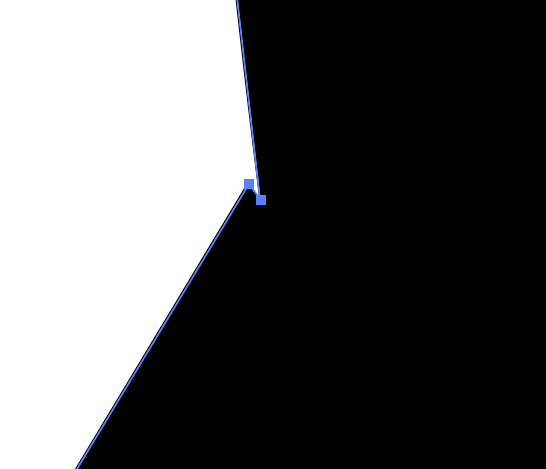
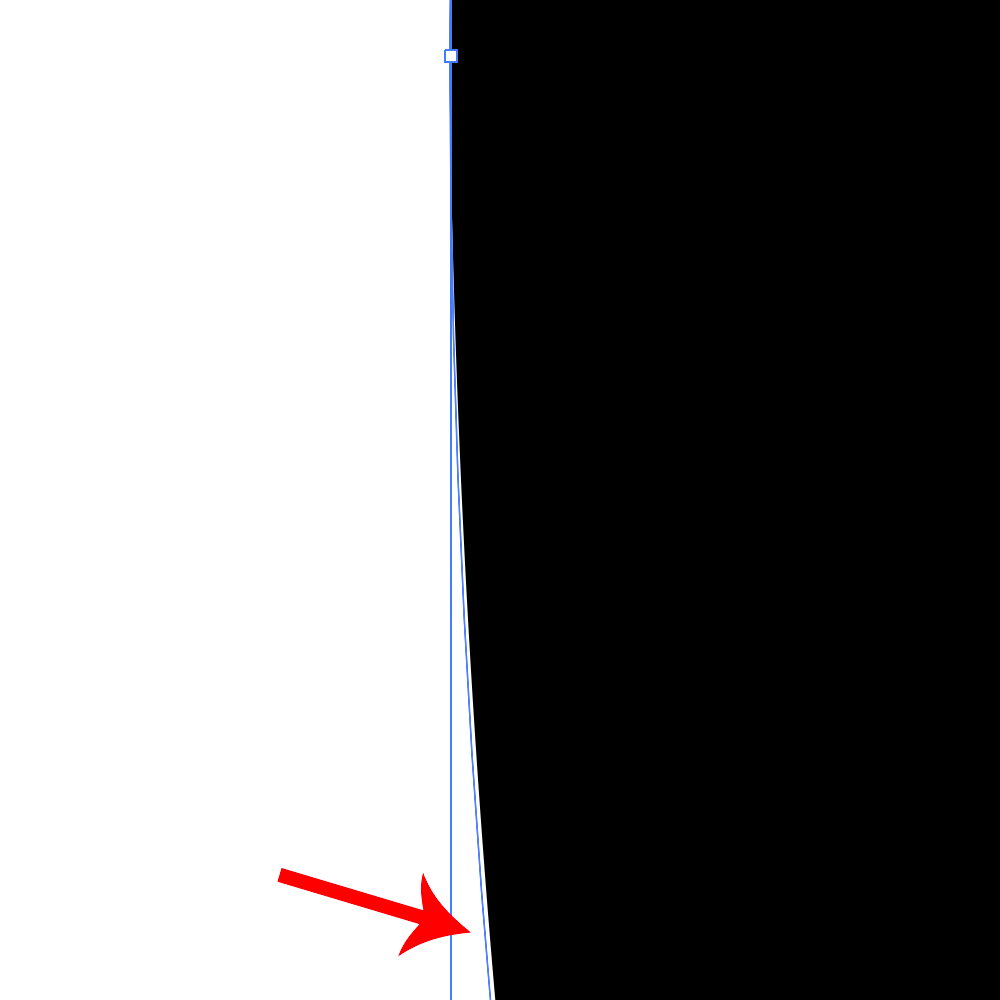
I have encountered a strange problem in Illustrator CC 2017. I am pretty sure I haven't seen this in previous version. When drawing shapes the path doesn't align with fill.

Zrzut ekranu 2016-12-15 o 10.43.17.png

Zrzut ekranu 2016-12-15 o 10.43.54.png

The problem is visible at very large scales. It might seem minor, but I am currently working on a typeface design, and this leads to problems when combining shapes. It is actually pretty annoying.

The circle on the image doesn't have any effects applied. All snapping is turned off.

Does anyone have any idea what's causing this? Thanks in advance for any help.

3.1K
Translate
Report
Community guidelines
Be kind and respectful, give credit to the original source of content, and search for duplicates before posting. Learn more
community guidelines

correct answers 1 Correct answer

Community Expert , Dec 15, 2016 Dec 15, 2016

Check the pathfinder options.

There's a precision setting in them. You might need to adjust it.

Translate
Adobe
Community Expert ,
Dec 15, 2016 Dec 15, 2016

Try View > Preview on CPU. Does the problem persist?

Translate
Report
Community guidelines
Be kind and respectful, give credit to the original source of content, and search for duplicates before posting. Learn more
community guidelines
New Here ,
Dec 15, 2016 Dec 15, 2016

Thank you for your answer. I didn't think of it.

It kind of does, and yet it doesn't. With CPU preview turned on the fill aligns with the path, but when I try to add a shape to it, it behaves like before.

To illustrate the problem I have tried combining a triangle with a circle. One of triangle's corners was placed directly on the circle'e path. Here's what happened after I added the triangle to the circle using Pathfinder:

This is with GPU preview. As you can see two points appeared instead of one.

trojkat-_0003_Warstwa-1.png

trojkat-_0002_Warstwa-0.png

And here is how it looks with CPU preview. It looks as it should, but when i try to add shapes together, the result is the same as before. Quite baffling honestly.

trojkat-_0001_Warstwa-3.png

trojkat-_0000_Warstwa-2.png

I have found a workaround by adding a point to the circle at exactly same coordinates as the triangles corner. It seems to work, but it slows down my workflow.

After some thought it seems that this problem is not about fill not being aligned to the path at all. 🙂

Translate
Report
Community guidelines
Be kind and respectful, give credit to the original source of content, and search for duplicates before posting. Learn more
community guidelines
Community Expert ,
Dec 15, 2016 Dec 15, 2016

Check the pathfinder options.

There's a precision setting in them. You might need to adjust it.

Translate
Report
Community guidelines
Be kind and respectful, give credit to the original source of content, and search for duplicates before posting. Learn more
community guidelines
New Here ,
Dec 15, 2016 Dec 15, 2016

It works.

Thank you for your help 🙂

Translate
Report
Community guidelines
Be kind and respectful, give credit to the original source of content, and search for duplicates before posting. Learn more
community guidelines
New Here ,
Oct 26, 2018 Oct 26, 2018

Preview on CPU solved my issue. Thanks!

Translate
Report
Community guidelines
Be kind and respectful, give credit to the original source of content, and search for duplicates before posting. Learn more
community guidelines
Contributor ,
Mar 24, 2022 Mar 24, 2022
LATEST

This worked for me

Translate
Report
Community guidelines
Be kind and respectful, give credit to the original source of content, and search for duplicates before posting. Learn more
community guidelines