Copy link to clipboard
Copied
Hello,
I am a novice Illustrator user and need some help! I have been creating works in Adobe Illustrator using templates for the fill of my text. When I save the document as a PDF, it looks great until I go to make a poster of it through Kinkos or Office Depot. Then, the photo template that is being used to fill the text becomes distorted and out of place (tiled, stretched, etc.). This seems unusual since it is a PDF document and should not be able to be edited. When I export the document and save as a jpeg, it becomes pixelated during the same process. Please help! What could I be doing wrong here?
Again, I am new to this and not an experienced user! I could use any suggestions. I am trying to make some posters for a friends wedding. ![]()
You use the word "template". Do you mean "Pattern"?
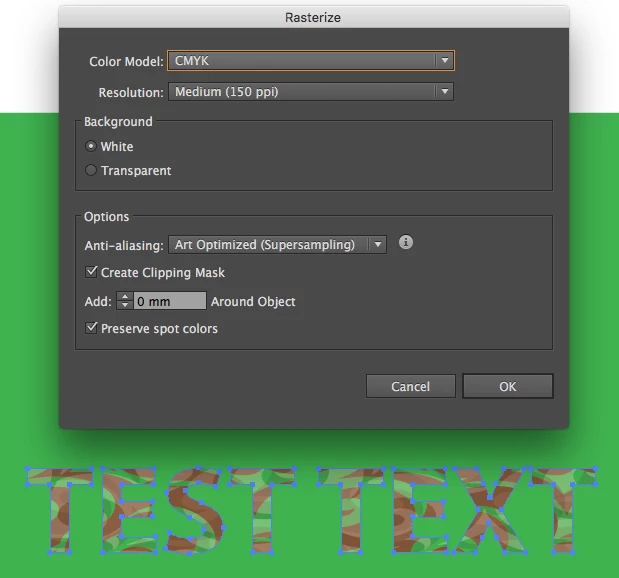
You could try "Expanding" the the Pattern before saving as PDF. This may produce a better result. You might also try "Rasterize" the object. Make sure to "Outline" the text first so the text outline can be saved as a "Clipping Mask" when rasterizing (see "Create Clipping Mask" in Rasterize dialog).

Copy link to clipboard
Copied
Given that you also seem to have issues with more than PDF and that this is an issue of saving/exporting from Illustrator, moving this thread to the Illustrator forum.
- Dov
Copy link to clipboard
Copied
It is possible that Kinko's is responsible for the problem.
Copy link to clipboard
Copied
You use the word "template". Do you mean "Pattern"?
You could try "Expanding" the the Pattern before saving as PDF. This may produce a better result. You might also try "Rasterize" the object. Make sure to "Outline" the text first so the text outline can be saved as a "Clipping Mask" when rasterizing (see "Create Clipping Mask" in Rasterize dialog).

Copy link to clipboard
Copied
Please show screenshots and photos.
Get ready! An upgraded Adobe Community experience is coming in January.
Learn more