


- Home
- Illustrator
- Discussions
- Re: PLEASE PLEASE adobe. The new pencil tool has b...
- Re: PLEASE PLEASE adobe. The new pencil tool has b...
PLEASE PLEASE adobe. The new pencil tool has become unusuble to me

Copy link to clipboard
Copied
Sorry for the dramatic subject but this is true, for me. but the pencil tool is my most used tool for my work.
I've used it for many many years and its the basis of everything I do in Illustrator which i use 99% of my work. (i havent even touched the pen tool for many years)
When I saw it was updated I was happy it finally got some attention and decided to give it a try.
Now I'm devastated to see the direction it's taken
I've used the pencil tool on the lowest fidelity 0.5px smoothness 0% setting for many many years.
So that when I draw the result I want is almost exactly what my hand draws and not a smoothed/math generated path.
In the new pencil tool settings the lowest "accurate" preset its still very smooth and controling and gives an output that is not at all something i can use.
Actually I cant draw anything in the style desired with it. Its like it has its own life and decides the outcome of what i draw. This is because of the few anchor points and smoothness.
Not all artists wants their drawings to have that smoothed perfect rounded edge with few anchor points.
Im sure many will like it and its good its there for them but this cripples illustrator to a forced style not everybody wants.
Why lock down the pencil tool to such few and controling presets???
The "accurate" needs to be more sensitive to the hand movement or bring back the old settings.
For example the lowest setting in earlier version was fidelity 0.5px smoothing 0%.
This is more accurate to what you actually draw. Why cant this also exist?!?!
For example when im trying to draw the silhouette of an eye or head shape as accurate as I can, when im done drawing and release my wacom pen cursor i get an roundish smooth blob now that doesnt look and feel as i want. Starting to adjust this shape with other tools is very time consuming and doesnt even then produce my desired result and above all doesnt feel like drawing. Feels like im plotting stuff around.
I need to be able to set the presets to finer detail so that i get many anchor points like before which give the possibility to draw in detail and make "turns" with the pencil that make corners, rugged edges etc.
I know I can continue to use my cs4 version but some day that could be too old for the modern technology coming and it feels now that for me illustrator has been given a death sentence, in my case.
Sorry again for being so dramatic and long in my writing but its really a disaster for illustrators who want to draw in illustrator and have it as accurate as possible to the hand.
Finding another way of drawing my illustrations is pretty nuts after all these years invested with illustrator.
Please Adobe can you fix this? save the pencil tool in this regard.
I dont know how but Im willing to help in any way I can as this is very important to me.
PS the removal of the handy smooth tool shortcut is also a very cumbersome remake. There is already and open discussion about this http://forums.adobe.com/message/6032965#6032965
(This is for the illustrator 17.1 update. I use 15" macbook pro retina computer with wacom cintiq 13hd drawing tablet)



Explore related tutorials & articles
 56
Replies
56
56
Replies
56


Copy link to clipboard
Copied
I don't mind the "Reshape" tool, but it has eliminated the traditional way of dragging path segments. It is no longer possible to maintain the angle of the direction points when dragging. This means adjacent segments will ALWAYS be affected. In technical/mechanical drawing this may not be preferred. There should DEFINITELY be an Option button just like Photoshop has.
I installed "PathScribe" and "VectorScribe" the same day I updated to 17.1. Either coinsidentally or as a result, my AICS5 now refuses to save files. I posted another thread about that… still to be resolved. I have since deleted 3rd Party plugins in an effort to get my CS5 back.

Copy link to clipboard
Copied
You are right, craighead. (Although this probably deserves its own thread) -- I was amazed to see that the original moving of paths between points was lost in this "reshape" implementation. I really thought, "no, there must be a key-command or something, allowing us to have the original (extremely valuable) functionality," but apparently not. 😞
I seriously think that in future development, Adobe should do some USABILITY TESTING during design and before release!

Copy link to clipboard
Copied
Hi,
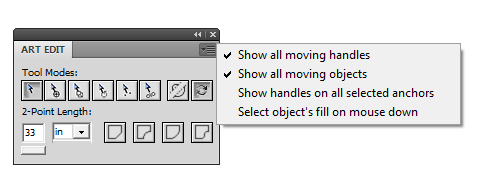
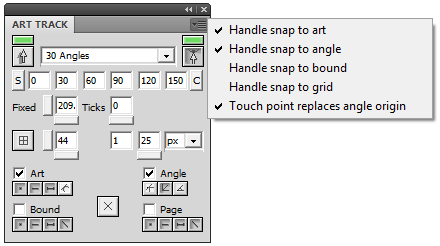
I have developed a plug-in called ArtBlue which consists of a path editor I used in placed of Direction Tool for a few years now, it also has a snapping engine that I used in placed of SmartGuide. Would you please check it out and let me know if it meets your need? I am eager to hear any inputs, any kind of inputs.
Copy link to clipboard
Copied
Hi,
I have ArtBlue 1.1 just released on www.amazoncanvas.com.
If you download 1.0, just uninstall it using windows uninstaller (Add Remove Program under Control Panel).
Then download 1.1 and install it.
Version 1.1
The following issues were fixed in this version:
1. ArtBlue did not ignore objects in hidden or locked layers.
2. Alt-Shift click a segment did not add alternate segments to selection.
3. Alt handle or point selection did not work if object are of the same path ordering.
4. ArtEdit ignored raster images and worked only with placed images.
5. When a paragraph has an empty text line, ArtTrack get stucked.
Some minor enhancements were added in this version.
By the way, I am looking for someone with experience on marketing software, please contact me if you are interested.
Copy link to clipboard
Copied
Working in CS6 is NOT even meantime solution. It has serious bugs that were never fixed and it just adds to the nightmare of trying to navigate multiple file formats to get our work done. Of course we can install it, CC users probably already have it installed. In fact, I have CS5 installed an rely on it heavily, but I was really hoping CC would allow me to work on the "latest" version of Illustrator. 17.1 has put an end to that likelihood.

Copy link to clipboard
Copied
I just started using CC recently and was equally as bummed as the rest of about the changes to the Pencil tool. Mainly because I use illustratror to well... illustrate.
Just like drawing on paper, if I want a perfectly straight line, I get out a straightedge. Moving on.
I found another temporary (hopefully) solution to the problem for people who use a tablet and illustrator. It's not as ideal, but at the very least it keeps you in the same and most current version of illustrator.
Here goes:
Setup a custom keyboard shortcut for the smooth tool in illustrator. For me, I used shift + n. If you don't know how to do this, go here: http://help.adobe.com/en_US/illustrator/cs/using/WS714a382cdf7d304e7e07d0100196cbc5f-6429a.html
Then go into your wacom tablet preferences and setup new applicaiton specific setting for Illustrator CC (make sure you do this just for AI CC and not for all applications).
Here's an older video a found, but it gets the idea across; http://insivity.com/portfolio/app-specific-settings-for-wacom-tablets/
Set the rocker switch on your pen from the default "right click" & "double click" to use keystroke commands. I set the lower for the pencil tool "N" and the upper for the smooth tool "shift + N".
It's not a modifier but at the very least I can use the rocker switch to go back and forth between both tools without having to set down my stylus.
Now just keep your fingers cross that I'll be able to delete this setup in the near future.

Copy link to clipboard
Copied
hey all, if you are going to file a bug report (as per Neeraj's suggestion), i've made up a draft to make the process easier. feel free to adjust it as much as you want, obviously; trying to equip us busy folk.
Obviously customer service & product development are two different departments, so if you're bummin out on the new functionality, submit a bug report!
link to submit bug report:
https://www.adobe.com/cfusion/mmform/index.cfm?name=wishform
******BUG******
Concise problem statement:
I was told to by Neeraj N(staff) to report this issue based on this link : (http://forums.adobe.com/message/6065706).
The Pencil / Brush tools have lost essential functionality with the addition of the new accurate / smooth adjustment preset. Users are no longer able to specify high-accuracy pen mapping, as the finest accuracy setting is now set to 2.5px (legacy versions allowed accuracy to .5px).
I would think adding additional slider nodes to allow more accurate mapping (while still using the accurate / smooth preset) allow for a minimal change in programming with a maximum return for power users.
Steps to reproduce bug:
1. open illustrator
2. use either pencil or brush tool.
3. draw erratic and high detail shapes
Results: shapes are smoothed to 2.5px smoothness, even when the accurate / smooth adjustment preset is set to full accuracy.
Expected results: shapes have minimal / no smoothing to maintain the integrity of the artwork.
Thank you for your consideration.
Copy link to clipboard
Copied
thanks danielevangarza for the bug report template. saved time

Copy link to clipboard
Copied
Why oh why.... I cannot believe this is a new "feature" of illustrator. At first I thought it's a major bug or they simply forgot to implement the smoothness slider within the update. This software doesn't deserve its name anymore because it isn't possible to draw a single line exactly how the real illustrator wants the line to be.
I now have to rethink my complete working process... or reinstall the old crappy version.
Are there any (software) alternatives? I guess not...
Thanks to danielevangarza - bug report submitted.
Joe

Copy link to clipboard
Copied
sncic wrote:
PS the removal of the handy smooth tool shortcut is also a very cumbersome remake. There is already and open discussion about this http://forums.adobe.com/message/6032965#6032965
This is the change that I'm most unhappy with. I really hope they revert back to the 'option' modifier to reach the smooth tool from pencil tool because it was so, so convenient!
Copy link to clipboard
Copied
looks like we got our wish.
Download Illus CC 2014. Double click on the pencil tool and select the smoothing option. Works just like before!
THanks for for listening adobe.

Copy link to clipboard
Copied
Hmm, nope, I have been using CC for months, and the fidelity controls are much cruder on this new drawing tool.
Maybe seaneee is talking about another problem? Illustrator CC is the program that has the problem: crude fidelity control on drawing and painting tools, less accurate than CS6's tools.
Please fix this Adobe.
Copy link to clipboard
Copied
Have you been using a beta? CC 2014 was debuted and available for download today. My specific gripe was the change of the modifier key to the straight line drawing tool. The option box has been changed in this new version to allow you to revert to pre CC functionality..
Copy link to clipboard
Copied
AHHH! Finally CC 2014 showed up for me in Australia just a few hours ago - you are correct, seaneee, my gripe's issue is a lot better now: more accurate tracking of your drawn line in the pencil and brush tool.
What a relief.
Thank you, Adobe!
Copy link to clipboard
Copied
First id like to thank adobe for listening and addressing this issue.
It shows Adobe listens to what users say. The team even called me up on the phone and we had a nice chat.
Ive been doing testing on and off since the release of the update fix so here is my feedback.
Its true that the pencil tool has been adjusted to generate more points on the lowest setting, thank you!
...but its just almost there. I dont see this as being resolved. Because for me I still can't do my work with it.
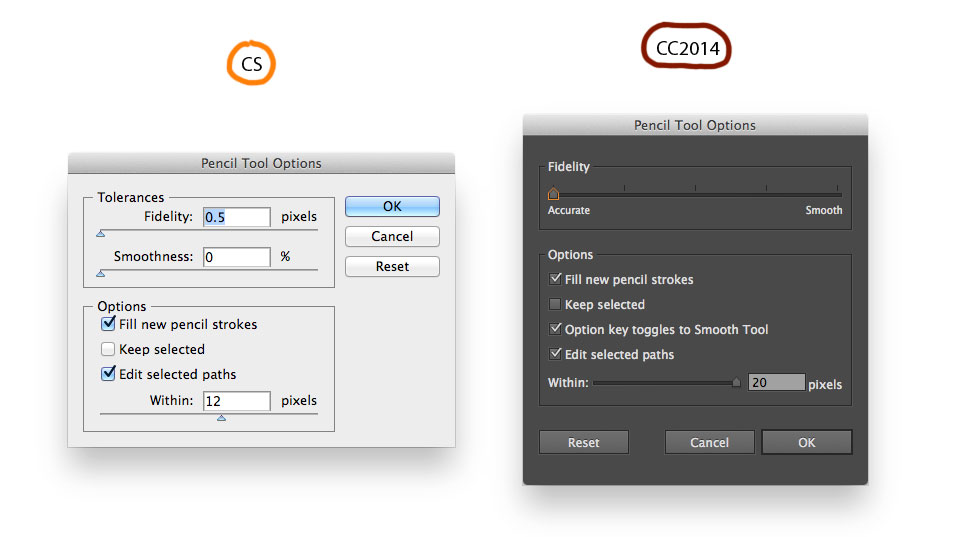
settings for tests
1)
In Illustrator the amount of anchor points (point density) generated along the path is dependent on how fast you draw. The faster you draw the less points, the slower you draw the more points are generated.
In this current (cc) version of the pencil tool this threshold is veeery aggressive and sensitive to the acceleration of the hand movement speed. Much more so than in previous versions.
(see images 1a 1b and 1c)
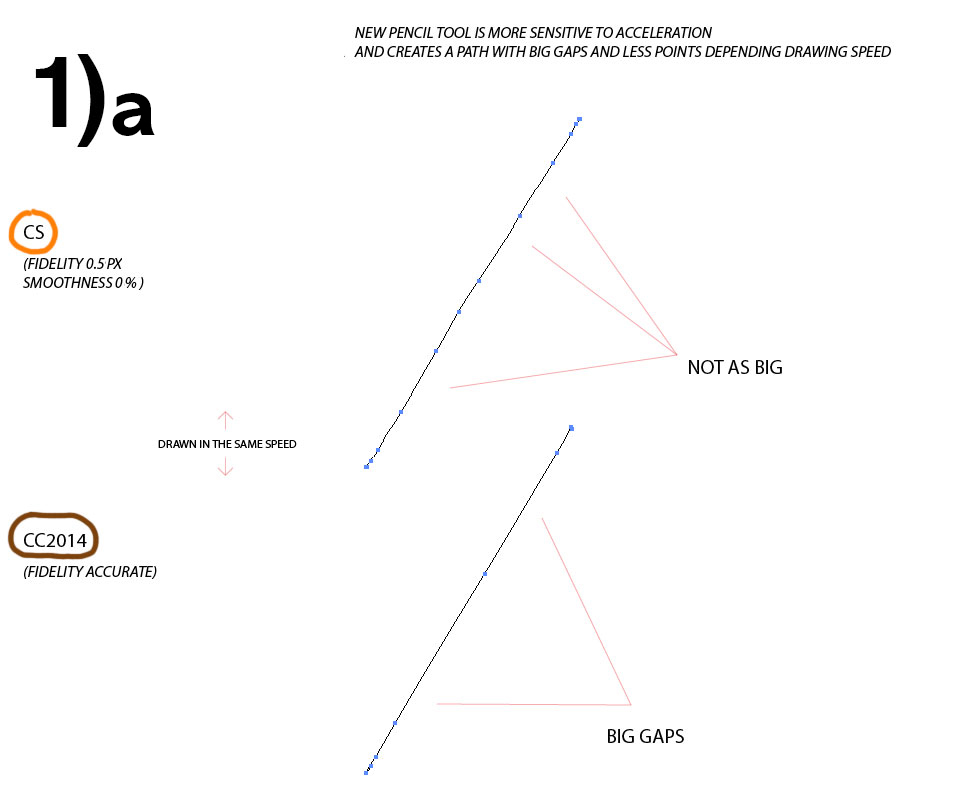
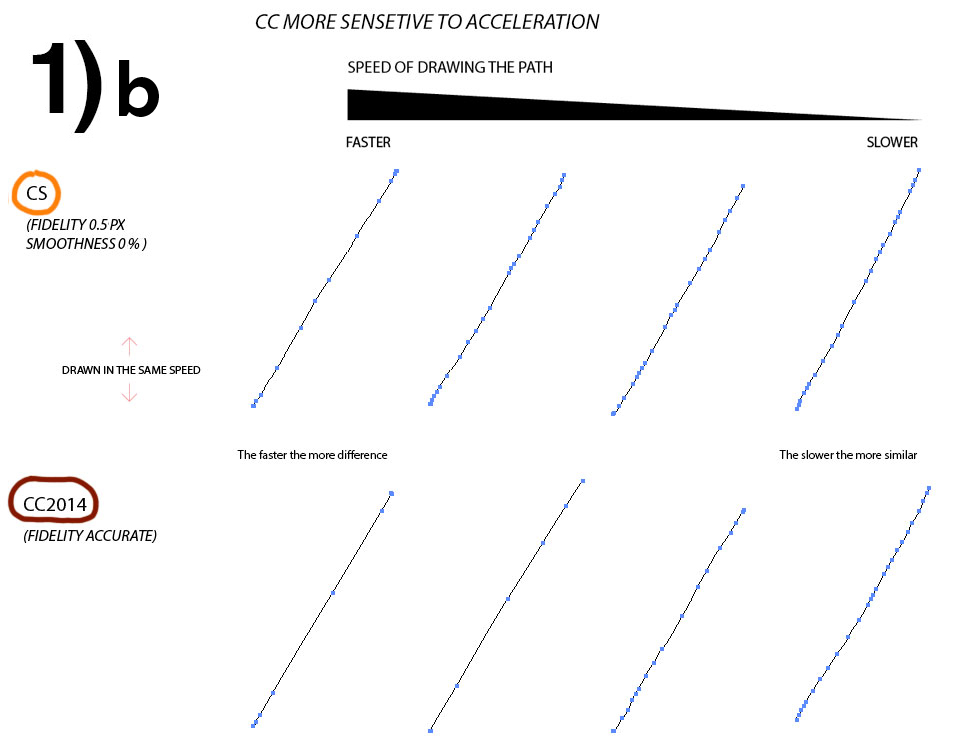

In earlier (cs) versions I could just quickly block out my shapes and then only need to fine tune it on certain parts of the path to get my desired drawing. This is because i would have enough anchor point density overall and on the parts i needed more density the pencil tool would produce the amount of points i needed.
In the current pencil tool (cc) I constantly have to slow down my drawing to get more points. Then I have to work the entire path all over, over and over again to get closer to my desired results. It feels like im faking an uneven edge and it takes so much time never really ends the way I want.
Another situation where the acceleration problem is so aggressive that it hinders the workflow is that sometimes when drawing over a selected path to adjust its shape it behaves almost like the old smooth tool if i draw just slightly too fast.
(see image 1d)
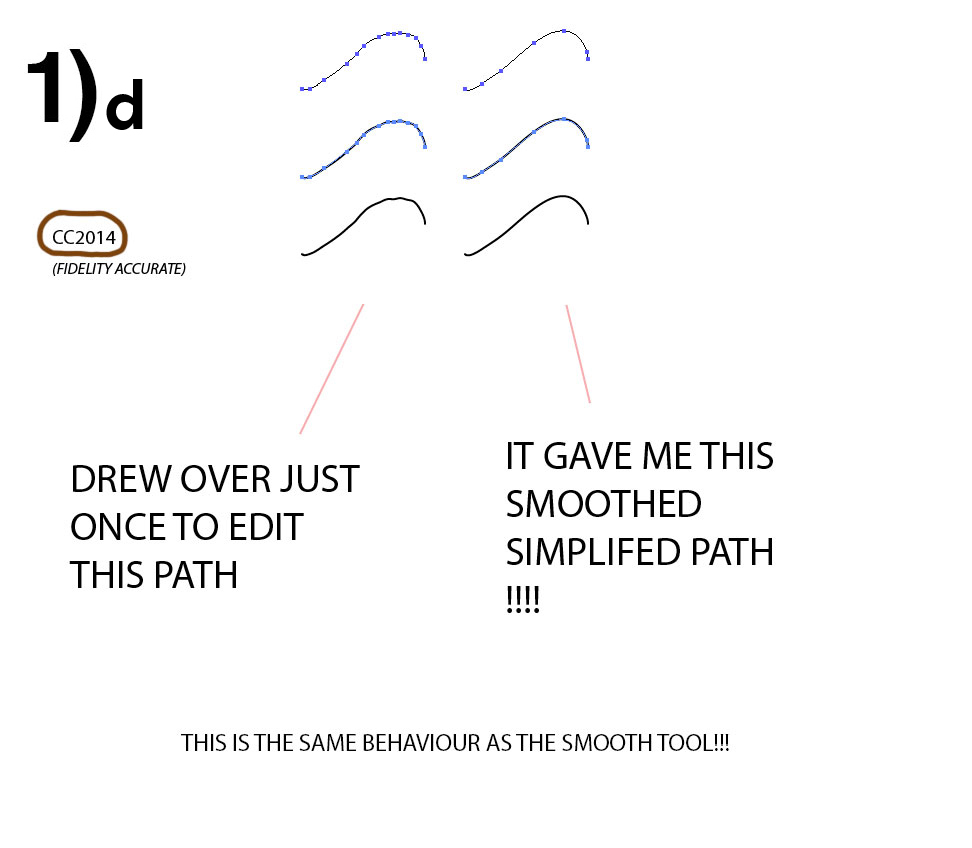
It removes points and simplifies the path more than what i initially drew. For example if i drew a path that produced 14 points, and after drawing over it leaves it with 7 points and a very smooth path. unpredictable and undesirable
This is also something that Ive encountered many times when vectorized a photoshop drawing in illustrator and wanted to adjust some edge with the pencil tool and it ruins the edge instead by removing the points.
2)
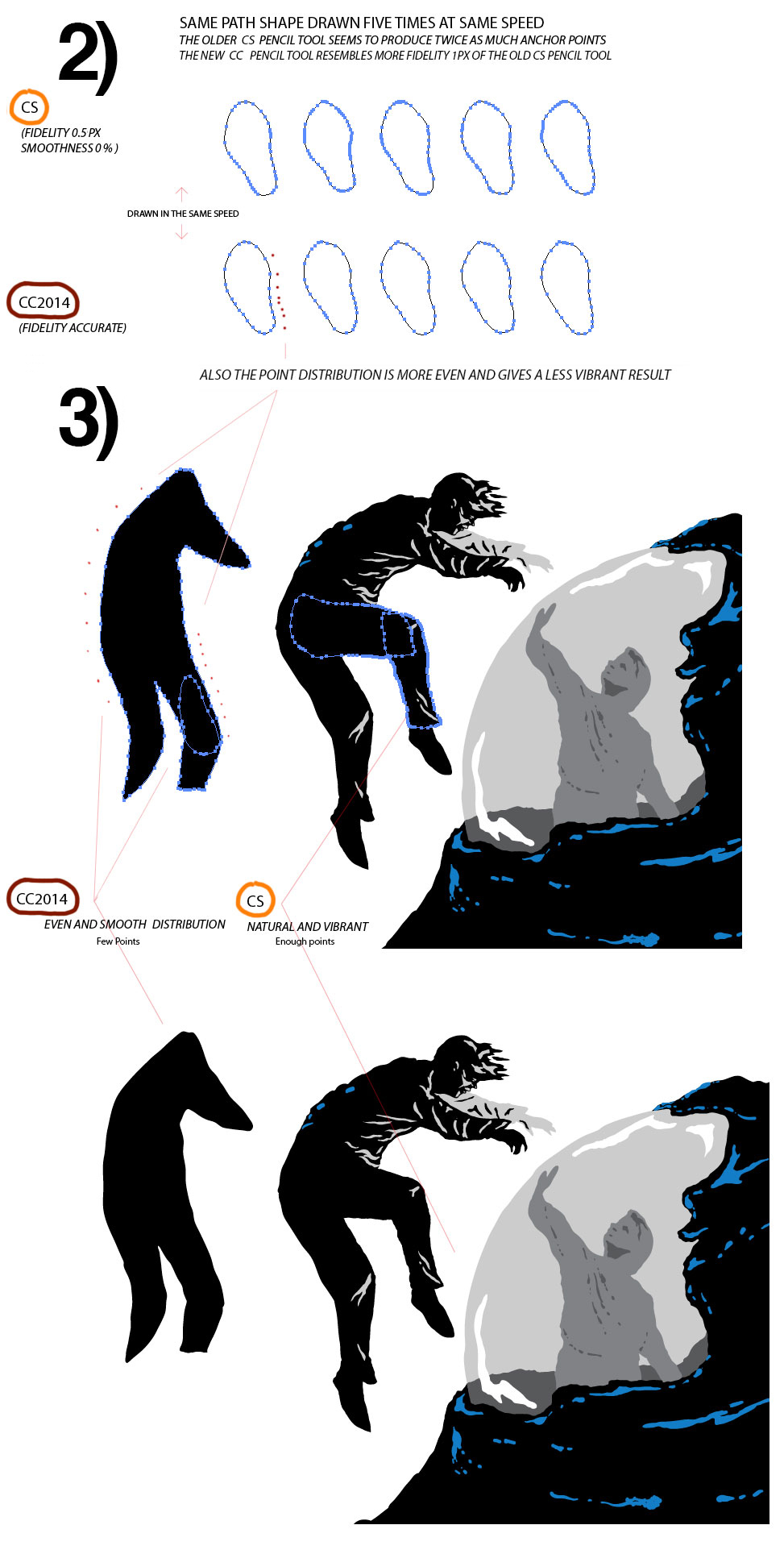
While theres more anchor points added than last CC version its still not producing enough anchor points.
The "old" CS pencil tool you had the ability to get higher, it seems twice the amount, anchor point density in places you needed it like where i would make a turns or move vibrantly with my hand.
I have estimated that its like it produces half the amount of points of what the cs pencil tool did on its fidelity 0.5px setting. the new cc is more close to a 0.8-1 px fidelity. this might not sound like a great difference to many but I notice it to the point of not being able to draw with it anymore.
(see image 2)
The space between the points is always too even and big and forces the look of the drawing to be smoother than desired.
Could it be so that even if the lowest settings has been are the same as the old 0.5px fidelity the fundamental rewrite of the pencil tool algorithm does something behind the scenes to still make behave differently?
This question leads me to the third point…..
3)
…..i don’t know if this is only in my imagination only but it seems to try to force producing an even space between the points as often as it can which adds to less vibrant strokes and harder to do sharp directional changes of an edge. This functionality was maybe a part of the rewrite. I don’t know Im just speculating at this point
(see images 2 and 3 and lower right corner of 1d)
4) MISC THINGS
There are other smaller issue that feel just strange and cumbersome while drawing.
When modifying the already drawn selected path the tool seems miss the selected path very often when i want to draw over to edit it. I find myself missing it very often and instead drawing weird double overlapping paths over and over again. Even when ive set edit selected paths within 20px.
This didn’t almost never happened in earlier versions now it happens all the time. Im using a wacom cintiq i dont know if its could be related to that but it isnt there in CS verisons.
Something different with the "keep selected" option.
In CS and CC if this option is disabled and you draw a path it is not selected. This is correct. But in CS when you finished drawing and you selected the path afterward you could draw on it and it stayed selected for the time you were modifying it until you actively choose to deselect it again. The CC version keeps deselecting the path constantly after each stroke i do over it so you have to reselect it constantly. Or enable the "keep selected" option for which i will then need to actively deselect the path after each stroke not to have the selection color inte way while drawing. I could stop select when i needed to modify a path a few times til i was happy.
Drawing very short strokes quickly seem to produce short straight/stiff two point strokes most of the time in CC where in CS it used to produce short curved strokes as I desired.
The interface is still very slow when it coms to zooming and panning around. This is very noticable when working on a retina display. When disabling the retina support on mac this becomes much better as it does when working on the cintiq because the cintiq is not retina.
Some of these experiences are hard for me to explain in writing.
Unfortunately all these issues in combination add up to make the pencil tool a much different tool than it used to be.
I don’t want to be rude but in my opinion in its current state it's a very low quality tool compared to the CS versions.
Even the smooth tool acts very undesirably compared to its predecessor, but i don’t have the time and energy to write an essay on that too.
I’ve started to rely my illustration workflow on pixel technology like photoshop and there are more alternatives out there to fall back on when specialized tool functionality like this suddenly change.
Illustrator used to be my go to tool for everything drawing. It used to be a joy to start working in it every morning.
Knowing the pencil tool is in its current state I find myself avoiding using Illustrator as much as I can and it has become just a tool necessary in the end stages of my process to live trace my photoshop drawings to vector. How suddenly things can change.
I hope the illustrator team continues to listen to these points about the pencil/brush engine and decide to further fix and refine it.
Maybe even develop something around this natural or traditional way of drawing aspect more in illustrator. Its been so focused on clean few point edged graphics for so long.
Computers are fast enough today to handle large amounts of points without slowing down the computer.
Thanks for reading.
Copy link to clipboard
Copied
Do you find other new features in CC compelling? Why not just do your work in CS5 or CS6? Just curious.
Copy link to clipboard
Copied
Its a good and valid question.
I mentioned the root of my concerns briefly in my first original post. They are much about the future.
You are right at the moment I can still use the CS products feature wise and they are currently compatible with the operating system i run.
I do use CS4 when Im not on a client computer who usually have the latest versions.
But what about the future as technology advances?
There will be a time where CS versions wont run anymore and the only option left waiting for me will be the current CC pencil tool which i cant do my work with.
I personally dont want to rely my business and continue to invest time in a tool that i in the future will only be able to use on dated technology because it was deprecated several versions ago.
In respect of the now legacy pencil tool Ive used so much the least I can do is try and save it by posting here and wishing they make the tool workable again.
Thanks for asking rcraighead.
On a side note about versions.
My personal favorite is the CS5 version with the addition of the shape builder tool which cs4 doesnt. This was also the last version with the snappy classic interface. With the CS6 version illustrator has faced some serious panning and zooming sluggish behaviour on retina displays after the dark interface rewrite. I really like the dark look aesthetically.
The very cool new features introduced since cs5 are not a necessary part of my workflow.
Since turning to pencil paper and photoshop for drawing the rewrite of the image trace engine, introduced in cs6, has been a valuable feature.
Copy link to clipboard
Copied
I'm in a similar place. I do LOVE CS5 but was tempted by the promises of new versions and the "introductory offer" for CC. I paid monthly for 2 years and could not use AI CS6 or CC because of changes to functionality. I spent HOURS pleading my case to Adobe and even got a few sympathetic calls from Adobe staff, but in the end CS6 was never fixed and CC introduced new GLARING bugs.
For now I've pulled the plug on CC and am happy to save $50 a month working with CS5. I no longer have the confidence Adobe will respond to known bugs in their software. They are milking the cash cow of monthly subscriptions at the expense of quality software. The new bells and whistles no longer hold the allure they once did.

Copy link to clipboard
Copied
Yup! In the same boat. Hate the new pencil tool. It doesn't edit selected paths like before either. I used to just be able to draw a new path and replace the old one (which is what "edit selected paths" should be for). Now its a lot harder to do and is very time consuming. Bring back the old pencil tool adobe!

Copy link to clipboard
Copied
Absolutely agree. It's a horror to work with the "new" pencil tool. To edit drawn pathes it's like a concentration game.
And to auto close pathes it simply doesn't show the close option 50 percent of all pathes. And you can't force it anymore....!

Copy link to clipboard
Copied
Adobe.... 20+ year user of AI. Give us both options. The new and the legacy pen tool please. This is even more annoying than when you took away hatch effects.


Copy link to clipboard
Copied
Hi Adam,
I would request if you can share your feedback here: Adobe Illustrator Feedback. This is the best way of communicating with the Engineering and Product Management teams regarding issues and suggestions so they can be implemented in future releases.
Regards,
Srishti

Copy link to clipboard
Copied
Agreed, it's literally made my job impossible. I can't round corners anymore at all!
I can not draw fast enough to correct lines with the pen tool genertaing WAY too many edges. It turned me correcting a small rounded corner real quick into making the corner a wild line that goes every direction. I can't just... smooth the lines anymore by hand. I don't understand how best to articulate it, and plenty of people have said it better here but this is devastating.
I had to uninstall and go back to previous version to do my job at all. PLEASE, if you are going to completly retool something, make the previous version available as well.
Addtionally, I cannot see where to report feedback without suggesting a new tool or reporting a bug?

Copy link to clipboard
Copied
Feedbacks are useless imho.
I remember a huge feedback-topic where plenty (plenty plenty!) users complained about the "new pencil tool" .
>>Totally disapperared today

Copy link to clipboard
Copied
I also agree, 100%. i work exclusively with vectors and the tool WAS perfect. it had the best functionalities, and now i m confused. why make it so bad and unsuseable ? i have been very upset with this year serie of bad updates( having to reset all my settings everytime i have an update) and the main menu/simple tools not working etc, but THIS ? i need this tool to WORK. i have daily reviews of vector files and i have to Add, remove and reset the besier curves as a daily task. This is horible to work with, i have now 4 different short cut to add to be able to remove one anchor point. It s just a waste of time, and that s how i make my money. I cannot work with this program if it stays like that, can anyone recomend another vector program that works ? i m willing to learn something new, not geting use to a stupid tool. i m very upset, my working day just sent to the Bin. i m so slow now, i m loosing money, patience, and trust for this Brand that obviously has no idea how to make something better... Change this now ! i m waiting for an update today, and retro instaling version CS5 if i have to. Damm


Get ready! An upgraded Adobe Community experience is coming in January.
Learn more
 AdChoices