



EcoCreative_UK
Participating Frequently
April 26, 2020
Answered

PNG with transparent background, placing into Illustrator with white background.

  • April 26, 2020
  • 7 replies
  • 36112 views

I'm placing a PNG file with a transparent background into Illustrator and it's showing a white background in the file. I've managed to remove the background again by selecting the 'Opacity & Mask Define Knockout Shape' tick box in the Opacity settings (image below)
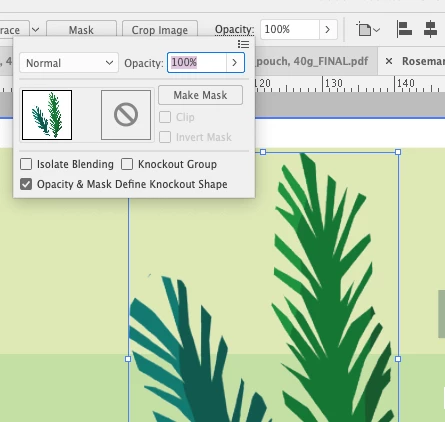


However, when I save the file as an PDF, the white boxes re-appear (image below)

Can anyone please help to find a solution to this issue or know what the problem could be?

Thank you!

Correct answer Blue Pervaz R

Hi, just switch from GPU preview to CPU by pressing Ctrl+E on windows system in Illustrator and you're good to go!

7 replies

Blue Pervaz RCorrect answer
Participant
March 26, 2025

Hi, just switch from GPU preview to CPU by pressing Ctrl+E on windows system in Illustrator and you're good to go!

Participant
April 9, 2025

Thank you!

Participant
January 9, 2025

I tried all the mentioned solution with no hope. I even uninstalled Illustrator cc 2023 and installed version 2021 but the same problem.


What worked for me is I went to view and select Pixel View and issue solved immediately

Participant
January 27, 2025

Yeah, this worked for me too! just had to adjust the zooming. 

Known Participant
November 30, 2023

By default (and i dont know why doesnt make any sense to me), illustrator as white background as colour. you must go to asset export panel > Format settings and then in background colour > Transparent


Participant
August 29, 2023

I'm as well having the exact same issue. I ussually just placed the PNG file to Illustrator without a problem but now is doing the same thing. It appears with a white background. I have tried everything and nothing works.

Monika Gause
Community Expert
Community Expert
August 29, 2023

Please show screenshots. Exactly what are you doing step by step?

A new thread might be a good idea, because this one is already a mess.

Participant
June 3, 2022

Flatten the png. Select then go to Object> Flatten transparency>Okay.

If you still see white or light grey background, then do some custom changes in Flatten transparency setting. Tick the box anti-alias raster and preserve alpha trasparency along with previously other ticked box then Okay. You're problem will be solved.

LITE2
Participant
February 8, 2023

I was also having this problem, tried rasterizing the image (within Illustrator) and tried flattening the transparency - no luck either way 😞

Monika Gause
Community Expert
Community Expert
February 8, 2023

Flattening transparency will obviously take it away.

What you can do is open your PNG in Photoshop and save it as a PSD or try and save it for web as a PNG.


PNGs exist in a lot of different flavours. Illustrator cannot read all of them.

Julian Gros
Participating Frequently
June 15, 2021

I encountered the same issue. The affected png files were set up in indexed colour mode. After changing to RGB mode the transparency was effective in Illustrator.

Ton Frederiks
Community Expert
Community Expert
April 26, 2020

Where was the PNG created?

A PNG with transparent background should stay transparent when place in Illustrator.

Where do you view your PDF? Apple Preview?

Preview is not reliable and does not support all features of a PDF.

EcoCreative_UK
Participating Frequently
April 27, 2020

Thanks Tom for your reply.


The PNG was created in Photoshop.

Viewing the PDF in Adobe Acrobat - part of Creative Cloud subscription.


The most confusing thing is the PNG in the Illustrator file has a clear background off the artboard but as soon as moved onto the artboard has the white background.

EcoCreative_UK
Participating Frequently
May 8, 2020

There seems nothing wrong with the file, but maybe resaving in Photoshop will help for you?

Also try placing in a new layer (there may be effects applied to the layer).


I have found a fix for the saving issue, it has something to do with Adobe Acrobat and saving as a PDF - Acrobat 5 PDF 1.4..... As soon as I've reverted to a legacy format Acrobat 4 PDF 1.3 it's saving without a white bounding box! Weird but works!