


New Participant
January 11, 2023
Answered

Print ready PDF Action problem – not saving as CMYK

  • January 11, 2023
  • 2 replies
  • 804 views

Hi,

Has anyone else had a problem recording an action to save artwork as a print ready PDF using the default [Press Quality] setting, where it's not saving as CMYK but it's saving as RGB?

Any advice to fix please.
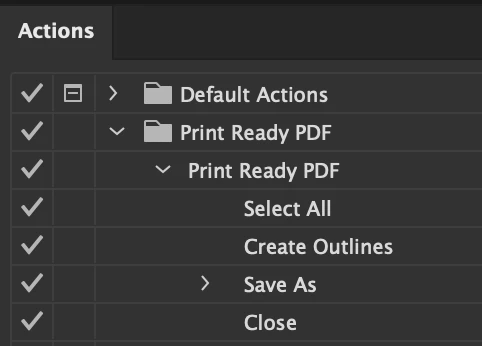


Many thanks in advance

Correct answer Mike_Gondek10189183

Actions with Save As >> PDF use the last PDF settings you used. It does not record the PDF preset. Save one file manually with the correct preset, and then use the action.


If you ever crash running a save As in the action, I add a small delay  in my playback settings and that fixes that.

2 replies

Mike_Gondek10189183
Mike_Gondek10189183Correct answer
Community Expert
January 11, 2023

Actions with Save As >> PDF use the last PDF settings you used. It does not record the PDF preset. Save one file manually with the correct preset, and then use the action.


If you ever crash running a save As in the action, I add a small delay  in my playback settings and that fixes that.

davel1Author
New Participant
January 12, 2023

Thanks for you reply.

Is this a recent thing. Just that I've been using an action for save as PDF for over 10 years and only now it's been a problem?

I use to have a number of actions saved i.e Print quality, Print quality layers flattended, Print quality with fonts outlined etc...

How do you add a delay in your playback settings?

Community Manager
January 25, 2023

Hello @davel1,


Thanks for reaching out. I hope the suggestions shared by Mike helped resolve the problem. You may also refer to this help article (https://helpx.adobe.com/illustrator/using/automation-actions.html) for more information on using Actions in Illustrator.


Feel free to reach out if you have more questions or need assistance. We'd be happy to help.


Thanks,

Anubhav
 

Ton Frederiks
Community Expert
January 11, 2023

Probly because there is no setting to convert to CMYK when saving. There is a convert to destination step but you need to specify the destination.

davel1Author
New Participant
January 11, 2023

Thanks for you reply. 
Sorry forgot to mention, it use to save as CMYK for many years but recently stop. If I set up the a new action it works until I restart illustrator. Then it reverts back to saving as RGB so I have to recreate the same action before I use it each day.