


New Participant
March 22, 2024
Question

Problem with exporting pattern tiles in illustrator 2020:

  • March 22, 2024
  • 4 replies
  • 1170 views

Problem withn exporting pattern tiles:

After creating a seamless pattern, I am "exporting as" a png 300 dpi using appropriate artboard & range.

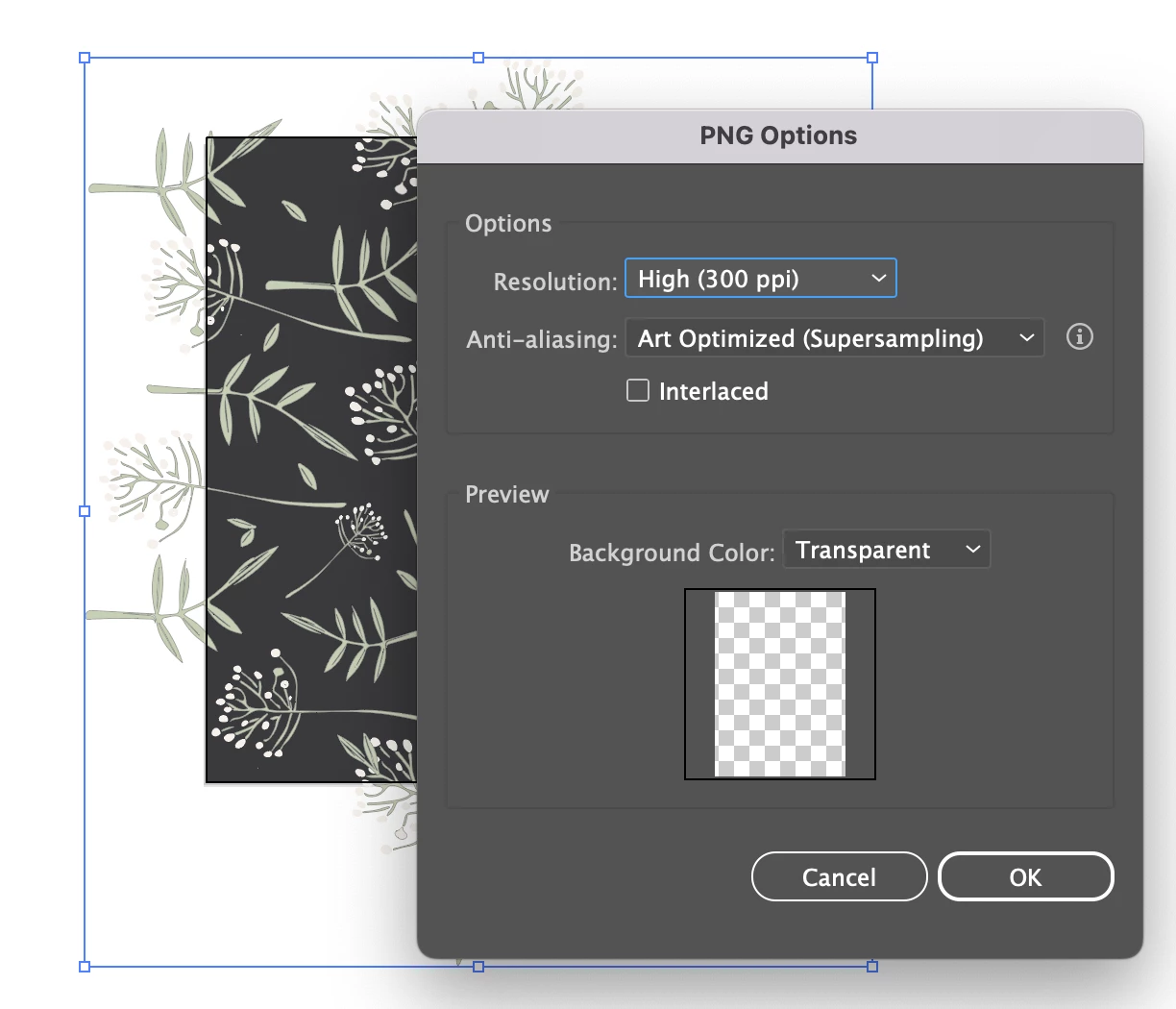
This is what happens....even on patterns that In have successfully exported before.

ANYONE have a suggestion as to whatn In am doing wrong?  Thank you upfront.
 

    This topic has been closed for replies.

    4 replies

    Ton Frederiks
    Community Expert
    March 28, 2024

    I see the same, no preview with export as...

    But it does export.

    Try to use Export for screens and use Artboards, this has a preview.

    Don't forget to click the cogwheel to set the Anti-aliasing method to Art-optimized.

    Before you do this, unlock the grey background and nudge it 1 pixel down or you will end up with a light 1 pixel line in the export.

    New Participant
    March 30, 2024

    Export for screens doesn't get me a 300dpi image ... is there a way to change dpi?  Should I load a different version of Illustrator? I have reset my workspace preferences in the 2020 version & that doesn't seem to help.

    Monika Gause
    Community Expert
    March 30, 2024

    Export for screens can be configured to 300 ppi.

    The thing is that resolution doesn't matter. It's all about pixel dimensions. Resolution is just metadata.

    Mike_Gondek10189183
    Community Expert
    March 23, 2024

    From your screenshot my best guess is the problem is that the preview is blank.


    • What happens when you export do you get a blank file? 
    • What OS & Illustrator versions are you using? 
    • What happens if you choose the art and choose object >> rasterize. 
    • Does it export to other file formats.
    • Have you installed any plugins since the issue started.
    • Does this happen if you create a new file, and just draw a simple shape as a test?


    New Participant
    March 28, 2024

    Using Illustrator 2020 on mac.  I have succesfully exported other files but when I try to export them agin In get the same blank preview. No plugins. I have made patterns from scratch , redone files etc...Always get the same thing. Possibly re install Illustrator? THANK YOU!!

    Monika Gause
    Community Expert
    March 28, 2024

    If you just ignore that litte preview and click OK, what happens? Do you not get a result?

    Monika Gause
    Community Expert
    March 22, 2024

    Check "Use artboards" in the first dialog box.

    If you just ignore the missing preview - does that work?

    New Participant
    March 28, 2024

    Monika, I use artboards, choose range etc. Nothing works. Ignoring preview doesn't get me an exported file.

    Monika Gause
    Community Expert
    March 28, 2024

    The missing preview could just be an issue with that dialog box - a bug.

    So can you just export?

    Community Manager
    March 22, 2024

    Hello @birdobject,

    Thanks for reaching out. Would you mind sharing some more details, like the exact version of the OS/Illustrator, a link to a sample file you're having trouble with after uploading it to Dropbox/Google Drive/etc., and the exact details of your workflow, including a screen recording of the problem (https://adobe.ly/4ckUbGK), so we can investigate this further?


    Looking forward to hearing from you.


    Thanks,

    Anubhav

    New Participant
    March 28, 2024
    Doug A Roberts
    Community Expert
    March 28, 2024

    The export thumbnail looks normal at my end:

    Does the pattern not export if you click OK?