


Exit
  • Global community
    • Language:
      • Deutsch
      • English
      • Español
      • Français
      • Português
  • 日本語コミュニティ
  • 한국 커뮤니티
0

problems with embedding color profiles

Community Beginner ,
Jul 13, 2023 Jul 13, 2023

My last print came out greenish on the final print after having sent my files to a vinyl pressing plant - they were supposed to be B&W.


They specifically ask you not to include a specific profile on your print and use euroscale uncoated v2, which is a rather old profile.


This time I decided to include GCR FOGRA27 Uncoated, as this mimics euroscale uncoated v2, but has less of a color variance and stronger K value, or so i've been told.


Now I got back this reply:


In our specification, it is written that the files should not have any profiles added/attached.
Adding profiles to the files is pointless because after going through the repro department all profiles are removed from the file. 


If your customer wants to use profiles, they should apply the profile, don't attach/add it to the file. Attaching a profile doesn't change the CMYK values, it just simulates the display, and that doesn't give us anything..."


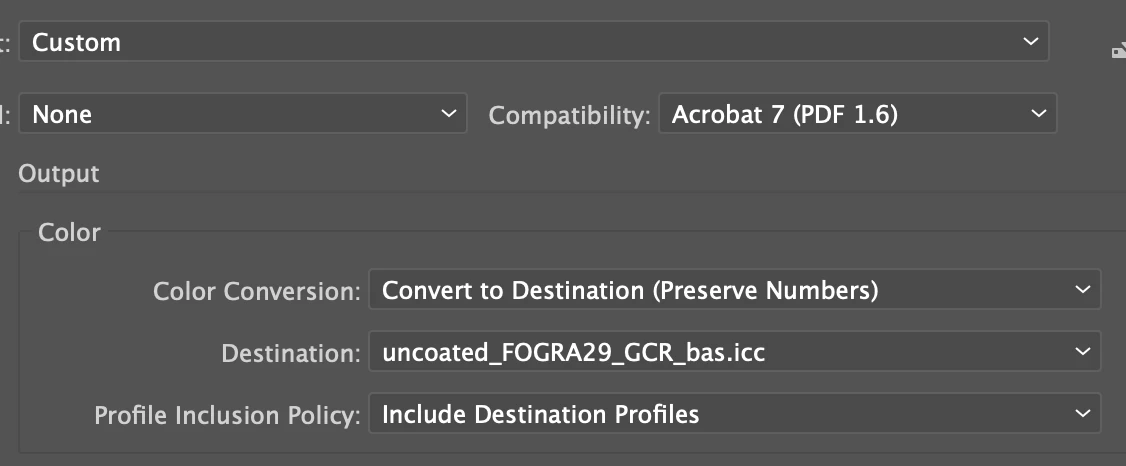
I don't know what they mean by saying I have attached the profile rather than applying it, I exported the file from Illustrator as a pdf with my preferred color profile attached:
 

Screenshot 2023-07-11 at 15.08.20.png

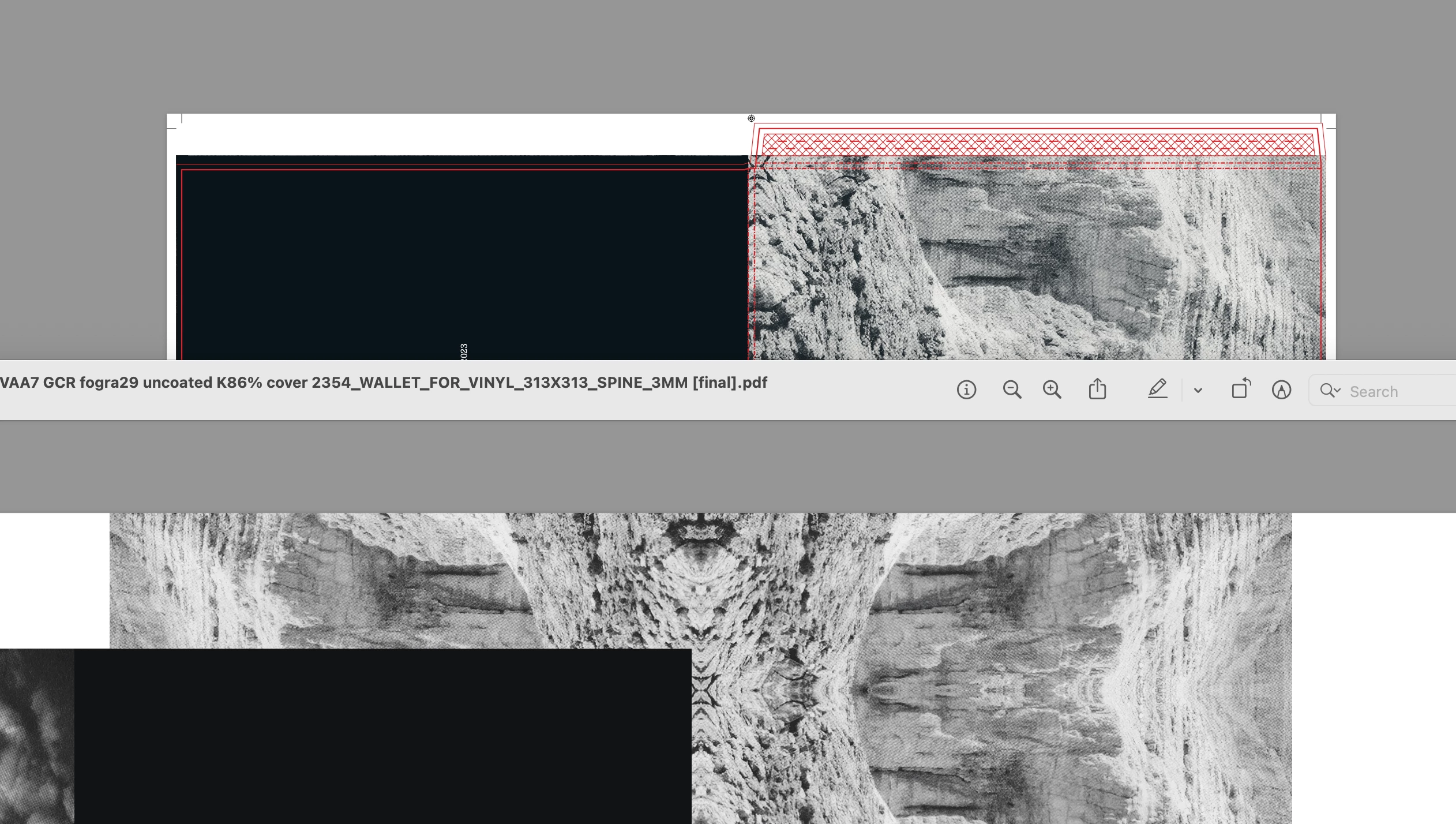
Now they are sending me previews where you can visibly see a color difference;
 

Screenshot 2023-07-11 at 15.02.10.png

It's subtle, but below is my version via overprint preview using the GCR 26 uncoated profile, vs their preview, which is slightly green when viewed through the euroscale uncoated v2 overprint preview that they are using...


All I want is for my record to be printed as intended, and not to come out slightly greenish again... Can someone help me here? 


Best


Oscar

TOPICS
Import and export
899
Translate
Report
Community guidelines
Be kind and respectful, give credit to the original source of content, and search for duplicates before posting. Learn more
community guidelines
Adobe
Community Expert ,
Jul 14, 2023 Jul 14, 2023

So that image is in which color space?

What you can do in Photoshop is "Convert to profile". I would assume that this is what they mean. 

But if this print is supposed to be b&w, I would make that I use a greyscale image in it.

Translate
Report
Community guidelines
Be kind and respectful, give credit to the original source of content, and search for duplicates before posting. Learn more
community guidelines
Community Expert ,
Jul 14, 2023 Jul 14, 2023

They do not want you to assign a profile. 


File >> Document Color Mode >> CMYK

Edit >> Color settings

MikeGondek_1-1689345152216.png


Then for your PDf generate using Illustrator Default, so you have no profile.

Translate
Report
Community guidelines
Be kind and respectful, give credit to the original source of content, and search for duplicates before posting. Learn more
community guidelines
Community Expert ,
Jul 14, 2023 Jul 14, 2023

Alternative:

Keep color management turned on. And have it (and the document) set up with the profiles the company uses.

When exporting the PDF: in Output: No Conversion, no profiles.

Translate
Report
Community guidelines
Be kind and respectful, give credit to the original source of content, and search for duplicates before posting. Learn more
community guidelines
Community Beginner ,
Jul 17, 2023 Jul 17, 2023

Thank you both for your answers;


Monika you make a fair point, and in theory I could just export it in their preferred profile 'Euroscale Uncoated v2'. Though as mentioned, i've done this in the past and sadly the record came out slightly greenish.


Someone on this forum recommended using 'GCR FOGRA29 uncoated' as it's close to Euroscale yet has a better performance with maintaining the image B&W. Though then I got this strange answer from them, regarding applying a profile vs attaching it...


Here are my color settings:


Screenshot 2023-07-17 at 10.22.59.png

Screenshot 2023-07-17 at 10.22.46.png

You've seen my export window, it's fogra 29 all the way.


Say I now wanted to do 'Euroscale uncoated v2' as you mentioned via my color management profile, to set up my file via the profile the company uses, well, I can't select Euroscale v2 from the color management selection grid;

Screenshot 2023-07-17 at 10.24.47.png

I can, however, Assign the 'Euroscale v2 uncoated' profile:

Screenshot 2023-07-17 at 10.25.28.png

Then export as such:


Screenshot 2023-07-17 at 10.27.11.png


Though, as mentioned prior, my image came out slightly off color (greenish, and this isn't the first I've had this problem with them) after following these steps the last time. 


Long story short. I've followed your steps and when exporting, (though instead of changing the profile via color management, I assigned the profile), and now the image looks fine. Though when doing a quick 'output preview' via Adobe Acrobat, I am previewing a reddish image instead of a B&W one:


Screenshot 2023-07-17 at 10.33.30.png


Is this cause for concern? The only mistake I can think of is that I edited the image in Ps using a different profile. But doesn't the assigned profile in Ai, (in this case Euroscale uncoated v2) override that Profile I exported the PS PDF in (FOGRA29), which I then added into Ai? 


Translate
Report
Community guidelines
Be kind and respectful, give credit to the original source of content, and search for duplicates before posting. Learn more
community guidelines
Community Expert ,
Jul 17, 2023 Jul 17, 2023

Your printer uses the CMYK numbers in your file. 

They will ignore every profile attached and don't care about assigned profiles. Assigned profiles do not change the numbers, they can be used to Preview the file or when a conversion needs to take place to another CMYK profile.

I wonder why you use a CMYK profile when the result should be B&W. Creating B&W with 4 colors is difficult to control and makes it very easy to get a color cast.

Maybe it is better to convert your file to Grayscale, which uses only Black.

Translate
Report
Community guidelines
Be kind and respectful, give credit to the original source of content, and search for duplicates before posting. Learn more
community guidelines
Community Beginner ,
Jul 18, 2023 Jul 18, 2023

I print in CMYK because you lose a lot of contrast and depth when only printing with K.


Could you give me a brief step by step rundown of getting my image print ready for them in euroscale uncoated v2?

Is it important that the source image i've edited in PS is exported as such, or is it simply important that the final Ai file is exported as Euroscale uncoated v2.


I am at a loss, as when I send them anything it always comes out color cast, so I tried to tackle this by using a better profile... Which they do not accept. So if I create my file in euroscale uncoated v2 from finish to start... I can hope that it will finally come out as intended?


Translate
Report
Community guidelines
Be kind and respectful, give credit to the original source of content, and search for duplicates before posting. Learn more
community guidelines
Community Expert ,
Jul 18, 2023 Jul 18, 2023

It's probably impossible to get that output without color casts when sending them a 4c image. 

And if you can't achieve the contrast you wish with the profile they use, then the solution is not to use a different profile, but to talk to them and get their advice. 

Translate
Report
Community guidelines
Be kind and respectful, give credit to the original source of content, and search for duplicates before posting. Learn more
community guidelines
Community Expert ,
Jul 18, 2023 Jul 18, 2023

Have your monitor calibrated so that you can detect color casts.

Create your image in Photoshop in CMYK with the Euroscale uncoated v2 profile if that is what the printer is using.

Create a doc in Illustrator also with the Euroscale uncoated v2 and use your image.

Pray that the printer correctly prints the file.

Translate
Report
Community guidelines
Be kind and respectful, give credit to the original source of content, and search for duplicates before posting. Learn more
community guidelines
Community Beginner ,
Jul 19, 2023 Jul 19, 2023

Talking to them does not work sadly, as I already sent you their rather cryptic reply regarding 'If your customer wants to use profiles, they should apply the profile, don't attach/add it to the file.' Though I am indeed applying the profile by embedding it in the exporting process, so I don't know what they want.


Hence, I am only left to follow Mr Frederiks advice, follow their orders and pray that the work doesn't come out color cast again.


Best;


o. 

Translate
Report
Community guidelines
Be kind and respectful, give credit to the original source of content, and search for duplicates before posting. Learn more
community guidelines
Community Beginner ,
Jul 25, 2023 Jul 25, 2023
LATEST

So I followed your steps, and it seems that they are not happy with the approach;


Not once have I received a file without a profile. The last file I received from the client also contained a profile - hence the difference in colours (cmyk values are different).

Please note once again: that you need to convert the file to a given profile (apply the profile), and not attach the profile to the file.


After creating and exporting the image in PS as Euroscale uncoated v2 (the profile they use), I added it into Indesign on my final design file and exported everything via 'Don't include profiles'.


Now I am told the pdf still contains profiles – perhaps the profile I included in the Ps document carried over to the Id document. (I guess simply not including a profile when exporting means you are holding on to whatever profile the image was bestowed with prior). 


Though that being said, why are they saying the CMYK values were different, when we are both using the same profile? And does anyone understand the difference between converting vs applying a profile that they are going on about?


Really would value any help!

Translate
Report
Community guidelines
Be kind and respectful, give credit to the original source of content, and search for duplicates before posting. Learn more
community guidelines