


Participant
December 2, 2019
Answered

"Previous session of Illustrator running" message when launching Illustrator in Windows

  • December 2, 2019
  • 5 replies
  • 41648 views

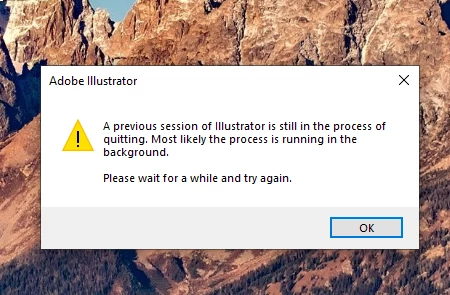
Below is a screenshot of the error that pops up when I attempt to launch Illustrator. This error has been occurring for 5 days. I have followed the error instructions to wait and try again later, but this has not fixed the problem. Does anyone have any solutions to this problem?
 

Thanks in advance for your help!


{Renamed by MOD}
Correct answer Ashutosh_Mishra

Hi there,


Thanks for reaching out. Would you mind sharing some more information like:

1. Version of Illustrator and OS.

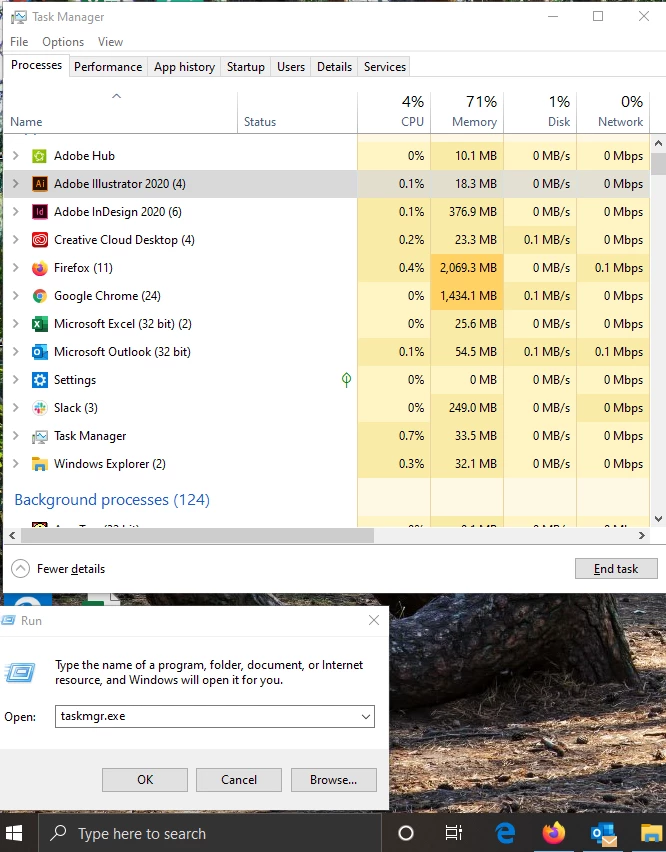
2. Have you tried task manager to check if there are Illustrator instances running? (You can right click on Start > Run > type "taskmgr.exe" and check the running instances. If you see Adobe Illustrator in the list, simply do a right click and click on End Task to close. I have attcahed a screenshot for your reference. Once done, try launching the Illustrator.)


Let us know how it goes.


Regards,

Ashutosh

5 replies

Participant
March 3, 2025

This helped me a lot, thanks you so much! 

Participant
March 31, 2021

This is not working for me can you please help me(not find illustrator)

Participating Frequently
March 31, 2021

I ended up uninstalling the most recent version of Illustrator, since I didn't have this issue with the earlier version.  I don't allow auto-update, and will check with each new version whether Adobe fixed the issue or not.

October 27, 2020

When I open task manager illustrator is not there Im very lost

October 27, 2020

I figured it out thank u

Cubicle Fugitive
Participant
December 4, 2020

How did you figure it out? I also get this message and it's not found under the task manager.

Participant
August 31, 2020

THANK YOU! This absolutely worked for me.

Ashutosh_Mishra
Ashutosh_MishraCorrect answer
Inspiring
December 2, 2019

Hi there,


Thanks for reaching out. Would you mind sharing some more information like:

1. Version of Illustrator and OS.

2. Have you tried task manager to check if there are Illustrator instances running? (You can right click on Start > Run > type "taskmgr.exe" and check the running instances. If you see Adobe Illustrator in the list, simply do a right click and click on End Task to close. I have attcahed a screenshot for your reference. Once done, try launching the Illustrator.)


Let us know how it goes.


Regards,

Ashutosh

sadieo97Author
Participant
December 2, 2019

Ashutosh,


This worked! My background session of Illustrator has closed successfully.


Thank you for your help!

Participating Frequently
February 19, 2021

I'm having the same issue with AI 2021 v 25.2.  Yes, the task manager trick works, but I've never had to take this extra step before.  When I save & close, AI shuts down, and I can open it back up whenever.  Now I can't.  This must be a glitch in Adobe.