


erisalar
Participant
November 13, 2018
Answered

Re: There is not enough memory to process the appearance of an object

  • November 13, 2018
  • 9 replies
  • 22528 views

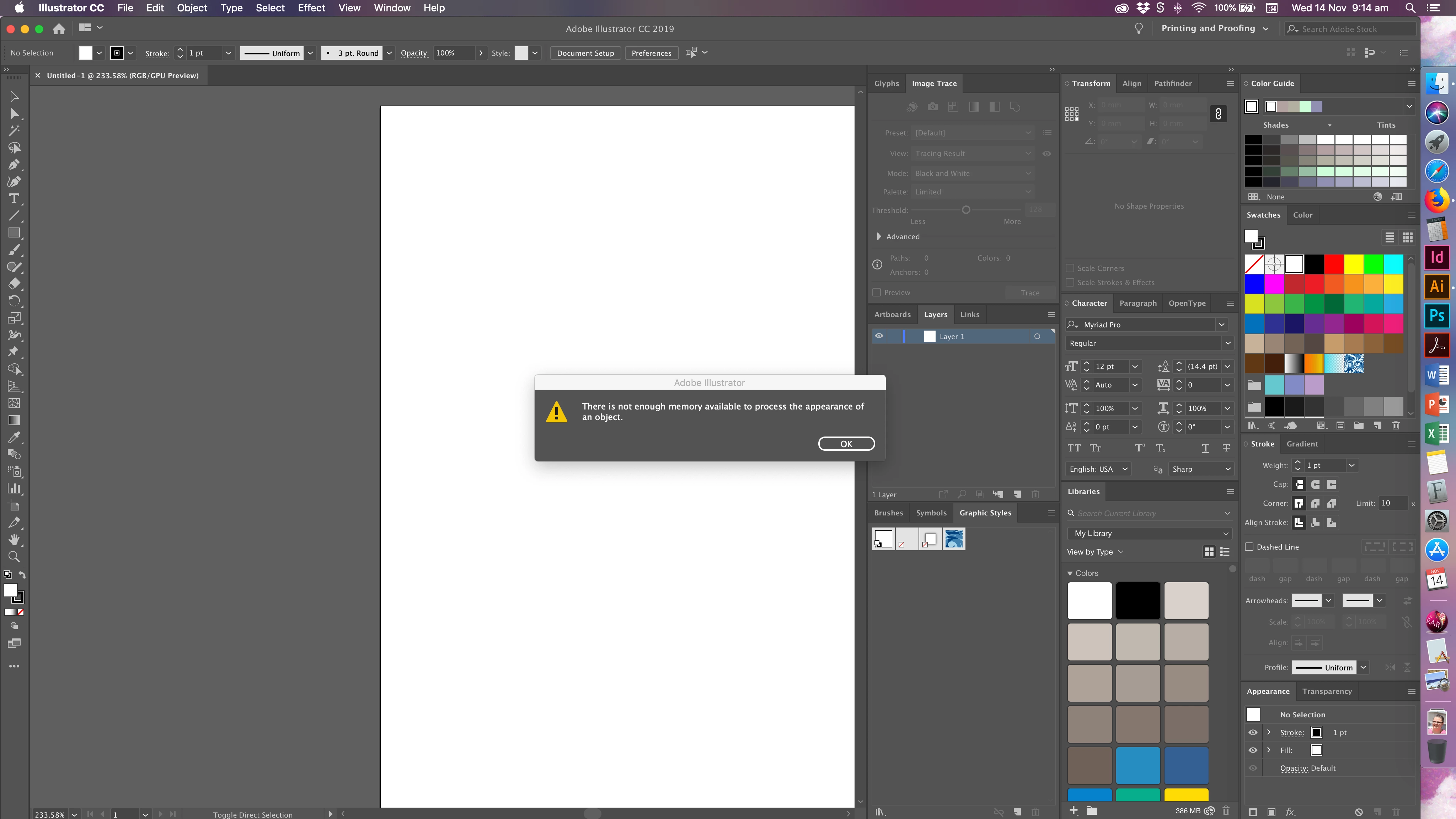
I'm getting the same error message. New document, 100 x 100 mm blank. After the error message all options are greyed out, even Quit.
CC 2018 latest updates, macOS latest version all up to date. 2017 MacBook Pro.
    Correct answer bradd4718607

    I found something that actually worked for me. I'm on a Mac so I can't say how this might work for the rest of the world, but I found that the Workspaces preferences were not updating correctly and that trashing it made everything function again. If that doesn't do it, try removing the Modified Workspaces preferences and replacing them one at a time until you get the memory error again.

    9 replies

    Rick E Johnson
    Inspiring
    July 11, 2020

    I started having the same problem and resetting workspaces didn't work for me. The error always happened when I opened a new blank document, then chose a drawing tool such as Pen or Rectangle, so I deleted the predefined graphic styles and pattern swatches I was unlikely to ever use and set a few other styles to what I typically use. Then I saved that as a new document profile as described here:


    https://www.rockymountaintraining.com/adobe-illustrator-cs5-setting-new-document-profile-defaults/


    The article is kind of old, but it still works, and I haven't seen the error since I've started using the custom new document profile.

    runninghead_design
    Inspiring
    May 18, 2020

    Also on a Mac- I just found that Reset Workspace freed it up, while other Menu items were greyed out and Quit was not possible this simple option still worked and may be a lot easier than trying to look under the hood for preference files.

    Inspiring
    July 3, 2019

    I figured my out as to being the Suitcase extension. I just pulled it and it's working for now. I know that Suitcase was just updated, but even the update didn't help. So I'm going without the extension and will see what happens.

    Participant
    July 3, 2019

    So this bug has been kicking around all year, but only two of the people who experienced it reported it as a bug, so I expect it's unlikely to get fixed...

    https://illustrator.uservoice.com/forums/601447-illustrator-bugs/suggestions/36618856-there-is-not-enough-memory-available-to-process-th

    Participant
    July 1, 2019

    For me, it's also happening just in the past two weeks. I reinstalled Illustrator and it works until ---  I try to open the graphic styles window, I get the out of memory error. Using latest version of Mojave and Illustrator.

    Srishti Bali
    Community Manager
    Community Manager
    July 3, 2019

    Hi All,

    Thanks for reaching out. As per your query, Illustrator gives you memory error the moment you open the Graphic Styles window (Window > Graphic Styles). I would need a few more details as mentioned in my comment above:

    • OS and version of Illustrator
    • Screenshot of the error and Activity Monitor.
    • Are there any recent changes made to your system? For example, any antivirus, system updates or web extensions installed recently.
    • Is the issue related to a specific document(s)/asset(s)? If yes, can you please share the document(s)/asset(s) with us? You can upload it to the creative cloud and share the download link.
    • Does resetting Illustrator Preferences (https://helpx.adobe.com/in/illustrator/using/setting-preferences.html) help resolve the issue? Please do take a backup of the same before trashing them and share it with us. You can zip the folders, upload it to creative cloud and share the download link.

    Regards,

    Srishti

    Participant
    July 8, 2019

    Thanks for your very helpful post!!!  Graphic Styles is the culprit.  As soon as I closed that window, all was good (for now, anyway).  I am running on High Sierra.

    dorjeetsetan
    Participant
    June 6, 2019

    I am also getting the same message. I have the latest version.

    bradd4718607Correct answer
    Inspiring
    January 16, 2019

    I found something that actually worked for me. I'm on a Mac so I can't say how this might work for the rest of the world, but I found that the Workspaces preferences were not updating correctly and that trashing it made everything function again. If that doesn't do it, try removing the Modified Workspaces preferences and replacing them one at a time until you get the memory error again.

    Participant
    January 16, 2019

    same error... version 22.1 worked for me. Ai stuck even create new document screen.

    Srishti Bali
    Community Manager
    Community Manager
    November 14, 2018

    Hi there,

    Sorry about this error.  Please install the latest update 23.0.1 and let us know if that helps.

    Regards,

    Srishti

    MichaelCluff
    Participating Frequently
    December 13, 2018

    I'm facing the same problem with the current build, sadly.

    Monika Gause
    Community Expert
    Community Expert
    June 26, 2019

    The most recent Illustrator CC version, on macOS Mojave. This happens even as I create a new file with a single, empty artboard. I closed all other applications. I hardly store any files on my iMac so lack of memory should not be an issue. I've restarted my iMac too — doesn't help unfortunately. I have now uninstalled the app and waiting for it to re-install.


    Does the answer marked as "Correct" help you?

    Is the graphic styles panel shown in your workspace? Does it help when you hide it?