


recolor artwork too many color rows
I'm attepting to recolor an some images that Ive added to illustrator and then used live trace on. The colorpalette that is used on the drawings (and that illustrator used aswell) has about 50-200 colors in it at most. However when I go to recolor the artwork it says the image has over 1000 colors, most of these are duplicates of the same color as it seems to not be able to recognize the same color as one color if it's not in the same fill. Aka if I have two dots in the same exact color that aren't connected the recolor tool thinks of it as two colors that I have to assign new colors to individually. Does anyone know a way to merge all the identical colors without having to click through over a thousand different rows of colors? I have checked that the colors are the exact same aswell, their color codes are the same.
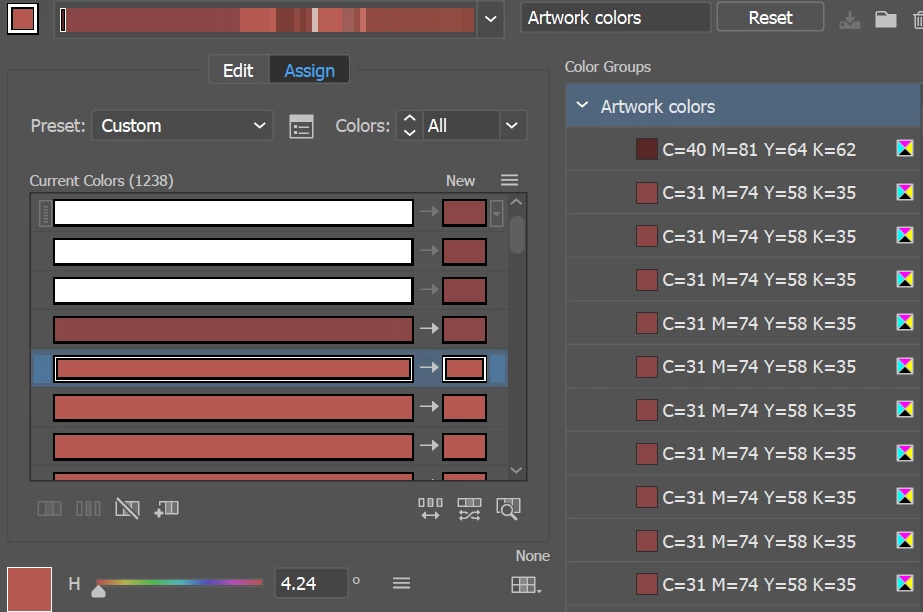
In short I'd like all these rows with the color C=31 M=74 Y=58 and K=35 to be one single row instead of having a seperate row for every time the color is used in the artwork (this red color is not the only one that has this problem, it's the same with all the colors used, but this was the easiest to show as an example)
- Karoline
 AdChoices