



JoshuaHuezo2424
Participating Frequently
March 3, 2022
Answered

.remove() in script not removing item in some files

  • March 3, 2022
  • 2 replies
  • 776 views

Hey y'all,


I wrote a script that runs against a folder you have your files saved in and is targeting rasterItems[0] within groupItems[1] within 'Layer 1' and I need to run it daily amongst hundreds of files. The problem that I'm facing is that on a large majority of files the script is working, but isn't working of files where the rasterItem I'm trying to remove is not being removed. The index of the rasterItem that isn't being deleted is the same index compared to the files where it is being deleted so I'm a bit confused as to why it's throwing an error. I will attach two files 1. the script will work perfectly for 2. The script throws the alert.


My script: 

#target "Illustrator";
var myFolder = Folder.selectDialog (prompt);
var myFiles = myFolder.getFiles("*");
for(i=0; i<myFiles.length;i++){
    var myDoc = app.open(myFiles[i]);
    try{
        app.activeDocument.layers["Layer 1"].groupItems[1].rasterItems[0].remove();
        myDoc.close (SaveOptions.SAVECHANGES);
        } catch(e){
            alert(e);
            } 
        }


For clarity, the target item is the faux silver and gold raster images in the files. 


I appreciate any help and input with this! 
 

This topic has been closed for replies.
Correct answer Charu Rajput

Hi,

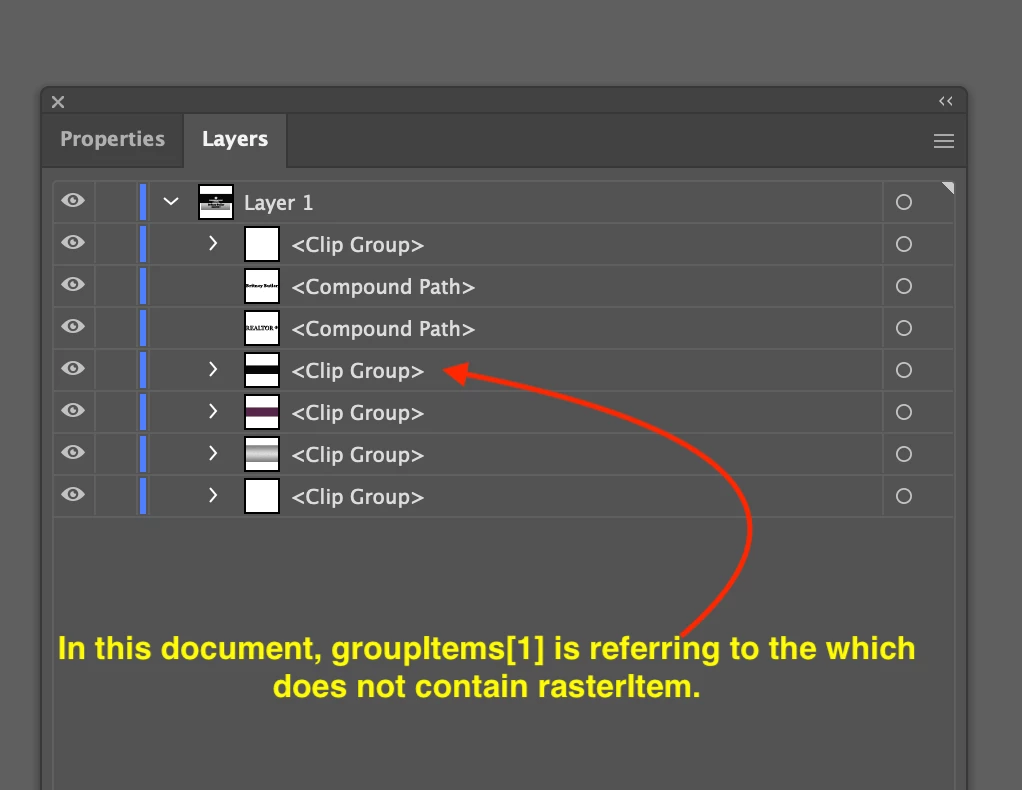
The script is failing on the document where faux silver item exists and its is because the number of groupsItems differ in both documents. See screenshot for clarification.


1. Traverse all groups and delete rasterItem, but this will fail when another group may contain raster element as well.

2. Secondly, if you know, it is always be the second last group(from bottom) in the layer, then use below version

#target "Illustrator";
var myFolder = Folder.selectDialog(prompt);
var myFiles = myFolder.getFiles("*");
for (i = 0; i < myFiles.length; i++) {
  var myDoc = app.open(myFiles[i]);
  try {
    var _groupsLength = app.activeDocument.layers["Layer 1"].groupItems.length;
    app.activeDocument.layers["Layer 1"].groupItems[_groupsLength - 2].rasterItems[0].remove();
    myDoc.close(SaveOptions.SAVECHANGES);
  } catch (e) {
    alert(e);
  }
}


2 replies

Charu Rajput
Community Expert
Charu RajputCommunity ExpertCorrect answer
Community Expert
March 3, 2022

Hi,

The script is failing on the document where faux silver item exists and its is because the number of groupsItems differ in both documents. See screenshot for clarification.


1. Traverse all groups and delete rasterItem, but this will fail when another group may contain raster element as well.

2. Secondly, if you know, it is always be the second last group(from bottom) in the layer, then use below version

#target "Illustrator";
var myFolder = Folder.selectDialog(prompt);
var myFiles = myFolder.getFiles("*");
for (i = 0; i < myFiles.length; i++) {
  var myDoc = app.open(myFiles[i]);
  try {
    var _groupsLength = app.activeDocument.layers["Layer 1"].groupItems.length;
    app.activeDocument.layers["Layer 1"].groupItems[_groupsLength - 2].rasterItems[0].remove();
    myDoc.close(SaveOptions.SAVECHANGES);
  } catch (e) {
    alert(e);
  }
}


Best regards
femkeblanco
Legend
March 3, 2022

The groupItems are not the same index.  Indices start from the top.  They are second from the bottom.  Maybe try something like this:


try {
    var index = app.activeDocument.layers["Layer 1"].groupItems.length - 2;
    app.activeDocument.layers["Layer 1"].groupItems[index].rasterItems[0].remove();
} catch(e) {
    alert(e);
}


JoshuaHuezo2424
Participating Frequently
March 3, 2022

OMG....... wow I am speechless. 
Back when I researched this script I remember someone telling me that the indexes of layer items were reversed meaning the items at the bottom were zero indexed. 

Wow thank you so much I feel dumb but so relieved that it works! Thank you!

femkeblanco
Legend
March 4, 2022

It takes getting used to.  Indices start from the top, but are the reverse order in which items were added.  So 0 was the last item added (at the top), 1 was added before 0, 2 was added before 1, and so on.  Also, indices are dynamic, changing as items are added.