Inspiring
September 6, 2016
Answered

script file(.js) for simplify the path points..............

  • September 6, 2016
  • 2 replies
  • 3893 views

I am using Illustrator CC 2015 version ,When I am loading any dxf or pdf file in Illustrator ,it is

showing too many points.

For removing these unused points, I am using the menu Object --> Path --> Simplify options.

After changing some values of simplify path option , It removes the unused points.

These points are given below it's showing the before apply the Simplify and after apply the simplify option. 

I want to the Script file (java script ) OR  code for this Simplfy options.

So Please assist me.

Regards

Kundan

This topic has been closed for replies.
Correct answer Ten A

Hello Ten,

As you suggested as previous message ,it's working fine.

But when I applying Angle Threshold with 180 degree  it's not applying .

I am doing some changes in your code but it's not working, it's given below
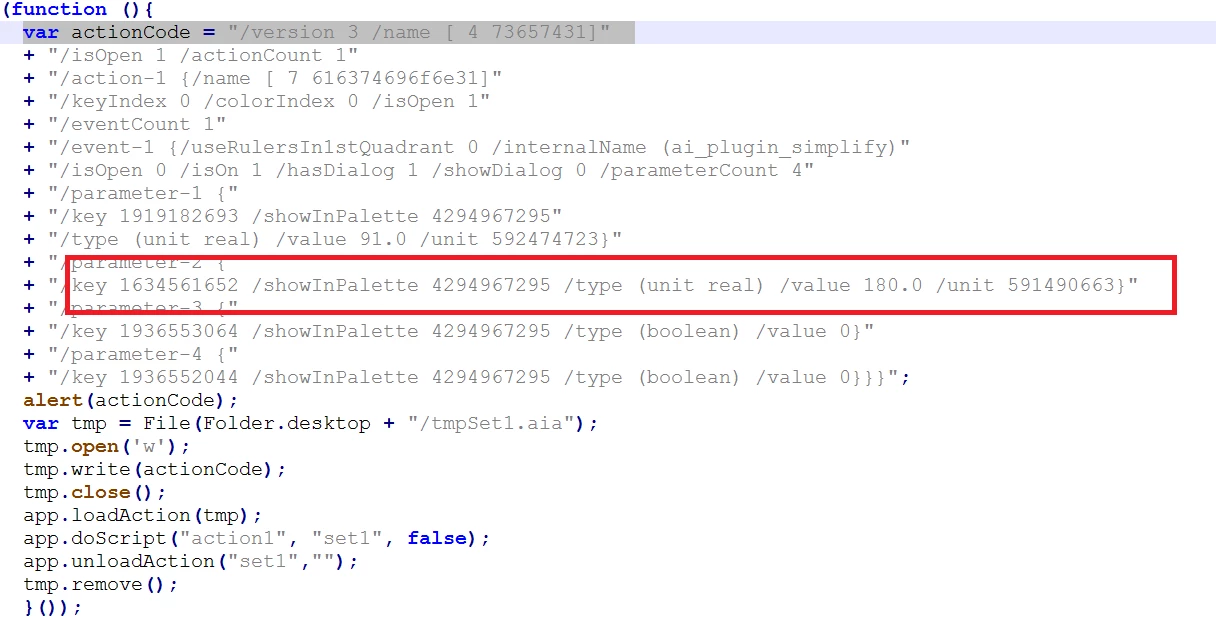
So Please assist me

Thanks in Advance .

Kundan


You can edit Parameter-2 value 0.0 to 180.0 like below

(function (){

  var actionCode = "/version 3 /name [ 4 73657431]"

  + "/isOpen 1 /actionCount 1"

  + "/action-1 {/name [ 7 616374696f6e31]"

  + "/keyIndex 0 /colorIndex 0 /isOpen 1"

  + "/eventCount 1"

  + "/event-1 {/useRulersIn1stQuadrant 0 /internalName (ai_plugin_simplify)"

  + "/isOpen 0 /isOn 1 /hasDialog 1 /showDialog 0 /parameterCount 4"

  + "/parameter-1 {"

  + "/key 1919182693 /showInPalette 4294967295"

  + "/type (unit real) /value 100.0 /unit 592474723}"

  + "/parameter-2 {"

  + "/key 1634561652 /showInPalette 4294967295 /type (unit real) /value 180.0 /unit 591490663}"

  + "/parameter-3 {"

  + "/key 1936553064 /showInPalette 4294967295 /type (boolean) /value 0}"

  + "/parameter-4 {"

  + "/key 1936552044 /showInPalette 4294967295 /type (boolean) /value 0}}}";

  var tmp = File(Folder.desktop + "/tmpSet1.aia");  

  tmp.open('w');  

  tmp.write(actionCode);

  tmp.close();

  app.loadAction(tmp);

  app.doScript("action1", "set1", false);  

  //app.unloadAction("set1","");

  tmp.remove();

  }());

Its work fine in my environment.

2 replies

Ten A
Braniac
October 18, 2016

To set showDialog value 0 to 1 in the 8th line and retry it. The dialog will come up and you can check parameters.

Inspiring
October 18, 2016

Thanks for reply

It's comes with same value but that curve is still remain.

Please assist me.

Thanks in Advance.

Kundan

Inspiring
October 19, 2016

Hello Ten,

I wish  to get the file type (like AI and PDF or DXF ) and  above code should be apply on the basis of

of file type . I wish to do all these through the js code.

Please assist me.

Thanks in Advance

Kundan

Loic.Aigon
Braniac
September 6, 2016
Inspiring
September 6, 2016

Thanks for reply Loic.

I already try to applied as you suggest but it's not useful.

It changes the shape also, I have to constant my shape.

I need the script for  Simplify , It will work properly.

Regards

Kundan

Inspiring
September 6, 2016

interesting but if applied on a simple oval with extra points it tends to actually add points.


Thanks for reply Ten A and Loic .

As you suggest It may be useful and Simplify windows is opening in Illustrator

How I will set these Simplify value "Curve Precision " and "Angle Threshold "

value and how I will make "show original " clicked.

I have set all these value

so Please assist me

Regards

Kundan