


arop16461101
Known Participant
February 14, 2016
Answered

Script. Insert text number in the middle of visible bounds of the each object

  • February 14, 2016
  • 3 replies
  • 16696 views

Hello! Adobe Illustrator CS 6

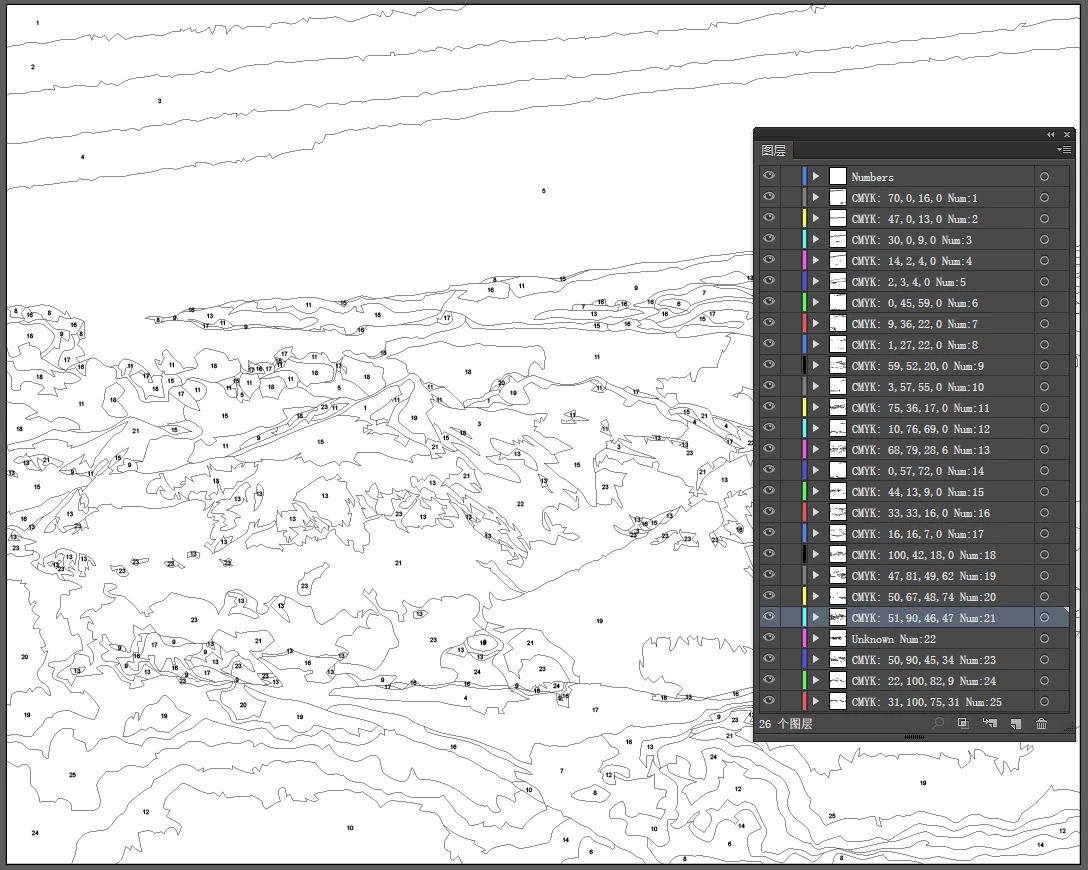
I have script, wich groups filled paths by colors. Link to script and traced image. Traced_image.rar - Google Drive

I have traced image, it has 25 colors. The script creates 25 groups, paths of each color in each group.

I need to modify script, i want to insert text number in visible middle of the each filled path. So one group is one number. From 1 to 25.

Can anyone help me?
This topic has been closed for replies.
Correct answer moluapple

Hello all, here comes the final version.

This time "offset path effect" been used. I thought this is a possible way at beginning, but never give it a try, until today.

It deal with both Path and Compound Path. Test the sample document, it only took 31 seconds.

3 replies

moluappleCorrect answer
Inspiring
May 15, 2016

Hello all, here comes the final version.

This time "offset path effect" been used. I thought this is a possible way at beginning, but never give it a try, until today.

It deal with both Path and Compound Path. Test the sample document, it only took 31 seconds.

arop16461101
Known Participant
May 15, 2016

Moluapple, this script works amazing! I tryed another file with many many objects, and it was pretty fast to do!

Thank you very much for your work! Qwertyfly thank u too for big beggining of this hard task!

I think, next step to improve, will be resizing numbers "pt" size in very small objects. It will be perfect to use, can u try?

Inspiring
May 17, 2016

So, does set the minimize font size to 4 pt fit your requirement? if size is too small, will be hard to recognize isn't it?

Above link has been updated, and big thanks to Hiroyuki Sato (@shspage) for his talent modify which lead to a more precise result.

As I have set the TIMES to 100, and other settings adjusted, It will use more time. The same document, this time 2'14''.

Inspiring
May 10, 2016

Ok, finally success to deal with Compound Path, using "stroke inside & compare area" method. Qwertyfly...

Select one Compound Path item and run the code, will draw a circle in the "fat center". Make sure the "stroke inside" graphic style exists.

var doc = app.activeDocument,

    pth = app.selection[0],

    Count = 0,

    per = 1, // take average betwenn hight and width and multiplies it by this to get starting stroke weight - 1 = 100% 

    increment = .2, // base amount to add to percentage on each iteration 

    TIMES = 20, // when error, try more higher value,

    AREA_PER = 0.02, // 2% of origin path's area, the lower the better, but more slow

    workLay,

    areaArr = logAreas(pth);

try {

    workLay = doc.layers.getByName('workLay');

} catch (e) {

    workLay = doc.layers.add();

    workLay.name = 'workLay';

}

FatPart(pth);

function FatPart(pth) {

    var success = false;

    while (!success) {

        success = process();

        // if recursive function runs too many times give option to exit 

        Count++;

        if (Count % TIMES === 0) {

            return 'error';

        }

    }

}

function process() {

    var item, scale, result;

    doc.selection = null;

    // make a copy of the shape to work on 

    item = pth.duplicate(workLay, ElementPlacement.PLACEATBEGINNING);

    // make sure the path is closed as we want the aligh stroke to inside

    closeAllPath(item);

    item = app.selection[0];

    // apply the "aligh stroke to inside" graphicStyle  by name

    doc.graphicStyles.getByName('stroke inside').applyTo(item);

    // scale works out how thick the stroke shold be 

    scale = Math.min(item.height, item.width) / 10 * per;

    // this function is needed as CompoundPath can not be stroked with script!!!

    strokeComPath(item, scale);

    //$.writeln("scale: " + scale + ' ' + per);

    app.executeMenuCommand('OffsetPath v22'); // = Outline Stroke 

    item = doc.selection[0];

    if (item.typename === "CompoundPathItem") {

        // if a CompoundPathItem selected, this will always be true

        result = compareArea(item);

        if (result != false) {

            addCenterCircle(result);

            item.remove();

            return true

        } else {

            return false

        }

    } else {

        // shape filled completely, reduced stroke and retry 

        item.remove();

        return false;

    }

}

function compareArea(compoundPath) {

    var pi = compoundPath.pathItems,

        l = pi.length,

        i,

        totalArea = 0,

        tmpArr = [],

        pthArea;

    for (i = l - 1; i >= 0; i--) {

        pthArea = Math.abs(Math.round(pi.area));

        // hack of array.indexOf, should be replaced with real

        var isOrigen = areaArr.toString().indexOf('' + pthArea);

        //$.writeln ('path ' + i +' : ' + pthArea + ' ' + isOrigen)

        if (isOrigen === -1) { // new path

            totalArea = totalArea + pthArea;

            tmpArr.push(pi);

        }

    }

    $.writeln(totalArea)

    if (totalArea < areaArr[0] * AREA_PER && totalArea > 0) { // the size is ok

        tmpArr.sort(function(a, b) {

            return Math.abs(b.area) - Math.abs(a.area)

        })

        return tmpArr[0]

    } else if (totalArea === 0) { //stroke width is too big

        compoundPath.remove();

        per = per - increment / 10;

        return false;

    } else { // totalArea >= AREA_PER, stroke width is too small

        compoundPath.remove();

        per = per + increment / 2;

        return false;

    }

}

function closeAllPath(compoundPath) {

    var pi = compoundPath.pathItems,

        l = pi.length,

        i;

    compoundPath.selected = true;

    app.executeMenuCommand('noCompoundPath');

    for (i = 0; i < l; i++) {

        app.selection.closed = 1;

    };

    app.executeMenuCommand('compoundPath');

}

function strokeComPath(compoundPath, weight) {

    var pi = compoundPath.pathItems,

        l = pi.length,

        i = 0;

    for (; i < l; i++) {

        pi.strokeWidth = weight;

    };

}

function logAreas(compoundPath) {

    var pi = compoundPath.pathItems,

        l = pi.length,

        i,

        totalArea = 0,

        areaArr = [],

        pthArea;

    for (i = l - 1; i >= 0; i--) {

        pthArea = pi.area;

        totalArea = totalArea + pthArea;

        // log 3 value as the outline stroke path may differ with origin

        areaArr.push(Math.abs(Math.round(pthArea)));

        areaArr.push(Math.abs(Math.round(pthArea)) - 1);

        areaArr.push(Math.abs(Math.round(pthArea)) + 1);

    }

    areaArr.unshift(Math.abs(totalArea));

    $.writeln(Math.abs(totalArea));

    return areaArr

}

function addCenterCircle(pth) {

    var gb = pth.position,

        radius = 5;

    center = [gb[0] + pth.width / 2 - radius, gb[1] - pth.height / 2 + radius];

    doc.pathItems.ellipse(center[1], center[0], 10, 10);

}

Qwertyfly___
Legend
February 14, 2016

take a look at this thread.

Re: How do I copy the path name from the layers panel to the center of the path/object in my AI file?  Is there a native…

it's not a simple task to get the gravitational center of an irregular object.

I'm sure its possible with some wiz bang algorithm.

but I am not going to try to tackle that with my math skills

if you need a hand modifying  it for your needs let me know.

arop16461101
Known Participant
February 15, 2016

Thank you, but my skill is not enouth to modify and compute your script with this one. Can you take a look on algoritm? The problem is that script generating sub and sub layers, so your script can work with 1 level layers only.

Look please on script:

#target illustrator

if (app.documents.length > 0)

{

if (app.activeDocument.pageItems.length > 0)

{

var release_to_layers_window; // make window global

var doc = app.activeDocument;

var doc_artboard = doc.artboards[0].artboardRect;

var unlocked_layers_count = 0; // number of unlocked layers in layer palette for progress bar

var msis_message_1 = "\nThis script will place each object within this current document into a new layer based on it's fill color. "+

                     "As the script currently does not detect locked layers and locked objects you need to unlock your layers and objects before you can run this script. " +

                     "Note that running this script will modify your document. You might want to save your document first.";

var doc = app.activeDocument;

var Counter = app.activeDocument.pageItems.length;

var LayerName = "";

var ReleaseMethod = 1;

// start dialog window

   release_to_layers_dialog();

}

// what if no document of no objects?

if (app.documents.length < 1)

{alert("No open documents found. Please open a document before you run this script");}

if (app.documents.length > 0 && app.activeDocument.pathItems.length < 1)

{alert("No objects found in this documents. Please add some objects before you run this script");}

}

// ********************************************************************************************************

// **                                                                                                    **

// ** find the most common value in an array                                                             **

// **                                                                                                    **

// ** http://www.experts-exchange.com/Programming/Languages/Scripting/JavaScript/Q_20871554.html         **

// ** var myArray = ["apple","banana","orange","banana","tomato","grape","apple"];                       **

// ** alert( GetMostCommonColor(myArray) );                                                                              **

// **                                                                                                    **

// ********************************************************************************************************

function GetMostCommonColor(theArray)

  {

  var tempArray = new Array();

  tempArray.length = 0;

  tempArray = theArray.slice(0,theArray.length);

  tempArray.sort();

  tempArray[tempArray.length] = "";

  mVal = aVal = "";

  mCnt = aCnt = 0;

  for(r=0;r<tempArray.length;r++)

    {

    if(aVal!=tempArray)

      {

      if(aCnt>mCnt)

    {

        mCnt = aCnt;

        mVal = aVal

       }

      aVal = tempArray;

      aCnt = 1;

    } else

  {

      aCnt++;

    }

  }

  // return [mVal, mCnt]; // returns value and count

  return mVal; // only returns value

}

// ********************************************************************************************************

// **                                                                                                    **

// ** create a layer name for the current object                                                         **

// **                                                                                                    **

// ********************************************************************************************************

function ConstructLayerNameBasedOnFillColor(myCurrentObject)

{

  var myLayerName = "Unknown";

  if (myCurrentObject.typename == "TextFrame") { myLayerName = "Text Objects"; }

  if (myCurrentObject.typename == "SymbolItem") { myLayerName = "Symbols"; }

  if (myCurrentObject.typename == "RasterItem") { myLayerName = "Raster Objects"; }

  if (myCurrentObject.typename == "PathItem")

     {

      if ( myCurrentObject.filled == true )

      {

       myLayerName = 'Object with unknown Fill Color'; // default name for if no color can be detected

       if (myCurrentObject.fillColor == "[CMYKColor]")  // CMYK color Item

             {

              myLayerName = "CMYK: " + Math.round(myCurrentObject.fillColor.cyan) + "," + Math.round(myCurrentObject.fillColor.magenta)  + "," + Math.round(myCurrentObject.fillColor.yellow) + "," + Math.round(myCurrentObject.fillColor.black);

             }

         if (myCurrentObject.fillColor == "[RGBColor]") // RGB color Item

             {

              myLayerName = "RGB: " + Math.round(myCurrentObject.fillColor.red) + "," + Math.round(myCurrentObject.fillColor.green)  + "," + Math.round(myCurrentObject.fillColor.blue);

             }

         if (myCurrentObject.fillColor == "[GrayColor]") // Gray color Item

             {

              myLayerName = "Gray: " + Math.round(myCurrentObject.fillColor.gray);

             }

         if (myCurrentObject.fillColor == "[LabColor]") // LabColor color Item

             {

              myLayerName = "Lab: " + Math.round(myCurrentObject.fillColor.a) + "," + Math.round(myCurrentObject.fillColor.b)  + "," + Math.round(myCurrentObject.fillColor.i);

             }

         if (myCurrentObject.fillColor == "[GradientColor]") // Gradient color Item

             {

              myLayerName = "Gradient Fill";

             }

         if (myCurrentObject.fillColor == "[NoColor]") // No Color Item

             {

              myLayerName = "No Color";

             }

         if (myCurrentObject.fillColor == "[PatternColor]") // Pattern Color Item

             {

              myLayerName = "Pattern Fill";

             }

         if (myCurrentObject.fillColor == "[SpotColor]") // Spot Color Item

             {

   // cmyk spot

           if (myCurrentObject.fillColor.spot.spotKind == SpotColorKind.SPOTCMYK)  // CMYK color Item

                 {

   myLayerName = "Spot CMYK: " + Math.round(myCurrentObject.fillColor.spot.color.cyan) + "," + Math.round(myCurrentObject.fillColor.spot.color.magenta)  + "," + Math.round(myCurrentObject.fillColor.spot.color.yellow) + "," + Math.round(myCurrentObject.fillColor.spot.color.black);

                 }

   // rgb spot

           if (myCurrentObject.fillColor.spot.spotKind == SpotColorKind.SPOTRGB)  // RGB color Item

                 {

                  myLayerName = "Spot RGB: " + Math.round(myCurrentObject.fillColor.spot.color.red) + "," + Math.round(myCurrentObject.fillColor.spot.color.green)  + "," + Math.round(myCurrentObject.fillColor.spot.color.blue);

                 }

   // lab spot

           if (myCurrentObject.fillColor.spot.spotKind == SpotColorKind.SPOTLAB)  // RGB color Item

                 {

                  myLayerName = "Spot Lab: " + Math.round(myCurrentObject.fillColor.spot.color.a) + "," + Math.round(myCurrentObject.fillColor.spot.color.b)  + "," + Math.round(myCurrentObject.fillColor.spot.color.i);

                 }

             } 

         }

     else

      {

       myLayerName = "Transparant Fill";

      }

     }

  if (myLayerName == undefined) {myLayerName = "Temporary Layer";}

  if (myLayerName == "") {myLayerName = "Temporary Layer";}

  if (myLayerName.length==0) {myLayerName = "Temporary Layer";}

     try

     {

             doc.layers.getByName(myLayerName);

            }

    catch (e)

         {

             doc.layers.add().name = myLayerName;

            }

  return myLayerName;

}

// ********************************************************************************************************

// **                                                                                                    **

// ** ungroup objects on current layer                                                                   **

// **                                                                                                    **

// ********************************************************************************************************

function Ungroup(WhereToUngroup, aGroup) // where to ungroup? layer, document, other group?

     {

    try

         {

       for (s=aGroup.pageItems.length-1; s>=0; s--)

       {

              WhereToUngroup = CreateLayerNameFill(myCurrentObject); // ????????? should be something like WhereToUngroup = CreateLayerNameFill(=aGroup.pageItems); // ???????????????????????????

   aGroup.pageItems.move(WhereToUngroup, ElementPlacement.PLACEATBEGINNING);

   }

  }

  catch(err)

  {

         }

     }

// ********************************************************************************************************

// **                                                                                                    **

// ** remove layerswith no objects                                                                   **

// **                                                                                                    **

// ********************************************************************************************************

function  RemoveEmptyLayers()

{

   var ThisDoc = app.activeDocument;

   var ActiveLayer = '';

    for (t = ThisDoc.layers.length-1; t>=0; t--)

      {

     ActiveLayer = ThisDoc.layers;

     if (ActiveLayer.pageItems.length == 0)

  {

   try

     {

      ActiveLayer.remove();

     }

    catch(err)

     {

     }

  }

      }

}

// ********************************************************************************************************

// **                                                                                                    **

// ** building and showing main dialog                                                                   **

// **                                                                                                    **

// ********************************************************************************************************

function release_to_layers_dialog() {

   // Export dialog

    release_to_layers_window = new Window('dialog', 'Release objects to layers based on object fill color');

    // PANEL with usage instructions

    release_to_layers_window.MessagePanel = release_to_layers_window.add('panel', undefined, 'Release Objects to Layers');

    // GROUP

    var Message_Group = release_to_layers_window.MessagePanel.add('group', undefined, '')

    Message_Group.orientation = 'column';

    Message_Group.alignment = [ScriptUI.Alignment.LEFT, ScriptUI.Alignment.TOP]

  // Labels

    var Message_Group_label_1 = Message_Group.add('statictext', undefined,  msis_message_1, {multiline:true});

    Message_Group_label_1.size = [500,80];

  // PANEL with group and compound path handling

  release_to_layers_window.OptionsPanel =  release_to_layers_window.add ('panel', undefined, 'Group and Compound Path Items:');

    // GROUP

  var Radio_Group = release_to_layers_window.OptionsPanel.add('group', undefined, '')

  Radio_Group.alignChildren = "left";

  Radio_Group.size = [500,65];

  Radio_Group.orientation = 'column';

  // Radio Boxes

  var RadioBox1 = Radio_Group.add ("radiobutton", undefined, "Do not process Group and Compound Path Items.");

  var RadioBox2 = Radio_Group.add ("radiobutton", undefined, "Release Groups and Compound Path Items by most common color.");

  var RadioBox3 = Radio_Group.add ("radiobutton", undefined, "Ungroup Group and Compound Path Items (caution: might alter shape appearance).");

  RadioBox2.value = true;

    // PANEL with Progressbar

    release_to_layers_window.ProgressPanel = release_to_layers_window.add('panel', undefined, 'Status:');

    // GROUP

    var Progress_Group = release_to_layers_window.ProgressPanel.add('group', undefined, '')

    Progress_Group.orientation = 'column';

    Progress_Group.alignment = [ScriptUI.Alignment.LEFT, ScriptUI.Alignment.TOP]

  Progress_Group.size = [500,5];

    // progressbar

  release_to_layers_window.ProgressProgressBar = release_to_layers_window.ProgressPanel.add( 'progressbar', undefined, 0, 100 );

    release_to_layers_window.ProgressProgressBar.size = [480,10];

  // label

  release_to_layers_window.ProgressLabel = release_to_layers_window.ProgressPanel.add('statictext', undefined, 'Found ' + Counter + ' objects in this document.' );

  release_to_layers_window.ProgressLabel.size = [ 480,20 ];

    // Buttons don't have a PANEL

    // GROUP

    Button_Group = release_to_layers_window.add('group', undefined, '');

    Button_Group.orientation = 'row'

    Button_Group.cancelBtn = Button_Group.add('button', undefined, 'Cancel', {name:'cancel'});

    Button_Group.cancelBtn.onClick = function() { msis_ai_dlg.close() };

    Button_Group.okBtn = Button_Group.add('button', undefined, 'Release', {name:'ok'});

    Button_Group.okBtn.onClick = function()

              { Button_Group.okBtn.enabled = false;

    Button_Group.cancelBtn.enabled = false;

    RadioBox1.enabled = false;

    RadioBox2.enabled = false;

    RadioBox3.enabled = false;


    if (RadioBox1.value == true)  {ReleaseMethod = 1;}

    if (RadioBox2.value == true)  {ReleaseMethod = 2;}

    if (RadioBox3.value == true)  {ReleaseMethod = 3;}

    Process_Objects();

  };

    release_to_layers_window.show();

}

//var textRef1 = myCurrentObject.textFrames.add();

//textRef1.contents = "1";

// ********************************************************************************************************

// **                                                                                                    **

// ** execute main routine when clicking the Release button                                            **

// **                                                                                                    **

// ********************************************************************************************************

function Process_Objects()

{

// Release to layers but skip Groups and Compound Paths Items OR move groups and compound paths but keep then as group objects

if (ReleaseMethod == 1 || ReleaseMethod == 2)

    {

     for ( i=0; i < Counter; i++ ) //123

          {

           LayerName = "0";

           try

              {

               CurrentItem = doc.pageItems;

            if (CurrentItem.typename != "GroupItem" && CurrentItem.typename != "CompoundPathItem" && CurrentItem.parent.typename != "GroupItem" && CurrentItem.parent.typename != "CompoundPathItem") // no need to create layers for objects within grouped items

               {

            LayerName = ConstructLayerNameBasedOnFillColor(CurrentItem);

                   CurrentItem.move( app.activeDocument.layers.getByName( LayerName ), ElementPlacement.PLACEATBEGINNING );

           }

              } // try

             catch(err)

              { // except

        alert("An error occured processing objects.\n(" + err + ").\n\nFunction: Process_Objects / method=1.");

              } // except

      release_to_layers_window.ProgressLabel.text = 'Processed ' + i + ' objects out of ' + Counter + ' objects in total.';

           release_to_layers_window.ProgressProgressBar.value = (100 / Counter) * i;

           release_to_layers_window.update();

          }  // for

    } // end method 1

// Release to layers, move Group and Compound Path Items based on most common fill color

if (ReleaseMethod == 2)

    {

  // first move all group objects

  LayerName = "0";

     for ( j=0; j < doc.groupItems.length; j++ )

      {

   var CurrentGroupItem = doc.groupItems;

       var MyArray = new Array;

   var TempLayerName = "";

   for (m = CurrentGroupItem.pageItems.length-1; m>=0; m--)

       {

    TempLayerName = ConstructLayerNameBasedOnFillColor( CurrentGroupItem.pageItems );

    MyArray.push( TempLayerName );

   }

   LayerName = GetMostCommonColor(MyArray);

   CurrentGroupItem.moveToBeginning(app.activeDocument.layers.getByName( LayerName ) );

   release_to_layers_window.ProgressLabel.text = 'Processed ' + j + ' group objects out of ' + Counter + ' objects in total.';

          release_to_layers_window.ProgressProgressBar.value = (100 / Counter) * j;

          release_to_layers_window.update();

         }

  // next move all compound path objects

  LayerName = "0";

     for ( j=0; j < doc.compoundPathItems.length; j++ )

      {

   var CurrentCompoundItem = doc.compoundPathItems;

       var MyArray = new Array;

   var TempLayerName = "";

   for (m = CurrentCompoundItem.pathItems.length-1; m>=0; m--)

       {

    TempLayerName = ConstructLayerNameBasedOnFillColor( CurrentCompoundItem.pathItems );

    MyArray.push( TempLayerName );

   }

   LayerName = GetMostCommonColor(MyArray);

   CurrentCompoundItem.moveToBeginning(app.activeDocument.layers.getByName( LayerName ) );

   release_to_layers_window.ProgressLabel.text = 'Processed ' + j + ' group objects out of ' + Counter + ' objects in total.';

   release_to_layers_window.ProgressProgressBar.value = (100 / Counter) * j;

   release_to_layers_window.update();

         }

  }

// Release to layers and ungroup Group and Compound Path Items

if (ReleaseMethod == 3)

    {

     for ( k=0; k < Counter; k++ ) //123

          {

           LayerName = "0";

           try

              {

               CurrentItem = doc.pageItems;

        LayerName = ConstructLayerNameBasedOnFillColor(CurrentItem);


            if (CurrentItem.typename != "GroupItem" && CurrentItem.typename != "CompoundPathItem") // no need to create layers for objects within grouped items

               {

                   CurrentItem.move( app.activeDocument.layers.getByName( LayerName ), ElementPlacement.PLACEATBEGINNING );

                  } // try

  else

               {

    UnGroupLayer = app.activeDocument.layers.getByName( LayerName );

    Ungroup( UnGroupLayer , CurrentItem );

                  }

   }

             catch(err)

              { // except

        alert("An error occured processing objects.\n(" + err + ").\n\nFunction: Process_Objects / method=3.");

              } // except


      release_to_layers_window.ProgressLabel.text = 'Processed ' + k + ' objects out of ' + Counter + ' objects in total.';

           release_to_layers_window.ProgressProgressBar.value = (100 / Counter) * k;

           release_to_layers_window.update();

          }  // for

    } // end methode 3

      RemoveEmptyLayers();

      release_to_layers_dialog.close();

}

Qwertyfly___
Legend
February 17, 2016

I'm not sure you will be happy with the outcome of this.

I can tack the 2 scripts together, but the method used for finding the center of an item is clunky and slow.

I am running a test now, and the script has been running for over 10 min already, I'll see how long it takes, if it even finishes...

Did you number the sample file by hand?