


Script required to find swatches with specific RGB values then rename the swatch
Hi all,
I have a challenge / bug bear that I want to put to bed forever - hopefully with your skills, expertise and help.
I'm using Illustrator 2019 on a windows pc.
Challenge
I'm looking for a script that can select a swatch using a specific RGB attribute, then using that RGB attribute - the scrip would change the "swatch Name" from whatever it has been named as (during import) - to a logical name for that layer. eg: "cut" or "crease" or "Bleed" (printing terms).
Background info:
I receive lots of autocad drawings from the same person (NB: Every AutoCad drawing starts from the same template file)
and the swatch colour names seem to be randomly generated from drawing to drawing - when opened into illustrator.
However the RGB colours for each swatch - in every drawing I receive - remain consistently the same
no matter what the assigned (AUTOCAD colour) name is.
During the import process from Autocad to illustrator - swatches are named randomly (as AUTOCAD Colour 1" 2 etc) -
I want to rename the colours to match the layers again. The following (Ideal) swatch names for the RGB values (below)
are what I'm trying to achieve with this script:
SWATCH NAME RGB VALUES
Cut layer - 255,0,0
Crease - 0,153,0
Bleed - 0,127,255
Dimensions - 0,255,0
Unprinted zone - 255,0,255
Lines - 0,0,0
Construction - 255,255,0
Corner datum - 0,255,255
10mm cut/crease - 0,0,255
2 x 2mm perf - 254,191,16
Image of Swatches in document For reference only - Image of LAYERS in the document
(With original Autocad Layer names - intact)
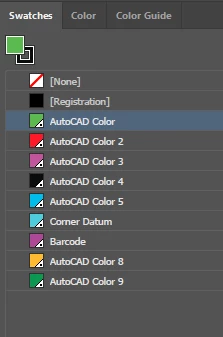
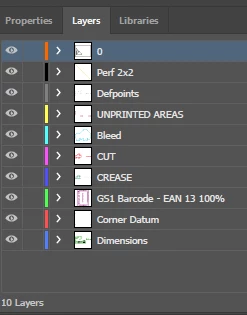
The above Swatch name list can vary sometimes, eg - sometimes there will be more or sometimes less layers.
it all depends upon the print dieline requirements, the layers listed are the main ones used
The Red lines are examples of swatch colours that may be there on occasion.
I don't know if it is possible for a script to do this
(including the chance that some layers may or may not be present) ?
but if it was, this would save me the task of repeatedly doing this routine for every drawing I import.
If I can achieve removal of 90% of this repetition (by your clever scripting)
it may well retain some of my sanity for manually re-naming the remaining swatches that can't be captured.
I'd welcome your thoughts and thank you in anticipation of any help.
PS I'm in Australia so I'm not ignoring you - if there is a delay in my reply.
Daryl
 AdChoices