


heroleam
Known Participant
March 31, 2022
Answered

Script to create layer and already set the color

  • March 31, 2022
  • 3 replies
  • 3073 views

I'm looking for a script that creates a new layer and already sets the color to Light Blue, but that keeps the Light Blue option and doesn't simulate it with Custom.
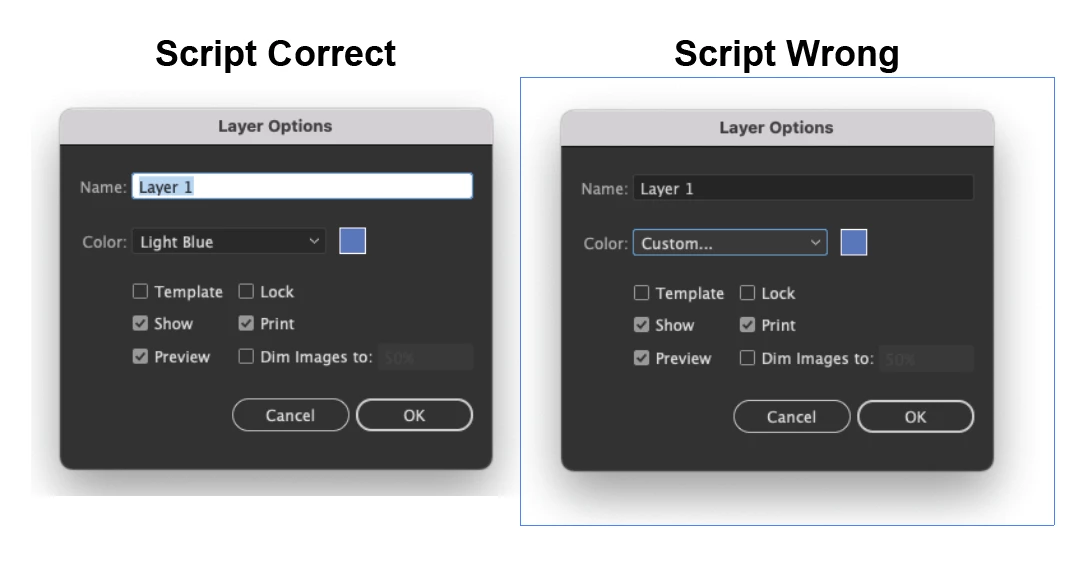

 

Correct answer tomr11694738

I'm not sure if this is what the OP looking for but..

https://www.dropbox.com/s/1etriuidpqqekvg/NewLayerColor_%20AI26%20Release_x64.aip?dl=0

for AI 2022, Win platform.

It forces all new layers to LightBlue color like on  a previous animation.


3 replies

Inspiring
April 1, 2022

Another options is to make a plugin which handles new layer creation event.

But unfortunately I have only a Win platform.


tomr11694738Correct answer
Inspiring
April 1, 2022

I'm not sure if this is what the OP looking for but..

https://www.dropbox.com/s/1etriuidpqqekvg/NewLayerColor_%20AI26%20Release_x64.aip?dl=0

for AI 2022, Win platform.

It forces all new layers to LightBlue color like on  a previous animation.


heroleam
heroleamAuthor
Known Participant
April 7, 2022

Very good man, that's exactly what I wanted, you're awesome!

Kurt Gold
Adobe Expert
March 31, 2022

Yesterday I already suggested to take a look at an action I had created a couple of years ago. It still works in the latest Illustrator versions and does exactly what you want.


See here:


https://community.adobe.com/t5/illustrator-discussions/fix-layer-color/td-p/12846828


https://community.adobe.com/t5/illustrator-discussions/layer-colors-set-default/m-p/9184587#M55097


Have you already tried it (following the instruction I provided in the older thread)?


heroleam
heroleamAuthor
Known Participant
March 31, 2022

I tested your action, but it does the same thing as the program itself, it will create a layer with a random color...

Larry G. Schneider
Inspiring
March 31, 2022

Why bother with Layers if they are all the same color? Just use a single layer.

pixxxelschubser
Adobe Expert
March 31, 2022

IMHO we are not able to use predefined colors for layers with scripting. Sorry

Disposition_Dev
Brainiac
April 1, 2022

every once in a while the suggestion of an impossibility lights a fire under me and i want to start figuring it out... The following is NOT good code and should NOT be considered an effective or useful workaround...


However... Having said that, there IS actually a way to determine the color of the layer label... Kind of...


As we know, when a layer is created, it's automatically assigned a color. i always assumed these were randomized.. but in my quick testing here, it looks like the same values are used every time. So let's say you write a little loop that just creates 10 empty layers.. We can check the "color" of each one of those layers to see whether it looks like what color we want... if it matches, then we can get rid of the rest of the layers so that we're left only with the layer that has the appropriate color. 


But what if the color i want isn't used for any of those 10 layers?! Make more, dammit! Make more layers and just keep checking their color until you find the one you want. Except that while testing this, I just learned that the numbers begin to repeat after 27 color combinations... i went through this whole thing of making a "library" of the first 1000 colors used for newly created layers.. and it just keeps repeating after 27. This isnt entirely bad, because tyring to make 1000 layers and then deleting 999 of them isn't a very quick or efficient process... So the good news is you'll never have to process more than 27 layers... The other good news is that that means you get to choose your own custom color, as long as it's one of these 27 colors


So, whenever you create a new layer, it will use one of the following colors, according to the index of the layer. If the index of the layer is > 27 (or a multiple of 27), the next layer will use color 0.


Choose one of these colors:


Then input the index (number in the top left corner) into the "myChosenIndex" variable in this script:


#target Illustrator

function setCustomLayerColor()
{
	if(!app.documents.length)
	{
		alert("Please open a document before running this script.");
		return;
	}

	const doc = app.activeDocument;
	const layers = doc.layers;
	var layersToRemove = [];


	var layerColors = [
		{
			"r": 78,
			"g": 127,
			"b": 255
		},
		{
			"r": 255,
			"g": 78,
			"b": 78
		}, {
			"r": 78,
			"g": 255,
			"b": 78
		}, {
			"r": 78,
			"g": 78,
			"b": 255
		}, {
			"r": 255,
			"g": 78,
			"b": 255
		}, {
			"r": 78,
			"g": 255,
			"b": 255
		}, {
			"r": 255,
			"g": 255,
			"b": 78
		}, {
			"r": 127,
			"g": 127,
			"b": 127
		}, {
			"r": 0,
			"g": 0,
			"b": 0
		}, {
			"r": 255,
			"g": 102,
			"b": 0
		}, {
			"r": 0,
			"g": 85,
			"b": 0
		}, {
			"r": 0,
			"g": 153,
			"b": 153
		}, {
			"r": 204,
			"g": 153,
			"b": 102
		}, {
			"r": 153,
			"g": 51,
			"b": 0
		}, {
			"r": 153,
			"g": 51,
			"b": 255
		}, {
			"r": 255,
			"g": 153,
			"b": 0
		}, {
			"r": 0,
			"g": 0,
			"b": 136
		}, {
			"r": 255,
			"g": 153,
			"b": 204
		}, {
			"r": 153,
			"g": 153,
			"b": 255
		}, {
			"r": 153,
			"g": 0,
			"b": 0
		}, {
			"r": 102,
			"g": 102,
			"b": 0
		}, {
			"r": 255,
			"g": 153,
			"b": 153
		}, {
			"r": 153,
			"g": 0,
			"b": 51
		}, {
			"r": 153,
			"g": 204,
			"b": 0
		}, {
			"r": 153,
			"g": 102,
			"b": 0
		}, {
			"r": 102,
			"g": 0,
			"b": 102
		}, {
			"r": 187,
			"g": 187,
			"b": 187
		}, 

	]

	//
	//
	//input the index of the layer color you want here
	var myChosenIndex = 0;
	//
	//

	var ccv = layerColors[myChosenIndex]; //chosen color value


	var foundColor = false;
	var curLay,curColor;
    var counter = 0;
	while(!foundColor && counter < 27)
	{
		curLay = layers.add();
		curColor = curLay.color;
		if(Math.floor(curColor.red) == ccv.r && Math.floor(curColor.green) == ccv.g && Math.floor(curColor.blue) == ccv.b)
		{
			foundColor = true;
		}
		else
		{
			layersToRemove.push(curLay)
            counter++;
		}
        
	}
    

	for(var x=layersToRemove.length-1;x>=0;x--)
	{
		layersToRemove[x].remove();
	}

}
setCustomLayerColor();


boom. "custom" layer colors. Or at the very least, the ability to choose which of the default colors you want to use at a given time. 

heroleam
heroleamAuthor
Known Participant
April 1, 2022

Yes, I've used a script like that, but it won't be a predefined color, but a custom one...And that bothers me.