



Alex Buisse
Inspiring
February 12, 2025
Answered

Script to modify fill color of outline shape in appearance panel

  • February 12, 2025
  • 3 replies
  • 493 views

Hi,

I have a collection of items in Illustrator which are a short text surrounded by a color circle. The circle is created via an outline shape in the appearance panel, see below.
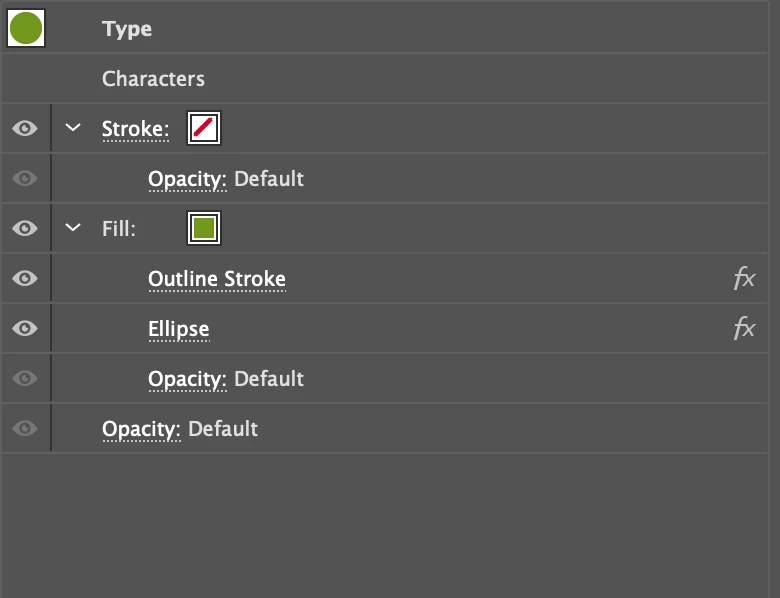
 

I have been trying to write a script that can change the fill color but can't seem to access that property. I retrieve the object, a TextFrame, and can access the text color via obj.textRange.fillColor, but can't seem to find how to change the fill color.


The documentation didn't seem to provide any methods to access the appearance properties either. I found an old message recommending the OnegaiSDK plug-in to access these, but it doesn't seem to function with CC 2025 anymore (hasn't been maintained since 2019 apparently).


Thanks for any ideas!

Correct answer sttk3

Set via Document.defaultFillColor.

/**
  * @File Set fill color of TextFrame
  * https://community.adobe.com/t5/illustrator-discussions/script-to-modify-fill-color-of-outline-shape-in-appearance-panel/td-p/15148110
  * @3653945.0.0
  * @7111211 sttk3.com
*/

(function() {
  if(app.documents.length <= 0) {return ;}
  var doc = app.documents[0] ;
  var sel = doc.selection ;
  if(sel.length <= 0) {return ;}
  
  var targetItem = sel[0] ;

  var newColor = new CMYKColor() ;
  newColor.cyan = 100 ;
  newColor.magenta = 0 ;
  newColor.yellow = 0 ;
  newColor.black = 0 ;

  // make only targetItem selected
  doc.selection = [] ;
  doc.selection = [targetItem] ;

  // set color
  doc.defaultFillColor = newColor ;

  // restore selection
  doc.selection = sel ;
})() ;

3 replies

Kurt Gold
Community Expert
Community Expert
February 13, 2025

sttk3's approach is really good.


Probably you already know that there are some other ways to recolour multiple objects that have Appearance panel colours in one go:


- Use global colour swatches and modify / replace them in the Swatches panel.


- Or use Recolour Artwork in the Edit menu.


- Or use graphic styles, modify their appearances once, and then redefine the graphic styles.

sttk3Correct answer
Legend
February 12, 2025

Set via Document.defaultFillColor.

/**
  * @File Set fill color of TextFrame
  * https://community.adobe.com/t5/illustrator-discussions/script-to-modify-fill-color-of-outline-shape-in-appearance-panel/td-p/15148110
  * @3653945.0.0
  * @7111211 sttk3.com
*/

(function() {
  if(app.documents.length <= 0) {return ;}
  var doc = app.documents[0] ;
  var sel = doc.selection ;
  if(sel.length <= 0) {return ;}
  
  var targetItem = sel[0] ;

  var newColor = new CMYKColor() ;
  newColor.cyan = 100 ;
  newColor.magenta = 0 ;
  newColor.yellow = 0 ;
  newColor.black = 0 ;

  // make only targetItem selected
  doc.selection = [] ;
  doc.selection = [targetItem] ;

  // set color
  doc.defaultFillColor = newColor ;

  // restore selection
  doc.selection = sel ;
})() ;
Alex Buisse
Inspiring
February 13, 2025

Thank you so much, that did it! You just saved me hours and hours of tedious work.

renél80416020
Inspiring
February 12, 2025

Bonjour Alex,

il faut utiliser:


var doc = activeDocument;
doc.textFrames[0].selected = true;
app.executeMenuCommand ('expandStyle');


René


Alex Buisse
Inspiring
February 12, 2025

Hi René,

I am trying to avoid using "Expand Appearance", as it is non-reversible. The text occasionally changes when I update the file, and if appearance is expanded, I then have issues with things not being centered anymore. I like the Appearance/Outline solution to generate the circles, and was hoping to find a solution to update the fill color without changing anything else.