


Participating Frequently
July 19, 2022
Answered

Script to rename artboards from textbox values?

  • July 19, 2022
  • 4 replies
  • 1378 views

Hi,

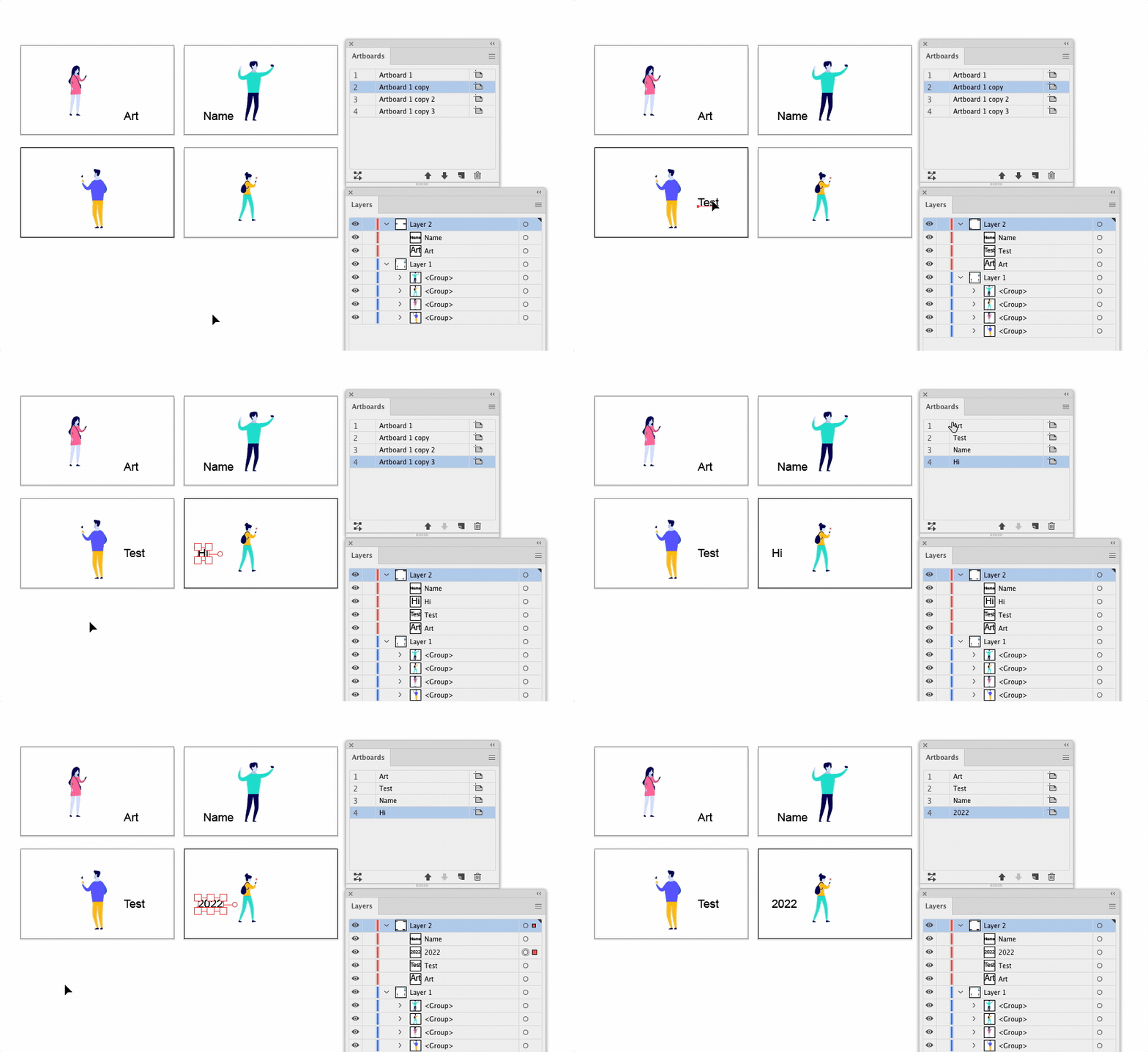
Is there a way to rename all artboards based on the text that occurs in a textbox in a specefic location on the artboard?

Effectively just copying the text to the artboard name.


I'm unsure if it's even possible to specify a textbox by location?

if it is would they have to be identical, or can you set a range i.e. 'the textbox that sits between 30-35mm from the top of the board' or similar?


Is this overly complicated? would it be easier to compile a list in excel and import into the artboard names somehow instead? Ideally I'd avoid this as I still have to manually create the list.


Thanks.
 

This topic has been closed for replies.
Correct answer Sergey Osokin

My script has something similar. If the top object on the artboard is a TextFrame, its contents will be the name of the artboard. If it's a different type of object, its name will be the name of the artboard
https://github.com/creold/illustrator-scripts/blob/master/jsx/RenameArtboardAsTopObj.jsx

4 replies

Sergey Osokin
Sergey OsokinCorrect answer
Inspiring
July 21, 2022

My script has something similar. If the top object on the artboard is a TextFrame, its contents will be the name of the artboard. If it's a different type of object, its name will be the name of the artboard
https://github.com/creold/illustrator-scripts/blob/master/jsx/RenameArtboardAsTopObj.jsx

Participating Frequently
July 21, 2022

I'd already come across your work and this is how I ended up doing it as it was easy to have all the names in a single layer and then just lock all other layers and run this script.


Thanks for sharing!


femkeblanco
Brainiac
July 19, 2022

This is based on the "Artboard title text frame" being the bottom-most textframe in an artboard.

var doc = app.activeDocument;
doc.selection = null;
var ABs = doc.artboards;
for (var i = 0; i < ABs.length; i++) {
    ABs.setActiveArtboardIndex(i);
    doc.selectObjectsOnActiveArtboard();
    var frames = [];
    for (var j = 0; j < doc.selection.length; j++) {
        if (doc.selection[j].typename == "TextFrame") {
            frames.push(doc.selection[j])
        }
    }
    frames.sort(function(a, b) {return a.top - b.top;})
    ABs[i].name = frames[0].contents;
}
Participating Frequently
July 21, 2022

Thanks, I ended up using Sergey's script below.

m1b
Community Expert
July 19, 2022

So you want to have some text on each artboard that sets the artboards name? It can sort of be done in various ways. How about this approach:

1. you make a textFrame item with a 'name' (in the layers panel) of "NAME_ARTBOARD_1".

2. you set the contents of the textFrame to, for example, "Figure A".

3. you repeat steps 2 and 3 for each artboard you wish to name—"NAME_ARTBOARD_2" and "Figure B", etc.

4. run a script that finds all the textFrames from step 1 and names the artboard at index 1, 2, etc. with the contents "Figure A" etc.

That would work, but you'd have to run the script again whenever you made a change. What is your scripting knowledge?

- Mark

Participating Frequently
July 19, 2022

I have Zero Scripting knowledge, so I was hoping to asses the feasibilty first.


For the above, can all the textframes containing the names be on one layer and then auto renamed using something like:

https://community.adobe.com/t5/illustrator-discussions/is-there-a-way-to-batch-rename-artboards-in-illustrator-cc/td-p/7243666/page/2


to give each text frame the 'look-up' name and then run a seperate script that'll pull the value from the object name in the layer and assign it to the artboard?


m1b
Community Expert
July 19, 2022

@default60bub5zrveng wrote:

For the above, can all the textframes containing the names be on one layer and then auto renamed using something like:

https://community.adobe.com/t5/illustrator-discussions/is-there-a-way-to-batch-rename-artboards-in-illustrator-cc/td-p/7243666/page/2

What do you mean "auto renamed"? The scripts in that thread are for speeding up batch artboard renaming. You original request is quite different I thought. At some point in the process you'll have to manually enter all the artboard names *somewhere*. I assumed you would simply enter them in as the contents of the textFrame items, for example in the "Artboard title text frame" text frame in your screenshot.


Then script would find the textframe and rename its artboard accordingly. Have I got that wrong?

- Mark

femkeblanco
Brainiac
July 19, 2022

Can you show a screenshot of an example?  

Participating Frequently
July 19, 2022