



Ben Vosper
New Participant
January 14, 2022
Answered

Scripting SVG Export: "Object IDs" and "Responsive" settings

  • January 14, 2022
  • 3 replies
  • 2891 views

We're exporting some documents as SVGs using scripting, and are trying to match the export settings we use via the UI. The settings we need are:
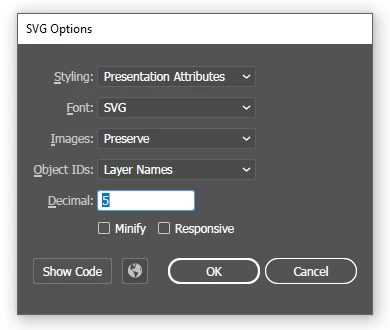

But using the ExportOptionsSVG settings in our script, it seems that we're unable to set the "Object IDs" or "Responsive" settings to our required values.

Does anyone know if this is possible? We're looking into potentially using dynamic actions from our script, but this seems heavy-handed for what should just be some simple settings!

Also, are these the most up-to-date docs for the various API functions? Or are there some other official docs that we're missing somewhere?

This topic has been closed for replies.
Correct answer Ben Vosper

We've made some progress with this. It turns out that there is also ExportOptionsWebOptimizedSVG and ExportType.WOSVG that we can use. This option class does have the svgResponsive property which seems to do what we need. It also seems to be doing "Object IDs = Layer Names" by default.

We pieced this together from some info in this post as well as some related docs for the ExportForScreensOptionsWebOptimizedSVG object buried in this post .

So the question now is, is this a valid approach or is there some reason we shouldn't be using these undocumented settings?

cc @CarlosCanto here because you published the "What's New in Illustrator Scripting CC2018" post mentioned above. Thoughts?

3 replies

CarlosCanto
Community Expert
January 14, 2022

Glad to see you found your own answer Ben

m1b
Community Expert
January 14, 2022

Hi @Ben Vosper, here's a link to ExportOptionsWebOptimizedSVG and ExportForScreensOptionsWebOptimizedSVG. Bookmark this site for latest API entries (you'll need the current one also—this only has the new stuff).

- Mark

Ben Vosper
New Participant
January 14, 2022

@m1bAmazing, thanks! Are these docs you maintain yourself or are they an offical Adobe resource? Just wondering if they're linked from anywhere!

m1b
Community Expert
January 14, 2022

No I don't maintain them and they aren't official adobe. I only just found the site thanks to CarlosCanto! Thank you Carlos!

 - Mark

Ben Vosper
Ben VosperAuthorCorrect answer
New Participant
January 14, 2022

We've made some progress with this. It turns out that there is also ExportOptionsWebOptimizedSVG and ExportType.WOSVG that we can use. This option class does have the svgResponsive property which seems to do what we need. It also seems to be doing "Object IDs = Layer Names" by default.

We pieced this together from some info in this post as well as some related docs for the ExportForScreensOptionsWebOptimizedSVG object buried in this post .

So the question now is, is this a valid approach or is there some reason we shouldn't be using these undocumented settings?

cc @CarlosCanto here because you published the "What's New in Illustrator Scripting CC2018" post mentioned above. Thoughts?

Ben Vosper
New Participant
January 14, 2022

Working export code for reference:

function exportFileAsSvg(path) {
    const options = new ExportOptionsWebOptimizedSVG();
    options.compressed = false;
    options.coordinatePrecision = 3;
    options.cssProperties = SVGCSSPropertyLocation.PRESENTATIONATTRIBUTES;
    options.fontSubsetting = SVGFontSubsetting.None;
    options.fontType = SVGFontType.SVGFONT;
    options.svgResponsive = false;

    app.activeDocument.exportFile(new File(path), ExportType.WOSVG, options);
}

exportFileAsSvg("X:\\foo.svg")