

twtybrd678-0b9rVM
New Participant
April 28, 2019
Answered

Sideways Text

  • April 28, 2019
  • 5 replies
  • 2795 views

I just can't figure out how to place a text of words to be read sideways like you had to turn the paper sideways to read it.

Thanks,

Joe

This topic has been closed for replies.
Correct answer Steve Werner

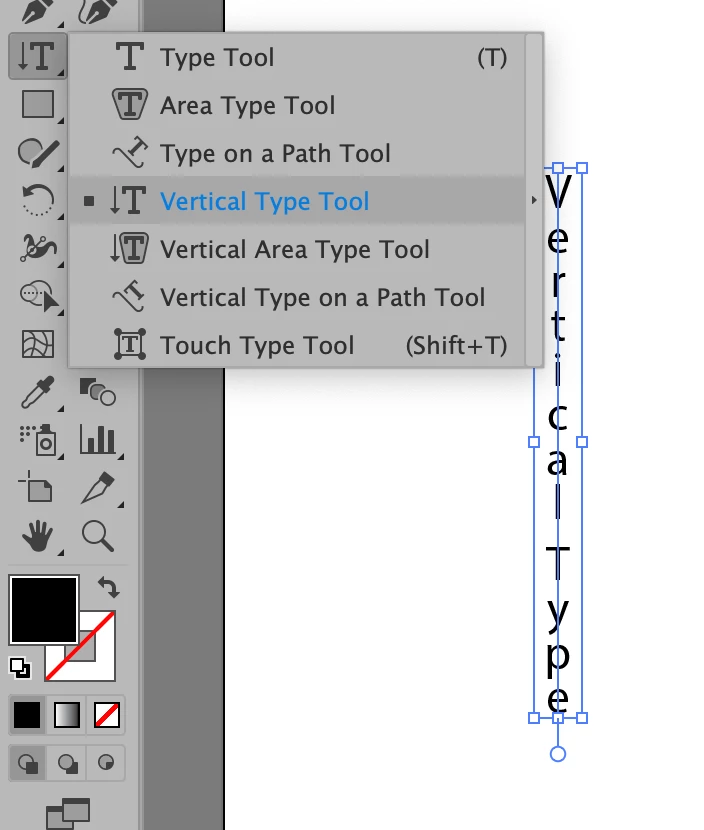
Monika probably has it right, but in case you wanted the text vertical, there is a Vertical Type tool:
5 replies

Simmer1
Inspiring
April 30, 2019

Hey

Try typing your word as normal:

Next select: Effects> Distort and Transform> Transform

Then set your Rotation point from the top left and the Angle to 270:

Hope this helps,

Sim

Steve Werner
Braniac
April 30, 2019

All great suggestions but the original poster has never returned to reply to any of them.

Braniac
April 29, 2019

If you are having a problem with your shape rotating, but the text remaining upright, try using the Rotate tool from the toolbar instead of the rotate arrow that appears when you hover over the shape. 

Myra Ferguson
Braniac
April 29, 2019
"...like you had to turn the paper sideways to read it."

If you want to set up your document like a letter sized sheet is rotated after you've already started, you can change the orientation in the Properties panel by clicking Edit Artboards and to the right of Preset, change portrait to landscape by clicking on the icon.

Inspiring
April 28, 2019

"...like you had to turn the paper sideways to read it"

Type out your text ( just as Monika has explained ) > rotate 90 degrees + or - depending on which side of the paper you want it.

Monika Gause
Braniac
April 28, 2019

Just create it upwards and then rotate it?

Steve Werner
Steve WernerCorrect answer
Braniac
April 28, 2019

Monika probably has it right, but in case you wanted the text vertical, there is a Vertical Type tool: