Inspiring
February 26, 2023
Answered

Simulate color paper

  • February 26, 2023
  • 1 reply
  • 1699 views

Hi,

there is a way to "Simulate colored paper" using script ?

I have a ton of documents with this white "stroke"

The only elegant way to view it, is by document setup, and I think I can do it faster using script 

(I don't want transparency grid, or a colored path below art)

This topic has been closed for replies.
Correct answer Sergey Osokin

Thank you, nice approach!

The limitations are fine to me

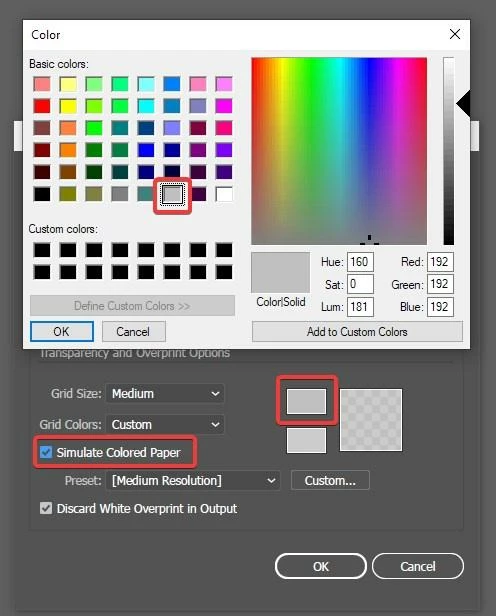
I cannot figure out how I can select for example a gray color and apply it


Color menu selection cannot be simulated from the keyboard via VBS. You can vote to enable the transparency grid for all documents: Option to "Show Transparency Grid" by default for all the files at all the time

1 reply

m1b
Adobe Expert
February 27, 2023

Hi @siomosp, you are right that a script would do this faster. However, I had a search through the scripting API—I searched in the OMV for "paper" and "simulate" and "transparency", as well as looking in the obvious places, and, unfortunately I found nothing that looked like it gave us access to the "Simulate Paper Color" option. My guess is that we can't do it in a "normal" way via script, but I could be wrong. Maybe it just has a strange name in the OMV. Hopefully someone has a solution. Perhaps an action?

- Mark

Sergey Osokin
Inspiring
February 27, 2023

I thought about opening the Document Setup window in JSX code and then running the built-in VBScript code to enable the options.  @siomosp limitations: 1) Windows OS only, 2) Illustrator localization with the Latin alphabet to select the preset by the first letter of the name "M", 3) GPU preview must be enabled.


//@target illustrator
function main() {
  if (!/win/i.test($.os)) {
    alert("Sorry, the script only works in Windows OS","Script Error");
    return
  }
  if (parseFloat(app.version) < 16) {
    alert("Sorry, script only works in Illustrator CS6 and above","Script Error");
    return;
  }
  if (!documents.length) return;
  enableSimColorPaper();
  app.executeMenuCommand("document");
}

function enableSimColorPaper() {
  if (!/win/i.test($.os)) return false;
  var tab = parseFloat(app.version) < 23 ? 10 : 9;
  try {
    var f = new File(Folder.temp.absoluteURI + "/SimulateKeyPress.vbs");
    var s = 'Set WshShell = WScript.CreateObject("WScript.Shell")\n';
    while (tab--) {
      s += 'WshShell.SendKeys "{TAB}"\n';
    }
    s += 'WshShell.SendKeys "{M}"\n'; // Medium grid name, EN locale
    s += 'WshShell.SendKeys "{TAB}"\n';
    s += 'WshShell.SendKeys "{ }"\n';
    s += 'WshShell.SendKeys "{ENTER}"\n';
    f.open('w');
    f.write(s);
    f.close();
    f.execute();
  } catch(e) {}
}

// Run script
try {
  main();
} catch (e) {}


siomospAuthor
Inspiring
February 27, 2023

Thank you, nice approach!

The limitations are fine to me

I cannot figure out how I can select for example a gray color and apply it