


SVG export format completely changed with Illustrator 28.4
[update August 2, 2024]
With Illustrator 28.6, Adobe again changed the SVG format. They seem to have abandoned the use of `data-name` for complex object ID's.
Illustrator 28.4.1-28.5:
<rect id="mouse_link_n" data-name="mouse/link/n" class="cls-17"...
Illustrator 28.6:
<rect id="mouse_x2F_link_x2F_n" class="cls-17...
This is the same as the old format, before 28.4.1. However, the new stylesheet format is still used (.cls-1 etc.).
——————————
Beginning with Illustrator 28.4, the format of SVG files exported via Javascript are in a very different format.
The following examples are exported with:
options.cssProperties = SVGCSSPropertyLocation.STYLEELEMENTS;
...
doc.exportFile(fileObjSingle, ExportType.SVG, svgOptions);
The AI file looks like this:
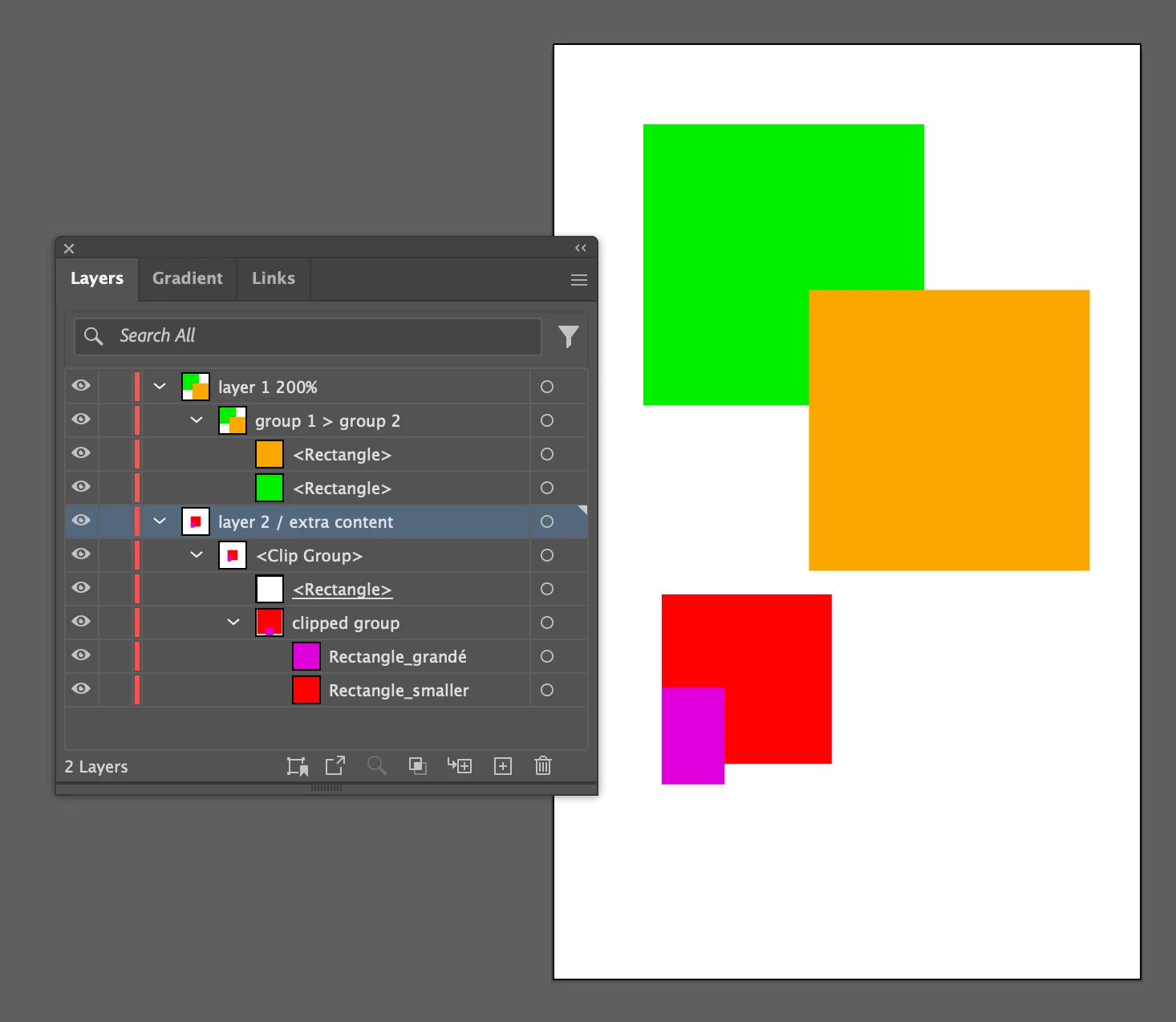
The old format looked like this (Illustrator 28.3):
<?xml version="1.0" encoding="utf-8"?>
<!-- Generator: Adobe Illustrator 27.9.0, SVG Export Plug-In . SVG Version: 6.00 Build 0)  -->
<svg version="1.1" xmlns="http://www.w3.org/2000/svg" xmlns:xlink="http://www.w3.org/1999/xlink" x="0px" y="0px"
	 viewBox="0 0 500 500" style="enable-background:new 0 0 500 500;" xml:space="preserve">
<style type="text/css">
	.st0{clip-path:url(#SVGID_00000050657835777145769900000007173324349283303303_);}
	.st1{fill:#FF000D;}
	.st2{fill:#CA00D5;}
	.st3{fill:#2AEC00;}
	.st4{fill:#F0AB00;}
</style>
<g id="layer_2__x2F__extra_content">
	<g>
		<defs>
			<rect id="SVGID_1_" x="207.75" y="328.25" width="128" height="128"/>
		</defs>
		<clipPath id="SVGID_00000120556236775382720460000010520103355737100182_">
			<use xlink:href="#SVGID_1_"  style="overflow:visible;"/>
		</clipPath>
		<g id="clipped_group" style="clip-path:url(#SVGID_00000120556236775382720460000010520103355737100182_);">
			<rect id="Rectangle_x5F_smaller" x="150" y="270.5" class="st1" width="128" height="128"/>
			<rect id="Rectangle_x5F_Grandé" x="193.5" y="367" class="st2" width="40" height="40"/>
		</g>
	</g>
</g>
<g id="layer_1_200_x25_">
	<g id="group_1__x3E__group_2">
		<rect x="37.5" y="33.5" class="st3" width="116.5" height="116.5"/>
		<rect x="106.25" y="102.25" class="st4" width="116.5" height="116.5"/>
	</g>
</g>
</svg>
The new format looks like this (Illustrator 28.4 & 28.4.1):
<?xml version="1.0" encoding="UTF-8"?>
<svg xmlns="http://www.w3.org/2000/svg" xmlns:xlink="http://www.w3.org/1999/xlink" version="1.1" viewBox="0 0 500 500">
<defs>
<style>
.cls-1 {
clip-path: url(#clippath);
}
.cls-2 {
fill: none;
}
.cls-2, .cls-3, .cls-4, .cls-5, .cls-6 {
stroke-width: 0px;
}
.cls-3 {
fill: #f0ab00;
}
.cls-4 {
fill: #ff000d;
}
.cls-5 {
fill: #2aec00;
}
.cls-6 {
fill: #ca00d5;
}
</style>
<clipPath id="clippath">
<rect class="cls-2" x="207.75" y="328.25" width="128" height="128"/>
</clipPath>
</defs>
<g id="layer_2_extra_content" data-name="layer 2 / extra content">
<g class="cls-1">
<g id="clipped_group" data-name="clipped group">
<rect id="Rectangle_smaller" class="cls-4" x="150" y="270.5" width="128" height="128"/>
<rect id="Rectangle_grandé" class="cls-6" x="193.5" y="367" width="40" height="40"/>
</g>
</g>
</g>
<g id="layer_1_200_" data-name="layer 1 200%">
<g id="group_1_group_2" data-name="group 1 &gt; group 2">
<rect class="cls-5" x="37.5" y="33.5" width="116.5" height="116.5"/>
<rect class="cls-3" x="106.25" y="102.25" width="116.5" height="116.5"/>
</g>
</g>
</svg>
There are many many changes:
- the style definitions
- ID's now strip out characters like / or < instead of replacing them with entities
- the original names are included via data-name tags
- the comment from the 2nd line is now gone
- clipping paths are handled differently
I have built a complex program over many years that depends on the previous format, and it is now completely broken.
Does anyone know how to get back the previous SVG export format?
Does anyone know if this is a bug that will be fixed?
I have filed a bug report with Adobe.
 AdChoices