


Piter1288
Inspiring
December 16, 2020
Question

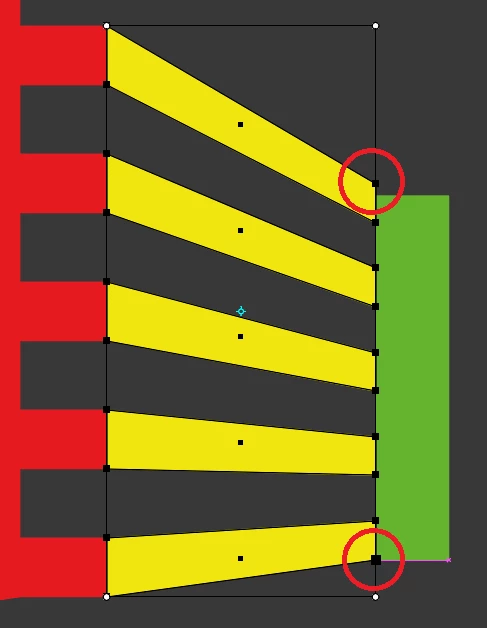
The bounding box does not follow the shape on free transform tool

  • December 16, 2020
  • 2 replies
  • 599 views

So I'm using the free transform tool to create some perspective because I need it to match the green rectangle height. I've done this in the past and it used to work fine but now I've aligned the bottom point and the bouding box stays a rectangle meaning if I move the top point it will move the bottom one again and so on. I need to grab each of them separately to a specific point keeping it available for adjustment. I've recently restarted AI so I don't know which option was changed. Hope I've explained myself clear.
 

This topic has been closed for replies.

2 replies

Doug A Roberts
Community Expert
December 16, 2020

What version of Illustrator are you using?

Piter1288
Piter1288Author
Inspiring
December 16, 2020

24.1.3 but it is the same version I had when I did it correctly.

Piter1288
Piter1288Author
Inspiring
December 16, 2020

And you're definitely using the free transform tool? I can't get it to behave incorrectly.


Sorry, it is the "free distort" tool. This guy explains my exact my problem: https://www.youtube.com/watch?v=Nc5noORtWe4 there's also a comment leading to this page: https://illustrator.uservoice.com/forums/333657-illustrator-feature-requests/suggestions/20525761-free-distort-bounding-box-doesn-t-follow-shape stating this was solved on version 24.1.1 but I still face that issue.


I had updated to 25.0.1 but had to roll back as I had this issue there: https://community.adobe.com/t5/illustrator/messed-up-values-on-size-and-corners-numbers-don-t-match-what-i-have-entered/m-p/11674890?page=1 

Piter1288
Piter1288Author
Inspiring
December 16, 2020

Here's another image of what I'm talking about. I got this from a Youtube tutorial in which the person uses the free distort and the bounding box follows the shape making each point editable independently from each other: