


Known Participant
November 17, 2023
Question

The shortcut "ctrl + tab"" to switch tabs (opened documents) doesn't work in Illustrator.

  • November 17, 2023
  • 4 replies
  • 12830 views

The shortcuts "ctrl + tab" and "ctrl + shift + tab" to switch tabs (open documents) don't work in Illustrator. They work in Adobe Photoshop (and any browser or app with tabs), but not in Illustrator for some reason. Please, somebody, fix it.
 

4 replies

Participant
September 25, 2024

Really late to reply, but this might help someone  - on my Mac M1, and the magic keyboard, its [COMMAND ~] . So I'm not entirely sure what that key is, I think it's the tilde key - see attached photo. Definitely works for me. So happy!!! 

Known Participant
December 13, 2024

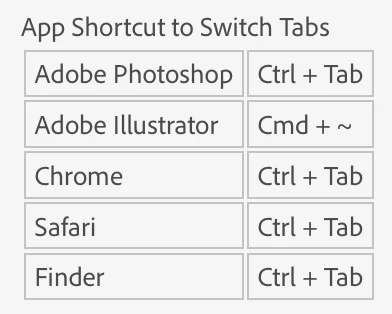
🤦‍♂ Dude, that's the issue. Instead of the standard Ctrl (+ Shift) + TAB, some other weird shortcuts work. As a result, the shortcuts are inconsistent. Look at this:

App Shortcut to Switch Tabs

Adobe PhotoshopCtrl + Tab
Adobe IllustratorCmd + ~
ChromeCtrl + Tab
SafariCtrl + Tab
FinderCtrl + Tab


The purpose of this post is to request a UX improvement: changing the weird, nonstandard shortcuts to standard ones. These shortcuts aren't even consistent across Adobe's apps, let alone other applications. Why would anyone want to use several different shortcuts for the same feature? What's good about that?

Known Participant
December 26, 2024

Hello @Eugen33238918pe67,

I understand your concerns regarding the inconsistent shortcut behavior in Illustrator. Would you mind creating a UserVoice for this feature request (https://adobe.ly/3BHohXv) and adding your comments there? Doing this will help us prioritize this request, and you will be notified of any updates.


Feel free to reach out if you have more questions or need assistance. We'd be happy to help.


Anubhav


I included the 'Feature Request' and 'Bug' tags. Isn't that enough? If not, why do they even exist – to confuse users?


adriawo
Participating Frequently
December 18, 2023

My problem is in the Photoshop.


Here is woking like this:

- Illustrator:  Cmd + ` or  ~

- Photoshop: ctrl + tab


How can I change Photoshop to work with the shortcut Cmd + ` or  ~

?

Known Participant
December 18, 2023

Why would you want to change it? Photoshop has the standard shortcuts (Ctrl/Cmd + Tab, Ctrl/Cmd + Shift + Tab) to cycle through open tabs/documents, so there is no problem with it. The issue lies with Illustrator, as the shortcuts 'Cmd/Ctrl + `' aren't standard and consistent. Open another app with tabs (a web browser of your choice, for instance) and check for yourself.

adriawo
Participating Frequently
December 18, 2023

So, my mindset is using cmd +`. In Illustrator, chrome, and another apps. Just Photoshop isn't working this shortcut. 

It's important to say, I formated my mac some last week and since then, the shortcut cmd + `in Photoshop has change to ctrl + tab.


Funny is I don't know if I change something before to work in Photoshop the cmd + `

Michael Ambroise
Community Expert
Community Expert
November 17, 2023

You may need to explore the keyboard shortcuts settings in Illustrator.

_______Senior graphic designer | United Nations Population Fund
Doug A Roberts
Community Expert
Community Expert
November 17, 2023

Ctrl + Tab is not accessible from Illustrator's keyboard shortcuts, as it's reserved for system functions. There are equivalent commands ('Navigate to Next Document', default Ctrl + F6), though.

Michael Ambroise
Community Expert
Community Expert
November 17, 2023

To see if there is anything that could have affected this shortcut.

_______Senior graphic designer | United Nations Population Fund
Doug A Roberts
Community Expert
Community Expert
November 17, 2023

It works fine for me on Windows 11, AI 27.9

Which OS and Illustrator version are you using?

Known Participant
November 17, 2023

macOS 12.7.1

Illustrator 28.0

Michael Ambroise
Community Expert
Community Expert
November 17, 2023

@brumby0890  To switch tabs In Illustrator, the shortcut is: Cmd + ` or Cmd + ~

_______Senior graphic designer | United Nations Population Fund