


New Participant
December 19, 2017
Answered

toolbars not offering dropdown menus

  • December 19, 2017
  • 9 replies
  • 12409 views

Working on Adobe Illustrator CC 18 (20.0.1) on a mac running OS 10.11.6. A number of my toolbars are not providing dropdown menus. More specifically, I cannot click on the arrow next to the type size to see a drop down of menu options. Noticed the same for Transparency tool; the drop down does not work so I cannot change the transparency effect. Has anyone experienced this issue and found a fix? Thanks.
    This topic has been closed for replies.
    Correct answer JoeLloyd33

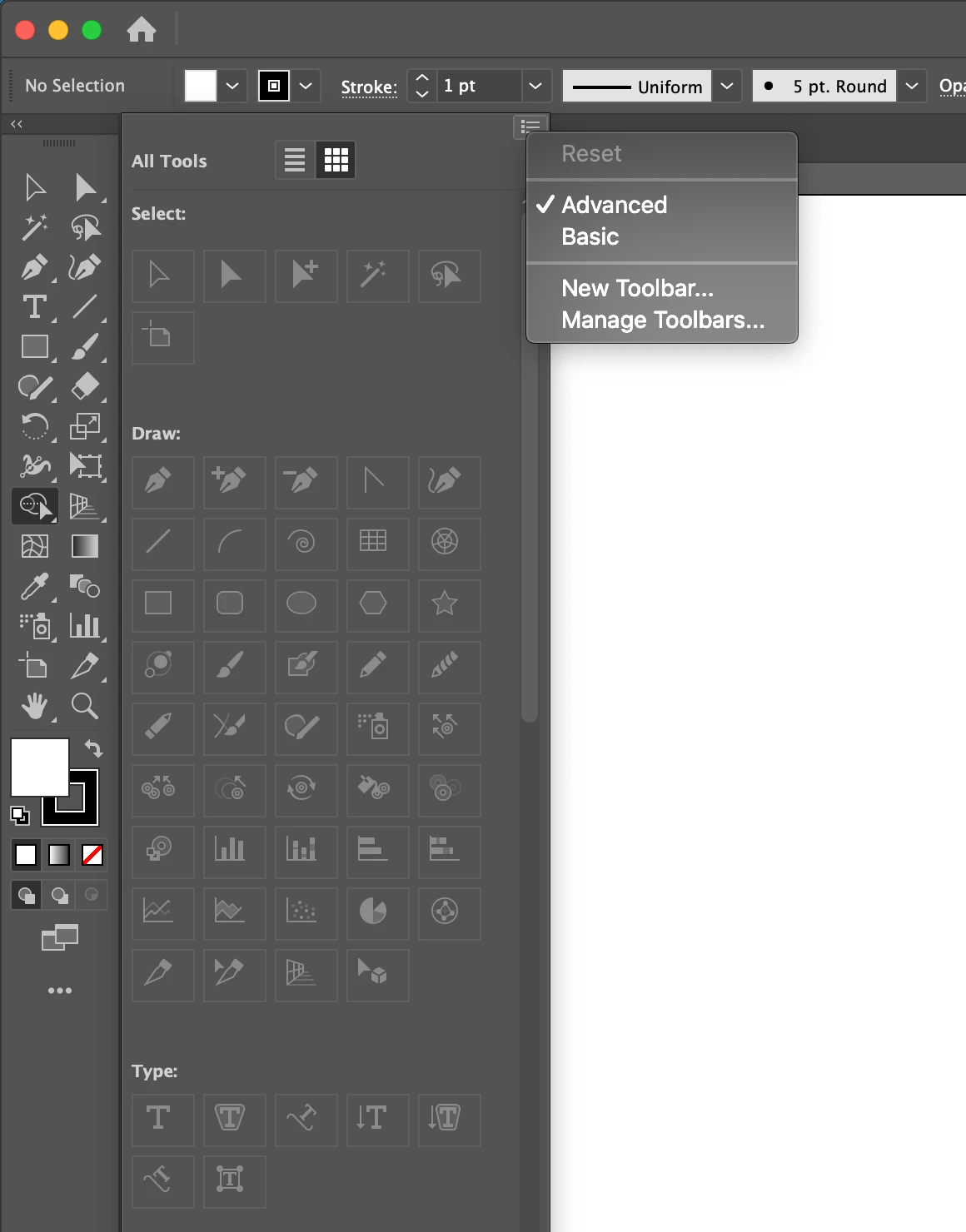
    This seemed to work for me. Go to 3 dots to 'edit toolbar' then go up to the top right corner of the window and click on the drop down icon which has the option for advanced. That added the arrow for the drop down list to my shape builder tool as well as others. 

    9 replies

    brainfade619
    New Participant
    September 10, 2024

    This fix worked for me kenm808, TY How the hell is this still an issue though. Come on Adobe, this seems simple enogh to fix with a patch. should'nt be an issue for this long. Just unreal!!

    New Participant
    January 26, 2024

    Same issue for me. Absolutely confounds belief, how is this even a problem? We've had drop-downs for 40 years now. I have to constantly log-in to do ANYTHING. I have to google 'How-to's' and troubleshooting every week! But in my defense I've only been using Adobe software every day for the last 32 years, so...

    Monika Gause
    Braniac
    January 26, 2024

    So you have no drop downs in panels?

    Or you have the issue with the toolbar shown in one of the posts in this thread?


    Do you also have 2 monitors? Which system?

    Participating Frequently
    April 11, 2023

    Update for my experience:


    My solution ended up being migrating the new test user space where the application performed as expected.

    Adobe was unable to determine a fix on my MacOS user–after hours of unhelpful, and hard to understand at times tech support could only advise building a new user.


    Very frustrating and disappointing experince causing hours of productivity loss.

    New Participant
    October 22, 2023

    A dual monitor setup was the culperate for me. I'm in Ai 2024 running Sonoma. First time I've ever had this happen. I'm just trying to get a few things done and have not tried to kick the 2nd monitor back on yet.

    New Participant
    October 22, 2023

    *culprit. 

    JoeLloyd33
    JoeLloyd33Correct answer
    New Participant
    April 11, 2023

    This seemed to work for me. Go to 3 dots to 'edit toolbar' then go up to the top right corner of the window and click on the drop down icon which has the option for advanced. That added the arrow for the drop down list to my shape builder tool as well as others. 

    Participating Frequently
    February 6, 2023

    Prefernece dump did not solve. I have no sub-menus; cant change arrow tool; can‘t change units. Been corresponding and chatting with Adobe with no solve.  Just did deep clean app remove and re-install. Found it works on newly created user. Very puzzling and annoying.


    CGB_CGB
    Participating Frequently
    June 7, 2022

    Yep - Same issue.

    My mac is up to date, my Ai is up to date.
    The very top bar "File, Edit, Object, Type..." etc are not responding.
    I can click them, nothing happens, I click again and get a flash of the menu.
    This is rendering my Adobe Illustrator as completely USELESS without my knowledge of hot-keys.
    What can I do?!?!?!


    Monika Gause
    Braniac
    June 7, 2022
    quote

    Yep - Same issue.

    My mac is up to date, my Ai is up to date.
    The very top bar "File, Edit, Object, Type..." etc are not responding.
    I can click them, nothing happens, I click again and get a flash of the menu.
    This is rendering my Adobe Illustrator as completely USELESS without my knowledge of hot-keys.
    What can I do?!?!?!


    By @CGB_CGB


    Current version?

    Which system?

    Are you using more than one monitor?

    Did you already reset the preferences?

    CGB_CGB
    Participating Frequently
    June 8, 2022

    Hi Monika,

    I am on the latest version of Adobe Illustrator from Creative Cloud.
    My mac is the most upto date it can be.

    I am only using one monitor,
    And I cannot get to the Preferences section of the menus, as my menus will not drop down.

    I shall continue to restart Ai and hope for the best.

    New Participant
    August 26, 2021

    I also have the same problem, when I click on the drop down menus, it doesn´t show me any off the options, and i just downloaded it and started working on it today, so i have never messed with the preferences


    New Participant
    January 13, 2021

    Are there any other suggestions for this issue? I m encountering the same problem in Illustrator on Windows. Drop down menus won't work for any panels. I did reset preferences and nothing changed.

    New Participant
    January 22, 2021

    I have the same issue since the update... Did you manage to solve it?

    New Participant
    April 30, 2021

    Can I jump on this too - same issue. 

    Srishti Bali
    Community Manager
    Community Manager
    December 19, 2017

    Hi designmade,

    As per your query, drop-down menus of few panels are not working. In that case please try resetting preferences for Illustrator.

    How to set preferences in Illustrator

    Regards,

    Srishti

    New Participant
    March 6, 2020

    Hi, Thank you for your response, but I hope you do realize that this is the Adobe suggestion for every bug that we encounter and it does not work. At this point, the first thing we do is reset the preferences. Still have problems. By the time we finally resolve the problems, if we do, then you upgrade the software and new problems arise. This problem has been replaced by host of new problems in the latets release. Thank you, but not really.