Copy link to clipboard
Copied
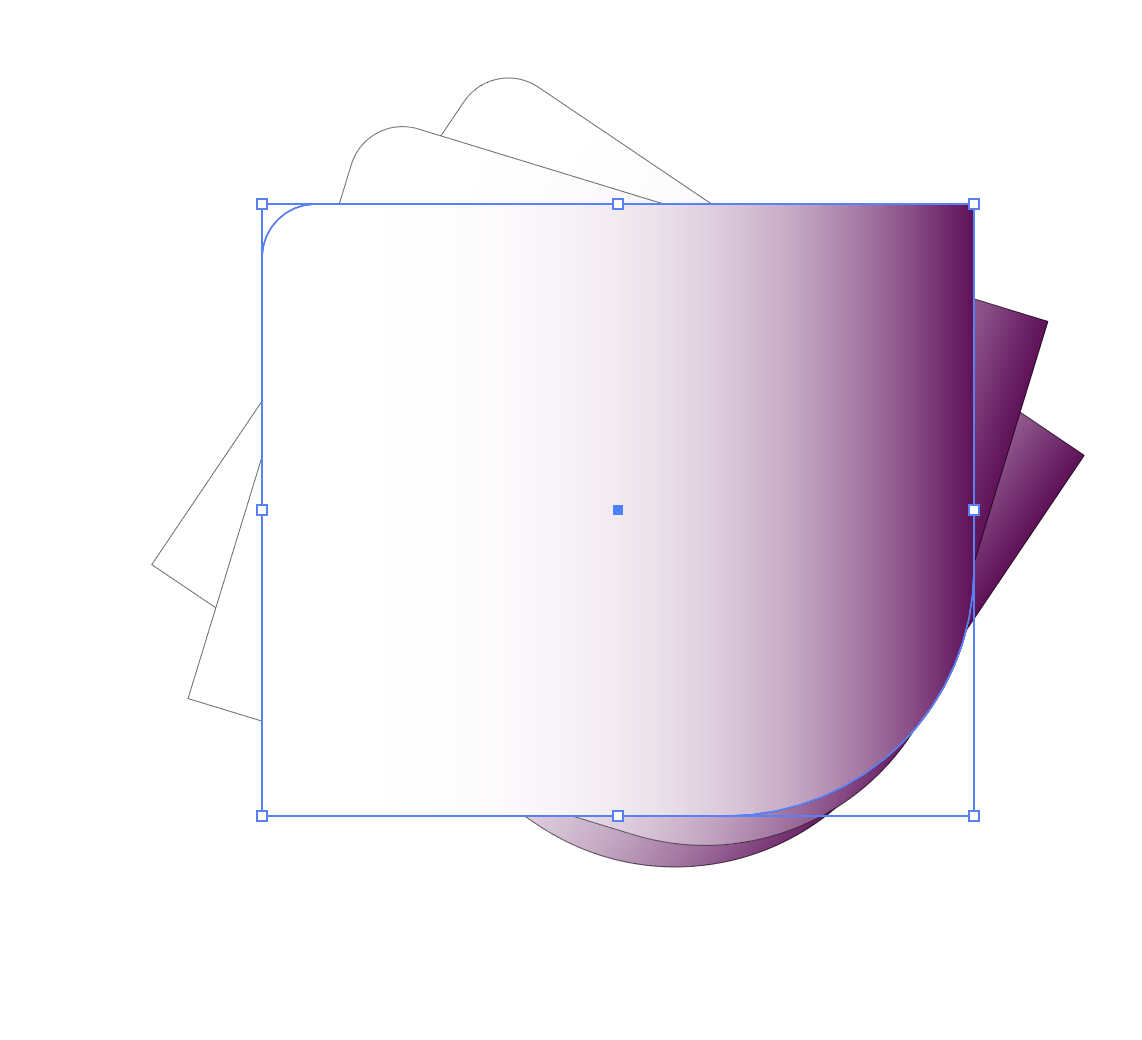
Im following a tutorial about using transfrom effect. I create a polygon shape adjust scale, roate and copies and instead of creating copies in front where I can see them they are all behind. Im using a gradient so its not transparent. When I do go transparent I can see copies. How do I apply this effect so copies are in front? Thanks for anyone who can help.


 3 Correct answers


If I understand correctly on the left is what you get and on the right is what you want.

You could vote for this feature request to have an option in the Transform Effect to change the stacking order:

Thanks I did vote. I also found a plugin through CValley Filterit that creates copys and has option to check stacking order back or front. Worked perfectly. Hopefully Illustrator will one day offer the option to stack copies in front or back.

Certainly not ideal, but in the meantime one kludge may be to make a copy of the live object, expand its appearance, then in the Layers palette highlight all items within the group that has been generated and choose the Reverse Order command in the Layers palette menu.

Explore related tutorials & articles
 15
Replies
15
15
Replies
15


Copy link to clipboard
Copied
Can you please show your result and the tutorial?
I guess you want to use the tutorial to build something different?
Basically to overcome this, you have to build the artwork the other way round, since you cannot instruct the transform effect to change stacking order. Would be a good feature request.
Copy link to clipboard
Copied
Here is the tutorial- https://www.youtube.com/watch?v=IQTQMn5GkGk&t=2292s
Fast Forward to block 6 about 4 min in.
Copy link to clipboard
Copied
sorry 40 min in
Copy link to clipboard
Copied
And what is it that you want to create? The same thing?
Note that the speakter is applying the effect only to the stroke, not to the object as a whole. Maybe that is your issue.
Copy link to clipboard
Copied
Copy link to clipboard
Copied
And what is this supposed to look like? Looks pretty much like in the tutorial.
Copy link to clipboard
Copied
No that is the tutorial picture. I didn't post mine. Mine is a shape with copies behind it you can't see. I can't get it to look like that cause his copies copy to the front and mine are in the back.
Copy link to clipboard
Copied
Please show.
Copy link to clipboard
Copied
His objects are also covering each other, but his object starts small and is scaled up.
Copy link to clipboard
Copied
So there is no way to create multiple copies in front instead of behind? I don't even understand in what situation would there be a reason to create copies behind something so you can't see them. When I copy and paste it's always in front. It's such an odd choice for the transform effect to create all the copies in the back of main shape.
Copy link to clipboard
Copied
If I understand correctly on the left is what you get and on the right is what you want.
You could vote for this feature request to have an option in the Transform Effect to change the stacking order:
 Correct answer by
gina238
AUTHOR
Correct answer by
gina238
AUTHOR
Copy link to clipboard
Copied
Thanks I did vote. I also found a plugin through CValley Filterit that creates copys and has option to check stacking order back or front. Worked perfectly. Hopefully Illustrator will one day offer the option to stack copies in front or back.
Copy link to clipboard
Copied
That is a nice plug-in. I like the option to change the stacking order and it also has the very useful option to specify the center of transformation.
Copy link to clipboard
Copied
Certainly not ideal, but in the meantime one kludge may be to make a copy of the live object, expand its appearance, then in the Layers palette highlight all items within the group that has been generated and choose the Reverse Order command in the Layers palette menu.
Copy link to clipboard
Copied
Thank you so much. I was looking for something that would reverse order and couldn't find it! That's a helpful tip.


Get ready! An upgraded Adobe Community experience is coming in January.
Learn more
 AdChoices