


trouble with selection tool.

Copy link to clipboard
Copied
i am on a macbook pro. and i just updated my cc to the most current version. i have never had this happen before. and it's very frustrating. slowed me down significantly. when i select an object, or a group of objects to move. i hear an audible blip, and i get a green circle with a plus (like i am moving files from one folder to another) and i am not allowed to move the objects. i have to try over and over again to finally be able to move it. i am totally confused. i am sure it is probably something simple. i just don't know what.



Explore related tutorials & articles
 14
Replies
14
14
Replies
14


Copy link to clipboard
Copied
This has been reported by a number of other people. Something to do with MacOS 12.3 and AI 26.1. Supposedly Adobe is working on a fix.
Copy link to clipboard
Copied
ok, thanks. glad to know this isn't just me. thank you for saving my sanity today!!

Copy link to clipboard
Copied
This has been reported by a number of other people. Something to do with MacOS 12.3 and AI 26.1. Supposedly Adobe is working on a fix.
By @Larry G. Schneider

Did a staff member comment this, or is there a uservoice post? Can you link to it?
Copy link to clipboard
Copied
Doug, Monika listed a link to uservoice in a message a couple below (the message is in German).

Copy link to clipboard
Copied
Yesterday I have read it in a post by one of the affected users that the engineers are on it. On Slack it has been reported, but no confirm yet that they are on it.
There are a couple of threads on uservoice.
Also: in a Facebook group there was someone who didn't have any issues with their Monterey 12.3.

Copy link to clipboard
Copied
No it's not just MacOS 12.3. Happening on my system:
MacOS Big Sur 11.6.4
Macbook Pro Retina
Copy link to clipboard
Copied
my exact system. MacOS Big Sur 11.6.4 2019 16 inch Macbook Pro

Copy link to clipboard
Copied
is there a way to revert to the older version again? i would rather work on the older version without this horrible glitch!!!
Copy link to clipboard
Copied
Yes, from the CC app:
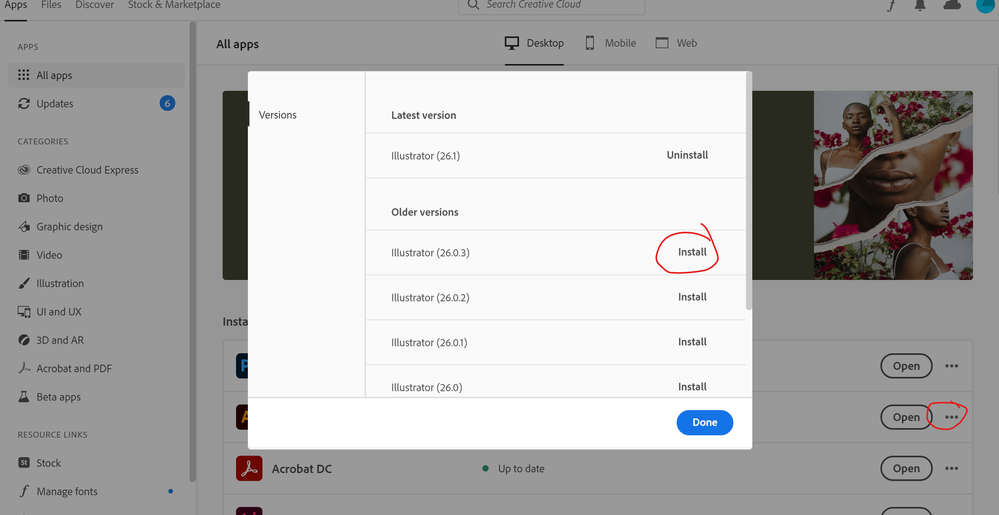
Copy link to clipboard
Copied
thank you!!


Copy link to clipboard
Copied
Hi @BJ23581667yvuh @BJ23715056rbsq @udderball,
We are sorry for the trouble. The product team is working hard on this, and the fix will be released with the next update.
The + sign icon while dragging the object in Illustrator only happens with the Apple Magic mouse.
I would request you all to upvote this UserVoice if not done already, and please be patient & stay tuned for the updates.
In the meantime, you may downgrade to Illustrator v26.0.3 until the fixed gets released. (This helped some users.)
Regards,
Anshul Saini
Copy link to clipboard
Copied
thank you so much for your response. i have been using an earlier version of the program with success, but i look forward to the fixed update. it is wonderful to know that a solution is coming. thank you and your team for you work!!

Copy link to clipboard
Copied
I have the same issue with my magic mouse... however I have an old battery (original) magic mouse in a draw so I tried that and it does not have the same issues - seems to work fine.
So instead of reverting to an earlier version of Illustrator have a rummage in the back of your draws to see if you have an older mouse to try.
Adobe - please fix this fast!!
Copy link to clipboard
Copied
Hi @BJ23581667yvuh @Fesseyo @BJ23715056rbsq
I am glad to inform you that this issue has been fixed in the latest Illustrator update, v26.2.1, released yesterday. I would request you to update and let us know if the issue persists.
Regards,
Anshul Saini


Get ready! An upgraded Adobe Community experience is coming in January.
Learn more
 AdChoices