



XYPN
Participant
January 18, 2021
Answered

Turn off Illustrator "Catch up with what's new" notification

  • January 18, 2021
  • 26 replies
  • 28626 views

Does anyone know how to turn off this notification for the Learn window in Illustrator? It pops up every single time I open Illustrator, multiple times a day regardless of when I last opened, and it's driving me crazy. It's not useful or interesting, but I can't find anyone that's successfully turned it off. 
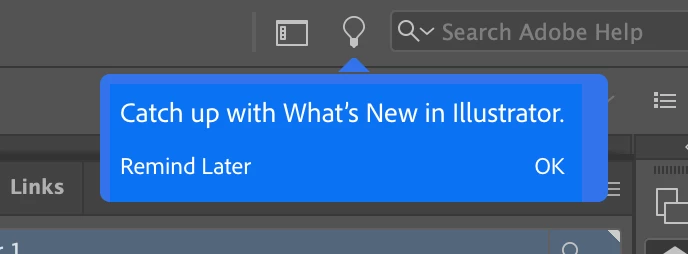
 

Correct answer Srishti Bali

Hi all,


We're extremely sorry to hear about this trouble.  I understand how distracting and frustrating it could be. Ideally, it should stop once you close it. We're currently investigating is issue but unfortunately couldn't replicate this behavior at our end. 


We need your help replicating this issue. In case you are still facing this issue, please feeel free to send us a DM. We'd be happy to help.


Regards,

Srishti


26 replies

Participating Frequently
February 16, 2022

Also updated to the new Illustrator 2021 and Photoshop 2021 and kept getting this annoying pop up. After trying all listed cures I've found one that is working in both programs. It appears related to the New Interface.


Preferences

Uncheck "Show Home Screen When No Documents Are Showing"

Check "Use Legacy New Files Interface" (Illustrator) or "Use Legacy New Documents Interface" (Photoshop).

When restarting either program for the first time both are slow reading the Preference but load normally after that.


I should note I had one instance in Photoshop when, after setting this preference and going back, opening the Preferance and making no changes, then hitting Cancel it popped up on Cancel but was okay when I went back. 


NOTE: I have had a couple instances where Show Tool Tips gets reset after and update but the above has held since May of last year.

Participant
February 16, 2022

No offense Adobe, but as a designer of 10+ years and always having been an Adobe user, this "Catch Up with..." balloon pop-up is EXTEREMLY ANNOYING. Please make a feature to disable this item.

Note: For those of you saying to disable tool-tips, that only applies to your mouse over text on the actual tool panels and other UI panels. It does not apply to this obnoxious pop-up.

Participating Frequently
November 3, 2021

Hi AudreyXY,

I run the current Illustrator and Photoshop on two machines, a laptop and iMac and it drove me crazy. Unchecking Show Tool Tips didn't help but is part of the solution I found that works on both machines in both programs. I've had no problems for the last several months.


This is the only fix that has worked for me.

- Preferences > General.

- Uncheck Show the Home Screen When No Documents Are Open..

- Check Use Legacy "File New" Interface.


Leaving Show Tools Tips helps "some" but you still get the pop-ups, just not as often. I don't want them at all so I unchecked this.


Hope this helps.

Known Participant
November 3, 2021

this is fkin annoying and I doubt anyone's even using it, please focus on fixing bugs instead of creating new pop-ups, Adobe.

Participating Frequently
October 14, 2021

Hi AudreyXY


I have tried everything listed to date and none of them worked. I run the current Illustrator and Photoshop on two machines, a laptop and iMac and it drove me crazy. Unchecking Show Tool Tips didn't help but is part of the solution I found that works on both machines in both programs. I've had no problems for the last several months.


This is the only fix that has worked for me.

- Preferences > General.

- Uncheck Show the Home Screen When No Documents Are Open..

- Check Use Legacy "File New" Interface.


Leaving Show Tools Tips helps "some" but you still get the pop-ups, just not as often. I don't want them at all so I unchecked this.


Hope this helps.

Participant
October 14, 2021

Please add "never show again" as an option, or better yet, get rid of this pop-up entirely.


I've got so much work to do right now, and I'm having to take time to make this pitiful request, which will most likely get ignored for months, or maybe even years. Perhaps it's time to find an alternitvie to Illustrator.

Known Participant
June 26, 2021

Just here to say, that on June 25th, 2021 this issue has yet to be resolved. For the love of God Adobe! Get rid of the damn notification! So annoying.

Participant
June 19, 2021

What solved the problem for me (I'm running macOS 11.4, latest Adobe CC):


- Turn off Syncing in the Creative Cloud app, and deactivated "always keep CC up to date"  in the general settings

- Start Illustrator, the notification may pop up again, click on okay, then close the "learn" window. Click "okay" on the next blue notification pop up

- When I restart Illustrator now, the annoying notification doesn't show up anymore (crossing fingers that it remains this way).


Of course, this workaround only helps/makes sense if your not using CC sync.


Cheers, Chris

Participant
June 15, 2021

Uneducated Adobe employees.

They can't understand how frustrating it is for uses. 


For my fellow friends here is the solution :


1. Go to Illustrator folder in program files.

2. Search for : 

  > com.adobe.illustrator.OnBoarding

  > com.adobe.illustrator.OnBoardingForLearnPanel

3. Delete the god***n folders (move them to a new folder in case of future need)

4. Restart Illustrator.


Srishti Bali
Community Manager
Community Manager
May 22, 2021

@Shauna5E7E  @Bruce5CDD  @Leepar @bradwoodsio

Sorry about this trouble. We're still investigating this issue. I have sent you a DM for more details, please check.


Regards!