


Arr-L
New Participant
April 22, 2017
Answered

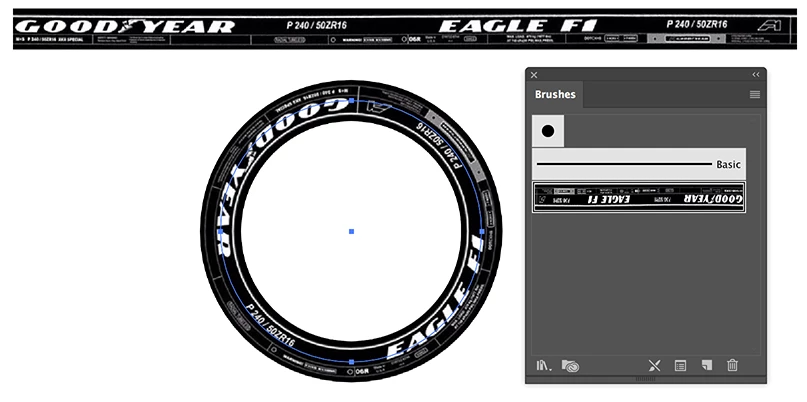
Turning type in a rectangle to a circle (pic attached)

  • April 22, 2017
  • 3 replies
  • 650 views

How is the below example achieved?

I'm assuming that the type would of been laid out normally within a rectangle and its interior lines, which would help the designer get the positioning and its balance right before then turning it into a circle. My question would be how is the linear composition then turned into a circle?
This topic has been closed for replies.
Correct answer Ton Frederiks

Maybe an Artbrush (instead of a Pattern brush) is a better solution:

3 replies

Ton Frederiks
Ton FrederiksCorrect answer
Adobe Expert
April 22, 2017

Maybe an Artbrush (instead of a Pattern brush) is a better solution:

Inspiring
April 22, 2017

I would create each section on its own circle, perhaps by using the original circle and applying offset path to achieve the circumference needed.  Or dupe circles.  Not sure I would attempt a rectangle first.

Ton Frederiks
Adobe Expert
April 22, 2017

Try making it as a Pattern Brush.