


- Home
- Illustrator
- Discussions
- Re: Type On A Path Tool is cutting off text
- Re: Type On A Path Tool is cutting off text

Copy link to clipboard
Copied
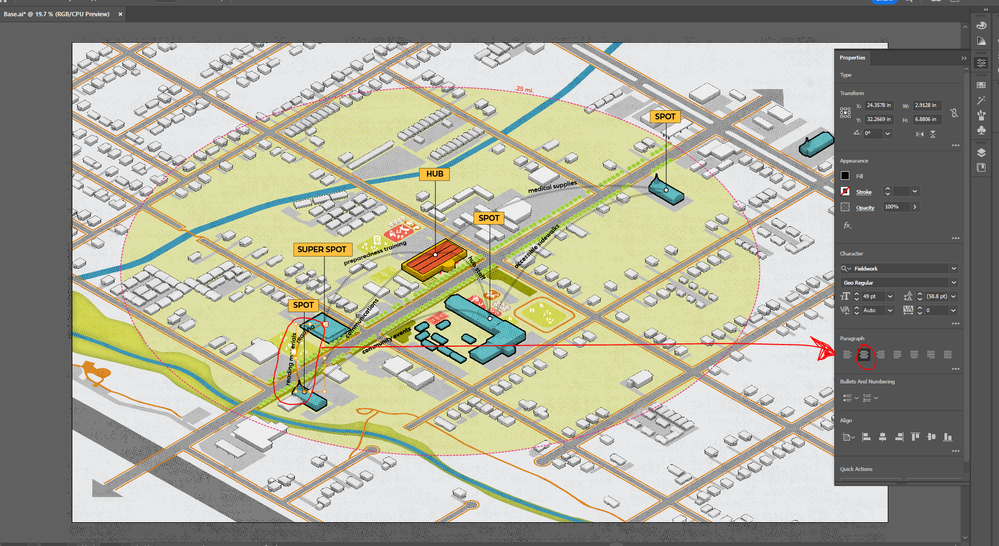
Hi! I am trying to place the text adjacent to the arc lines in the photo within the shape path of the arc. I have made a copy of all of the arcs and am using the type on a path tool to align the text to the arc. Even though I have played with the alignment and type>type on a path options, the text is biasing to one side of the arc. Even though I have typed "reading materials" on the line, only the word "reading" is shown and the rest of the phrase is falling out of the text box. If I try to extend the texbox, it just stretches the font.
How can I center the text on the arc so that all the words are visible? Thanks!


 3 Correct answers
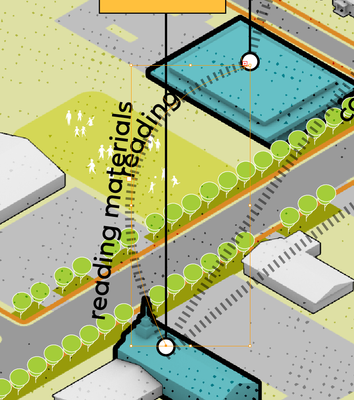
It is giving me the sign for overset text, but it isn't starting in the center of the arc, so it is not giving the text as much room as it should. I just tried to simplify the stroke (only has one midpoint now) but the same thing is happening. Here is a close up. I just incliuded the straight text off to the side for reference of the intended phrase.


… move the starting point …

[ edited by pixxxelschubser ]
Haha.
🙂
30 seconds to late

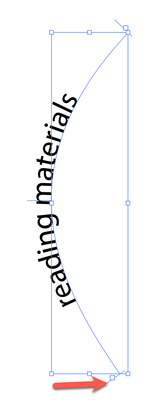
Type or paste your text. There should be a handle near the start of the type:

Drag it to the start of the path. Since you have Paragraph set to Align center, your type should properly align to the middle of the path.
Have I missed what the problem is here?
Peter
Edit: Late as usual.

Explore related tutorials & articles
 11
Replies
11
11
Replies
11


Copy link to clipboard
Copied
There is at least one other thread reporting this, but not a lot of people (if any) can reproduce it.
Does this happen in a new file?
You can report it as a bug: https://illustrator.uservoice.com
Copy link to clipboard
Copied
Yes, I am unable to upload the file for some reason... it says the "post script" something or another doesn't match for the file extension so the file was removed. Not sure what that means. I even tried locking all my layers, created a new layer, traced over the existing arc with the pen tool, and tried again... sadly no avail 😞

Copy link to clipboard
Copied
Can you provide a sample Illustrator file that includes just the Type on a Path object in question?
Copy link to clipboard
Copied
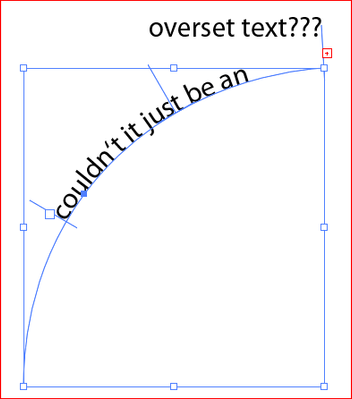
Couldn't it just be an overset text?
Copy link to clipboard
Copied
It is giving me the sign for overset text, but it isn't starting in the center of the arc, so it is not giving the text as much room as it should. I just tried to simplify the stroke (only has one midpoint now) but the same thing is happening. Here is a close up. I just incliuded the straight text off to the side for reference of the intended phrase.
Copy link to clipboard
Copied
Now I'm pretty sure it's overset text.
- What happens if you click twice on the plus sign with the selection tool (black arrow tool)?
- Or - why don't you just move the starting point of your path text?
Copy link to clipboard
Copied
🙂
Copy link to clipboard
Copied
I think you marked the wrong answer as correct, but we are glad we could help you.
😉
Copy link to clipboard
Copied
By moving the verticies with the direct selection tool, I was able to fudge it enough to work. It isn't an exact match for the radius of the arc but I'm able to eyeball it at least. Thanks!
Copy link to clipboard
Copied
… move the starting point …
[ edited by pixxxelschubser ]
Haha.
🙂
30 seconds to late
Copy link to clipboard
Copied
Type or paste your text. There should be a handle near the start of the type:
Drag it to the start of the path. Since you have Paragraph set to Align center, your type should properly align to the middle of the path.
Have I missed what the problem is here?
Peter
Edit: Late as usual.


Find more inspiration, events, and resources on the new Adobe Community
Explore Now
 AdChoices