



Question
UI Scaling menu problem on external monitor
Hi All,
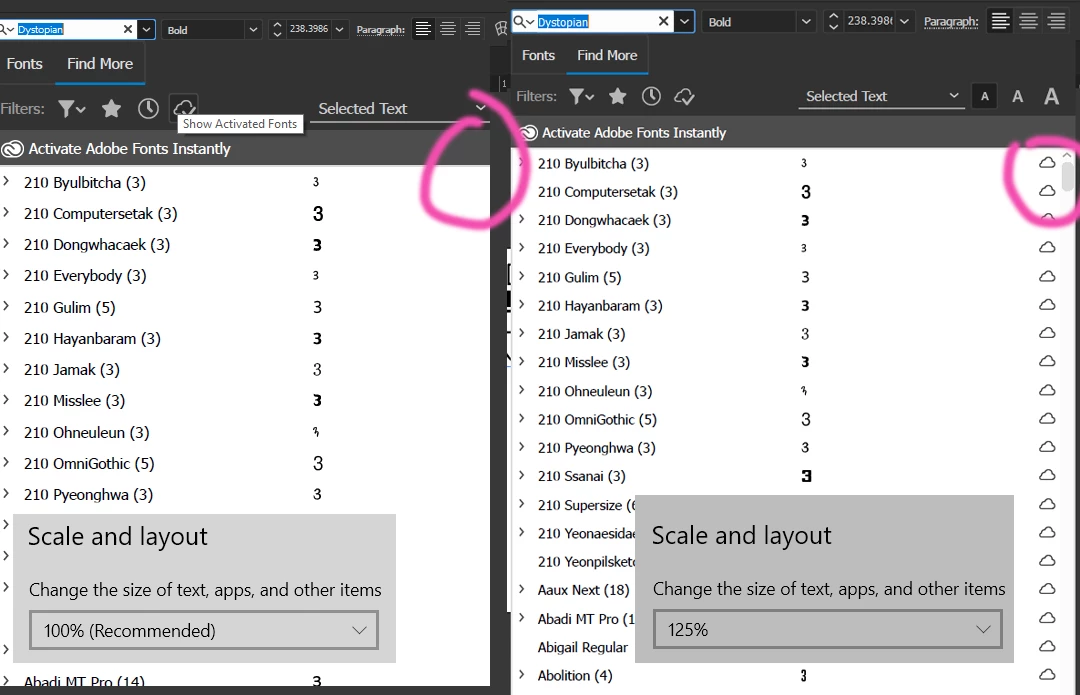
I have this problem on two laptops when connected to an external monitor. Both laptops are 15-inch Window 10 64bit. The display scale and layout suggestions for the laptops is to use 125% for more readable fonts etc. That's fine on the laptop, however, when I am connected to 21" monitor, I don't need the 125% and prefer 100% scaling. The problem is that at 100% the "activate fonts" column of the Find More Fonts menu is not there. Every time I want to activate/deactivate adobe fonts I have to change my display setting or the UI setting. I contacted support and they didn't think this was a problem and I should just change settings... but my thought is I shouldn't have to change settings to access a menu function.
 AdChoices