


Participating Frequently
May 29, 2018
Answered

Unable to export in png

  • May 29, 2018
  • 6 replies
  • 8714 views

Hello,

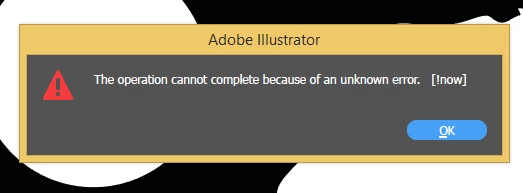
I am trying to export to .png from illustrator in 300Dpi, it is showing me this error " The operation cannot complete because of an unknown error" [!Now] . Please help me in fixing it. I am using windows 8.1 pro 64 bit.

Thanks
This topic has been closed for replies.
Correct answer LaserJoe2

I had this crazy problem to. Tried absolutely all the suggestions and nothing worked. But I did make it work finally: "Look for a stray element on the artoard" was a suggestuion. - there was nothing there to delete. So I next checked Layers and the sub layers and there was a sub layer that was empty. I deleted it and apparently that was the bogus element. The png exported fine. 

6 replies

LaserJoe2
LaserJoe2Correct answer
Participant
September 17, 2024

I had this crazy problem to. Tried absolutely all the suggestions and nothing worked. But I did make it work finally: "Look for a stray element on the artoard" was a suggestuion. - there was nothing there to delete. So I next checked Layers and the sub layers and there was a sub layer that was empty. I deleted it and apparently that was the bogus element. The png exported fine. 

krbdesign
Participant
April 26, 2024

I made my artboard & design smaller. Problem solved.

leoleoleoleoleoleomak
Participant
August 15, 2022

Just updated my graphic card driver and problem solved, 

you should try it too, can't export PNG will annoy us forever.


Using Illustrator on Win 10, nvidia card.

-www.instagram.com/leoleoleoleoleoleoleoleomak
Participant
April 8, 2022

Hi, did you manage to solve this problem? I have the same problem.

Participant
April 20, 2022

I also do! Just 3 days ago my Illustrator started doing the same thing. I had to restart the whole computer to get this to work again...

Anshul_Saini
Community Manager
Community Manager
April 21, 2022

HI @brenda.barb @Eleanora5F93,


We are sorry to hear about the trouble you are facing. Would it be possible for you to share the download link to the Ai file with me here or via DM? I will forward it to the product team, and they will check what is causing the issue.

Also, please share the OS & version of Ai, and please confirm if it is a new file or old. If it is old, then in which version of Ai was it created.


I will be looking forward to your responses.


Thanks!

Anshul Saini

Ton Frederiks
Community Expert
Community Expert
May 29, 2018

I would try to reset the Preferences:

How to set preferences in Illustrator

Participating Frequently
May 29, 2018

I tried rhat, but it's also not working. Even I tried to re-install the software.

Ton Frederiks
Community Expert
Community Expert
May 29, 2018
Larry G. Schneider
Community Expert
Community Expert
May 29, 2018

Which version of AI? When was the last time you restarted the computer?

Participating Frequently
May 29, 2018

Hey ... I am using version 2018 and I have restarted many times .

Monika Gause
Community Expert
Community Expert
May 29, 2018

Just how large is that document?