



cartonofmilk12
Inspiring
October 27, 2020
Answered

Unable to scale object smaller, can only make longer

  • October 27, 2020
  • 2 replies
  • 674 views

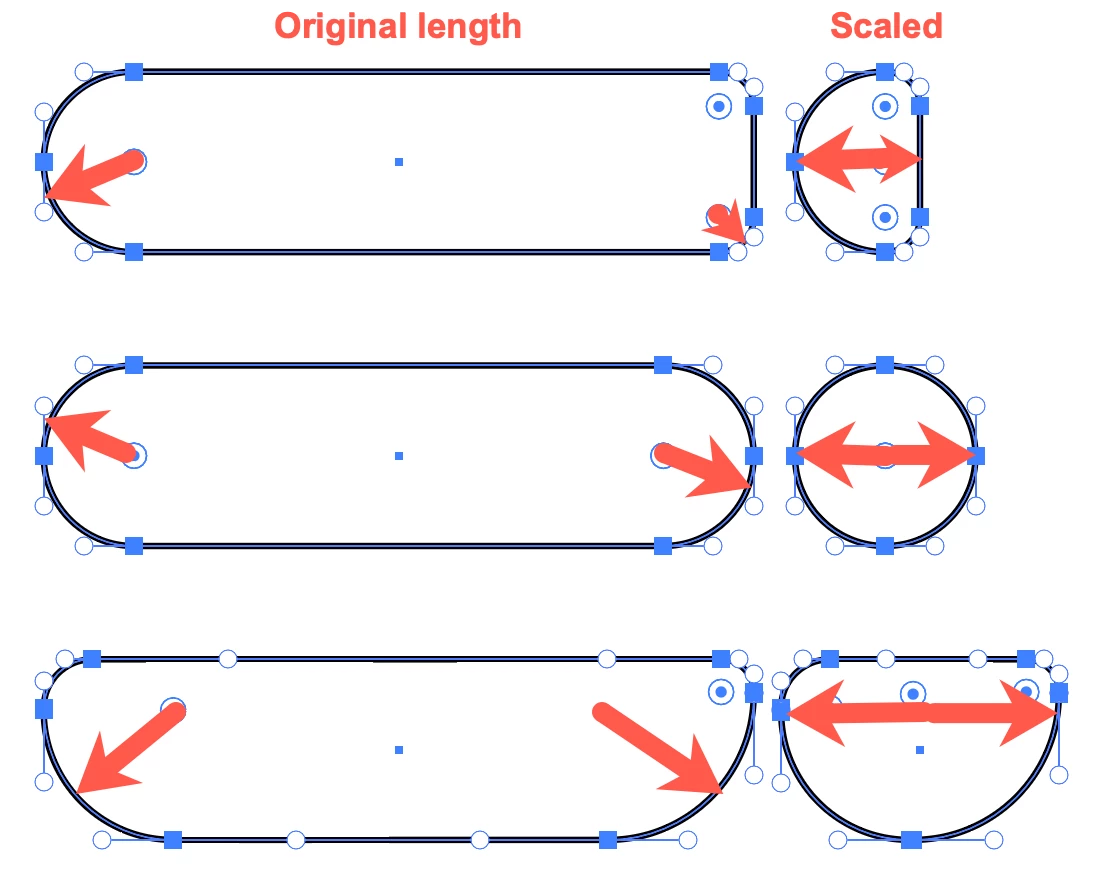
I'm trying to scale a rounded rectangle to make it smaller but it won't go any smaller, but I can make it longer for some reason. Sometimes it thinks I'm rotating it even though I'm not clicking a corner edge or my mouse icon isn't the rotate icon.


https://i.imgur.com/vteiwm0.mp4


I just started using illustrator.
This topic has been closed for replies.
Correct answer tromboniator

Barbara, in my experience the scaling in one dimension is only affected (stopped) when the length or width equals the sum of the larger of the radii that approach each other with scaling. Or something like that. In any case, the lengthwise scaling should not be hindered at the point shown in the video.


Peter


2 replies

barbara_a7746676
Community Expert
October 27, 2020

It is probably because the corner radius of the rectangle can't get smaller. Try making the corner radius small before scaling the rectangle, and I think you'll be able to scale the rectangle.

tromboniator
tromboniatorCorrect answer
Community Expert
October 27, 2020

Barbara, in my experience the scaling in one dimension is only affected (stopped) when the length or width equals the sum of the larger of the radii that approach each other with scaling. Or something like that. In any case, the lengthwise scaling should not be hindered at the point shown in the video.


Peter


tromboniator
Community Expert
October 27, 2020

Just as a baseline for what to try, have you A) restarted Illustrator? B) restarted your computer? These often work wonders when odd things happen.


Peter


Edit: Save your document first.